
Java I/O Streams: Input, Output and Wrapping (Decorator) Explained
The program wrote a report through BufferedWriter and finished without a single exception — yet report.txt is empty, 0 bytes:
BufferedWriter writer = new BufferedWriter(new FileWriter("report.txt"));
writer.write("Total: 42");
// close() was never called, the program ended
// Result: report.txt exists, but its size is 0 bytes
The line stayed in the wrapper's buffer and never reached the file. Why that happens, and which stream in a chain you have to close, is covered below — starting with what a stream is.
A stream in Java I/O is an ordered sequence of bytes or characters that flows between a program and a source or destination of data: a file, the console, a network connection, an array in memory. Java I/O streams are either input (read data) or output (write data), and either byte or character streams. Their classes live in the java.io package.
What is a stream in Java I/O
A stream is an abstraction over input and output: the program reads or writes data piece by piece, without knowing what physical device sits on the other end. An input stream is connected to a source of data, an output stream to a destination.
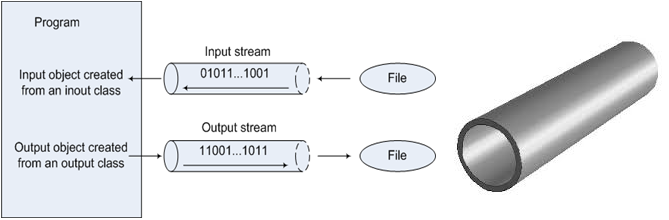
In computer science a stream is a sequence of data that becomes available gradually rather than all at once. In Java, I/O streams are implemented as a hierarchy of classes in the java.io package. They spare you from the low-level details of the operating system: a program works with a file, the keyboard or the network through the same read() and write() methods.
All I/O streams behave the same way regardless of the device. The same code that reads from an InputStream can read from a file on disk, from a network socket or from standard input System.in. For the keyboard case, see Java user input with System.in and Scanner. A stream is read sequentially: a byte that has been read is gone, and you cannot go back to it without special classes.
I/O streams vs Stream API vs threads
In Java, two unrelated APIs are called "stream": the I/O stream (java.io.InputStream and its relatives) and the Stream API stream (java.util.stream.Stream, Java 8). A third concept, the thread of execution (java.lang.Thread), is often mixed in by beginners, especially in translated materials where "stream" and "thread" share one word. This lesson is only about I/O streams: moving bytes and characters.
| Concept | Classes | What it is | Example |
|---|---|---|---|
| I/O stream | InputStream, OutputStream, Reader, Writer (java.io) | A sequence of bytes or characters between a program and a file, console or network | new FileInputStream("photo.jpg") |
| Stream API | Stream<T>, IntStream (java.util.stream, since Java 8) | A pipeline of operations over the elements of a collection or array; it does not read anything from disk on its own | list.stream().filter(s -> s.isEmpty()).count() |
| Thread | Thread, Runnable (java.lang) | A separate path of execution that runs concurrently with other code | new Thread(task).start() |
The names overlap, but the three are not related: FileInputStream does not extend Stream and does not start a Thread. The only point of contact is BufferedReader.lines(), which turns the lines of an I/O stream into a Stream<String>.
Types of I/O streams: byte and character, input and output
Java streams are classified by two criteria: by data type — byte or character streams, and by direction — input or output streams. Combined, they give four basic abstract classes: InputStream, OutputStream, Reader and Writer.
By data type, Java has two kinds of streams:
- Byte streams (binary streams) carry bytes — 8-bit values. They suit any data: images, archives, audio, serialized objects.

- Character streams (text streams) carry
charvalues — 16-bit Unicode (UTF-16) units. They suit text.

Keep in mind that a file or a network connection always holds bytes. A character stream is a byte stream plus a charset that converts bytes to characters and back (more in A chain of wrappers).
By direction, streams are input streams and output streams. Java defines four basic abstract classes for working with them:
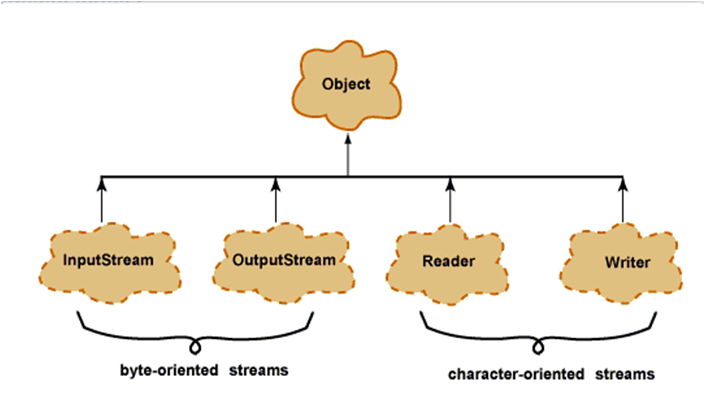
| Direction | Byte streams | Character streams | Example subclasses |
|---|---|---|---|
| Input (reading) | InputStream | Reader | FileInputStream, FileReader |
| Output (writing) | OutputStream | Writer | FileOutputStream, FileWriter |
The class name tells you the kind: the suffix ...Stream means a byte stream, ...Reader/...Writer a character stream.
How to work with a stream: open, read or write, close
Working with any Java I/O stream comes down to three steps: open a stream connected to a source or destination, read or write data while there is any, and close the stream to release the operating system resource and flush buffers.
- Create a stream object and connect it to a source or destination of data (a file on disk, a socket, an array).
- While there is data, read it from the stream or write it to the stream.
- Close the stream.
In modern code the third step is done by the try-with-resources statement (Java 7+): any object that implements AutoCloseable declared in the parentheses after try is closed automatically, even if an exception occurs inside. Exception handling basics are covered in Java try-catch-finally. The skeleton of any stream code looks like this:
try (InputStream in = new FileInputStream("data.bin")) { // 1. open
    int b;
    while ((b = in.read()) != -1) {                       // 2. read until -1
        // process byte b
    }
}                                                         // 3. close() is called automatically
Wrapping streams: the decorator pattern
Wrapping streams means passing one stream into the constructor of another so that it gains new abilities: buffering, reading lines, formatted output, converting bytes to characters. The outer stream is called a wrapper; it delegates the real reading and writing to the inner stream.
This is the decorator design pattern: a wrapper has the same type as the stream it wraps (BufferedReader is also a Reader), so wrappers can be nested in any order without creating a separate class for every combination.
BufferedReader is used for more efficient reading of characters, arrays and lines:
BufferedReader reader = new BufferedReader(new FileReader("input.txt"));BufferedWriter and PrintWriter are used for more efficient writing of characters, arrays, strings and other data types:
BufferedWriter writer = new BufferedWriter(new FileWriter("report.txt"));
PrintWriter printer = new PrintWriter(new BufferedWriter(new FileWriter("log.txt")));
The last line has three layers: FileWriter writes to the file, BufferedWriter collects characters in a buffer and passes them on in larger chunks, PrintWriter adds the convenient println() and printf(). The main java.io wrappers:
| Wrapper | Wraps | Adds | Gotcha |
|---|---|---|---|
BufferedInputStream / BufferedOutputStream | InputStream / OutputStream | An 8192-byte buffer: fewer disk accesses | Without flush()/close() written data stays in the buffer |
BufferedReader | Reader | An 8192-character buffer and the readLine() method | readLine() returns null at the end of the stream and drops the line terminator |
BufferedWriter | Writer | A buffer and the newLine() method | Data reaches the file only when the buffer fills up, on flush() or on close() |
PrintWriter | Writer or OutputStream | print(), println(), printf() | Does not throw IOException: a write error is only visible through checkError() |
InputStreamReader | InputStream | A bridge from bytes to characters with a given charset | Without an explicit Charset the default charset is used |
OutputStreamWriter | OutputStream | A bridge from characters to bytes with a given charset | Same: better to specify the charset explicitly |
A chain of wrappers: from bytes to lines
To read a text file line by line in the right encoding, wrap the byte stream in an InputStreamReader (the bridge from bytes to characters) and wrap that in a BufferedReader (a buffer and readLine()). Writing mirrors it: FileOutputStream → OutputStreamWriter → BufferedWriter → PrintWriter.
Example: the program writes two lines to a file in UTF-8 through a chain of four streams, then reads them back through a chain of three.
import java.io.*;
import java.nio.charset.StandardCharsets;

public class WrappingDemo {
    public static void main(String[] args) throws IOException {
        // Writing: PrintWriter -> BufferedWriter -> OutputStreamWriter -> FileOutputStream
        try (PrintWriter printer = new PrintWriter(
                new BufferedWriter(
                        new OutputStreamWriter(
                                new FileOutputStream("notes.txt"), StandardCharsets.UTF_8)))) {
            printer.println("Hello, stream!");
            printer.printf("%d + %d = %d%n", 2, 3, 2 + 3);
        }

        // Reading: BufferedReader -> InputStreamReader -> FileInputStream
        try (BufferedReader reader = new BufferedReader(
                new InputStreamReader(
                        new FileInputStream("notes.txt"), StandardCharsets.UTF_8))) {
            String line;
            int number = 1;
            while ((line = reader.readLine()) != null) {
                System.out.println(number++ + ": " + line);
            }
        }
    }
}
Program output:
1: Hello, stream!
2: 2 + 3 = 5
Each link does exactly one job: FileOutputStream knows only about bytes and the file, OutputStreamWriter about the charset, BufferedWriter about the buffer, PrintWriter about formatting. If the file turns out to be ISO-8859-1 (Latin-1) instead of UTF-8, it is enough to change one argument to StandardCharsets.ISO_8859_1.
Default charset
If you do not specify a Charset, FileReader, FileWriter and InputStreamReader use the default charset. Up to and including Java 17 it depended on the OS (for example windows-1252 on Western Windows), so a UTF-8 file could be read as garbled text. Since Java 18 (JEP 400) the default is UTF-8 everywhere. Since Java 11, FileReader and FileWriter have constructors that take a Charset — an explicit charset makes the code behave the same on any version and OS.
Which stream to close
Close only the outermost wrapper: its close() first flushes its own buffer (flush()) and then closes the stream inside it, which closes the next one, and so on down to the file. Closing the inner stream instead of the outer one is a common mistake: the data in the wrapper's buffer is lost.
What will this code print, and what ends up in the file?
FileWriter fileWriter = new FileWriter("log.txt");
BufferedWriter writer = new BufferedWriter(fileWriter);
writer.write("line");
fileWriter.close();   // closed the inner stream
writer.close();       // trying to close the wrapper
Result: log.txt is empty, and writer.close() throws java.io.IOException: Stream closed. The string "line" was sitting in the BufferedWriter buffer; on close the wrapper tries to flush it into the inner stream, which is already closed. That is exactly why report.txt from the example at the start of the lesson is empty too: close() was never called, so the buffer was never flushed.
The fix is to close the outer wrapper, ideally with try-with-resources:
try (BufferedWriter writer = new BufferedWriter(new FileWriter("log.txt"))) {
    writer.write("line");
} // writer.close(): flush() of the buffer, then FileWriter.close()
// Result: "line" is written to log.txt
The one exception to the rule
Closing the outer wrapper is enough only if the wrapper was actually created. In new InputStreamReader(new FileInputStream(f), "UTF8x") the file is already open when the wrapper's constructor throws UnsupportedEncodingException, and nobody closes the FileInputStream. If a wrapper's constructor can fail, declare each link as a separate resource: try (FileInputStream in = new FileInputStream(f); InputStreamReader r = new InputStreamReader(in, cs)) — try-with-resources closes them in reverse order.
Frequently asked questions
Can I copy an image or a zip archive with FileReader and FileWriter?
No. Character streams decode bytes into characters using a charset, and byte sequences that are invalid for it are replaced with a replacement character, so the copy is corrupted. Copy binary data with the byte streams FileInputStream and FileOutputStream.
Why wrap FileInputStream in BufferedInputStream if it already reads the file?
Each read() on a bare FileInputStream is a native call to the operating system, so reading a 10 MB file byte by byte means about ten million system calls. BufferedInputStream fetches 8192 bytes at once and serves the following read() calls from memory, which is usually many times faster. If you already read into your own large array with read(byte[]), an extra buffer gives little benefit.
Where in java.io can you see that wrappers are the decorator pattern?
In the base classes FilterInputStream, FilterOutputStream, FilterReader and FilterWriter: they hold a reference to the inner stream and by default pass all calls to it. For example, BufferedInputStream and DataInputStream extend FilterInputStream. How wrappers combine into a chain is shown in Wrapping streams.
When should I call flush() if there is close()?
close() calls flush() itself, so no separate call is needed at the end. You need flush() when the stream stays open but the data must reach the destination right away: writing a log in a long-running program, a network response, progress output.
What is the difference between java.io and java.nio?
java.io is built on streams and blocking read()/write() calls. java.nio (Java 1.4) added channels, buffers and non-blocking I/O, and NIO.2 (Java 7) added the Path and Files classes. Still, Files.newBufferedReader(path) returns an ordinary BufferedReader in UTF-8, so knowing java.io streams matters when working with NIO too.
Comments