
Object-Oriented Programming in Java (OOP Concepts). Practical Tasks
Seventeen hands-on tasks cover core Java OOP: classes and objects, constructors, the this keyword, method overloading, the stack/heap memory model, passing objects to methods, varargs, recursion, garbage collection, inheritance, super, access modifiers, JavaBeans, overriding, abstract classes, and final. Work through them in order — later tasks assume the classes built in earlier ones.
1. The Phone Class
- Create a class
Phonewith the fieldsnumber,model, andweight. - Create three instances of the class.
- Print the values of their fields to the console.
- Add the methods
receiveCallandgetNumbertoPhone.receiveCalltakes one parameter — the caller's name — and prints "Incoming call from {name}" to the console.getNumberreturns the phone number. Call both methods for every object. - Add a constructor to
Phonethat takes three parameters to initializenumber,model, andweight. - Add a constructor that takes two parameters to initialize
numberandmodel. - Add a no-argument constructor.
- From the three-parameter constructor, call the two-parameter one.
- Add an overloaded
receiveCallmethod that takes two parameters — the caller's name and phone number. Call it. - Create a
sendMessagemethod with varargs. The method takes any number of phone numbers and prints them to the console. - Rework
Phoneto follow the JavaBean convention.
2. The Person Class
Create a class Person that has:
- the fields
fullNameandage; - the methods
move()andtalk(), each simply printing a message such as "{Person} is talking" to the console; - two constructors —
Person()andPerson(fullName, age); - two objects of the class, one built with
Person(), the other withPerson(fullName, age); - calls to
move()andtalk()for both objects.
3. The Matrix Class
Create a class Matrix. It should have the following fields:
- a two-dimensional array of floating-point numbers;
- the number of rows and columns.
It should have the following methods:
- addition with another matrix;
- multiplication by a number;
- printing the matrix;
- multiplication by another matrix.
4. Library Readers
Define a class Reader that stores the following information about a library patron:
- full name,
- library card number,
- department,
- date of birth,
- phone number.
- The methods
takeBook()andreturnBook(). - Write a program that creates an array of objects of this class.
- Overload
takeBook()andreturnBook():
– atakeBookversion that accepts a count of books taken and prints, for example, "J. Smith took 3 books".
– atakeBookversion that accepts a variable number of book titles and prints, for example, "J. Smith took: Adventures, Dictionary, Encyclopedia".
– atakeBookversion that accepts a variable number ofBookobjects (create a new class holding a book's title and author) and prints the same kind of message. - Overload
returnBook()the same way, printing either the list of returned titles or the count of books returned.
5. Print a Range of Numbers Recursively
Given two integers A and B, print every number from A to B inclusive — in increasing order if A < B, or decreasing order otherwise. Use recursion.
6. Inheritance: Student and Aspirant
- Build an inheritance example with a
Studentclass and anAspirantclass (a graduate student), where anAspirantdiffers from aStudentby having ongoing research work. Studentholds the fieldsString firstName,lastName,group, anddouble averageMarkfor the GPA.- Add a method
getScholarship()toStudentthat returns the scholarship amount: 2000 if the average mark is 5, otherwise 1900. Override this method inAspirant: 2500 if the average mark is 5, otherwise 2200. - Create an array of type
Studentholding bothStudentandAspirantobjects. CallgetScholarship()for every element.
7. Cars
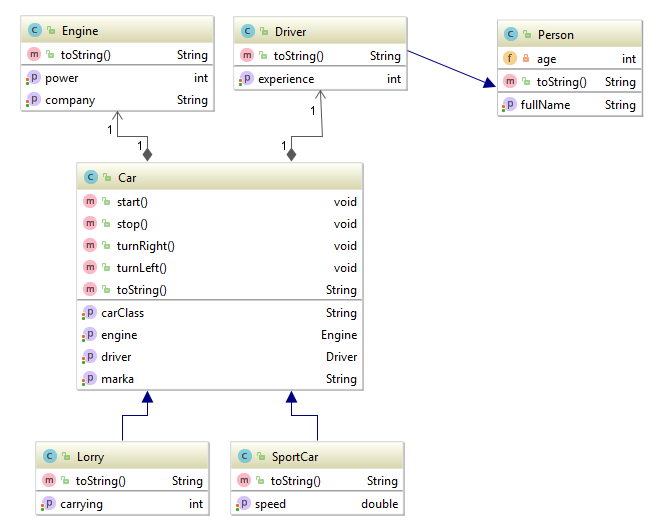
- Create the class
Carin packagecom.company.vehicles,Engineincom.company.details, andDriverincom.company.professions. Driverholds fields for full name and years of driving experience.Engineholds fields for horsepower and manufacturer.Carholds fields for make, class, weight, aDriver, and anEngine. Add the methodsstart(),stop(),turnRight(),turnLeft(), each printing a matching message ("Driving off", "Stopping", "Turning right", "Turning left"), plus atoString()that prints the full car, driver, and engine details.- Create a class
Lorryderived fromCar, adding a cargo capacity field. - Create a class
SportCarderived fromCar, adding a top-speed field. - Make
DriverextendPerson(see task 2).
8. Animals
- Create a class
Animaland the abstract classesDog,Cat, andBearextending it. Animalholds the fieldnameand the abstract methodsmakeNoise,eat, andgetDescription.makeNoiseprints the animal's sound;eatprints what the animal eats;getDescriptionreturns a description of the animal.Dog,Cat, andBeareach overridemakeNoise,eat, andgetDescription.- Create a class
Vetwith a methodvoid treatAnimal(Animal animal)that prints the animal'snameand description. - In
main, build an array of typeAnimalcontaining every animal type you have. In a loop, send each one to the vet; in a separate loop, callmakeNoiseandeatfor each animal.
9. Access Levels
- Fill in the table.
Access levels # Situation private default protected public 1 Same class 2 Subclass in the same package as the superclass 3 Class in the same package, not a subclass 4 Subclass in a different package 5 Class in a different package, not a subclass - Create classes that let you verify each cell of the table.
10. Shapes
- Create an abstract class
Shapeand its subclassesCircleandRectangle. Shapeholds an abstract methoddraw()and a field for color.CircleandRectanglehold coordinates.- Create an array containing these shapes.
- Draw them in a loop (call
draw()).
11. Online Store, Part 1
- Create a class
Productwith the fieldsname,price, andrating. - Create a class
Categorywith anamefield and an array ofProduct. Create severalCategoryobjects. - Create a class
Basketholding an array of purchased products. - Create a class
Userholding a login, a password, and aBasketobject. Create severalUserobjects. - Print the product catalog to the console.
- Print every visitor's purchases to the console.
About tasks 12-17
These six tasks close gaps that plain "build a class" exercises don't cover: this, passing objects to methods, the stack/heap, garbage collection, super, and final. Whenever a step says "confirm it does not compile," actually try it — these are some of the most common Java interview questions, and they test understanding, not syntax memorization.
12. The this Keyword: BankAccount
- Create a class
BankAccountwith the fieldsString owneranddouble balance. - Add a constructor
BankAccount(String owner, double balance)whose parameter names match the field names. Inside it, usethis.owner = owner;andthis.balance = balance;to tell the field apart from the local parameter. - Add a method
deposit(double balance)— the parameter name shadows the field again. Inside it, add the amount to the object's balance withthis.balance += balance;. - Add a method
BankAccount richerThan(BankAccount other)that comparesthis.balancewithother.balanceand returns whichever object (thisorother) has the larger balance. This step shows thatthisis not just a way to reach a field — it is a reference to the whole current object. - In
main, create twoBankAccountobjects, calldepositon each, then callricherThanand print the owner with the larger balance.
13. Passing Objects to Methods: Counter
- Create a class
Counterwith a single fieldint value. - Write a method
increment(Counter c)that increasesc.valueby 1. Call it frommainand confirm the change is visible outside the method — the object is passed by reference, so the method mutates the same object the caller holds. - Write a method
reset(Counter c)that assigns a brand-new object to the parameter:c = new Counter();. Call it and confirm the variable inmaindid NOT change — the reference itself is passed by value, so reassigning the parameter inside the method never touches the caller's variable. - Print
valuebefore and after each call, and explain in a code comment whyincrementandresetbehave differently.
14. Stack, Heap, and StackOverflowError
- Write a method
printCountdown(int n)that printsnand recursively calls itself withn - 1, but with NO base case (no stopping condition). - Run it and trigger a
java.lang.StackOverflowError. In a comment, explain why: every call gets its own stack frame holding local variables and a return address, and a thread's stack has a fixed, non-negotiable size. - Fix the method by adding a base case (for example,
if (n <= 0) return;) and confirm it now finishes normally. - Create a class
Pointwith fieldsxandy, and inmaincreate severalPointobjects in a loop, storing them in an array. In a comment, state where thePointobjects themselves live (the heap) and where the reference variable holding the array lives (the stack frame ofmain).
15. Garbage Collection and finalize
- Create a class
Resourcewith a fieldString nameand an overridden methodprotected void finalize() throws Throwablethat prints"Released resource: " + nameand callssuper.finalize(). - In
main, create severalResourceobjects in a loop without keeping references to them past the loop body (or explicitly set the variable tonull), then callSystem.gc(). - In a comment, explain that a
finalize()call is neither guaranteed nor timely — it is only a hint to the garbage collector, not a command to free memory immediately. - Also note in a comment that
finalize()has been deprecated since Java 9 (and is disabled by default starting with Java 18), and that real code releases resources withtry-with-resourcesand theAutoCloseableinterface instead offinalize().
16. The super Keyword: Vehicle and Bicycle
- Create a class
Vehiclewith a fieldString name, a constructorVehicle(String name), and a methodprintInfo()that prints"Vehicle: " + name. - Create a class
Bicycle extends Vehiclewith an extra fieldint gearsCount. In the constructorBicycle(String name, int gearsCount), callsuper(name)as the first line to initialize the parent's field. - Override
printInfo()inBicycle: callsuper.printInfo()first, then print the gear count. - In
main, create aBicycleobject and callprintInfo()— confirm both lines print: the parent's and the one added in the subclass.
17. The final Keyword: Constants, Classes, Methods, Parameters
- Create a class
MathConstantswith a fieldpublic static final double PI = 3.14159;. Try assigning a new value to it elsewhere in the code, confirm the code does not compile, comment out that line, and explain the compilation error in a comment. - Create a
finalclassSecurityUtilswith a single static method. Try writing a class that extendsSecurityUtils, confirm the compiler rejects it, and explain why a class might need to befinalin the first place (for example, to guarantee its behavior can't change, the wayStringdoes). - In the
Vehicleclass from task 16, declareprintInfo()asfinal. Try overriding it inBicycleand confirm it is impossible. - Write a method with a
finalparameter, such asvoid process(final int value), and try reassigningvalueinside the method — confirm it is a compilation error.
Frequently Asked Questions
What's the difference between calling this(...) and super(...) in a constructor?
this(...) calls another constructor of the SAME class — for example, the three-parameter constructor in task 1 calling the two-parameter one. super(...) calls the parent class's constructor, as in task 16. Whichever one appears has to be the first line of the constructor, and a single constructor can never use both — it's this(...) or super(...), never both.
Why can I change an object passed into a method, but not replace the variable itself?
Java always passes arguments by value, but for objects that value is a reference (an address) into the heap. The method receives a copy of the reference to the same object, so changing its fields — as increment does in task 13 — is visible to the caller. Assigning a new object to the parameter, as reset does, only changes the local copy of the reference inside the method; the caller's variable never sees it.
Should I use finalize() to release resources in real code?
No. finalize() guarantees neither when it runs nor that it runs at all, has been deprecated since Java 9, and is disabled by default starting with Java 18+. For files, database connections, and sockets, use try-with-resources with the AutoCloseable interface — it releases the resource deterministically, the moment the block exits.
If a reference variable is final, can I still change the fields of the object it points to?
Yes. final on a reference variable only stops you from reassigning the reference itself to point to a different object — it does not make the object immutable. Its fields can still change normally, if they have public setters or are not themselves final. True immutability is a separate design decision (final fields, no setters), not an automatic side effect of a final variable.
Comments