
Set Interface in Java: HashSet and LinkedHashSet
A User class overrides equals() but not hashCode(). The code set.add(new User("ann")); set.add(new User("ann")); runs without errors, and set.size() returns 2: a collection that “does not allow duplicates” now holds two equal objects. A HashSet looks an element up by its hash code first, so equals() is never even called.
The Set interface (java.util.Set<E>) models a mathematical set: a collection of unique elements without indexes. It extends the Collection interface, and its main implementations are HashSet (a hash table with no guaranteed order) and LinkedHashSet (a hash table plus a linked list that keeps insertion order). Adding a duplicate changes nothing, and add() returns false.
What is the Set interface in Java
A Set in Java is a collection in which every element appears at most once, there is no index access, and the iteration order is decided by the implementation. The interface adds no new abstract methods to Collection, but it tightens their contract: add() does not insert an element that is already present.

How a set decides that two elements are “the same” depends on the implementation:
HashSetandLinkedHashSetcompare elements withhashCode()andequals(), so your own classes must override both methods (see The hashCode() and equals() contract);TreeSetcompares elements withcompareTo()or aComparatorand keeps them sorted; it implements theSortedSetandNavigableSetsubinterfaces, which have their own lesson.
Besides the Collection methods, the interface has static factories Set.of(...) (Java 9) and Set.copyOf(...) (Java 10) that create an unmodifiable set. The diagram shows the branch of the collection hierarchy that starts with Set:
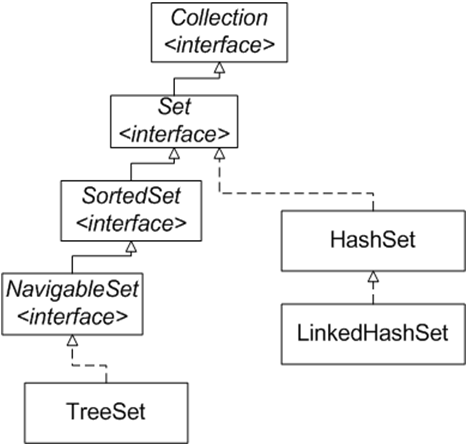
Where Set sits among the other collections and which implementation to pick for a task is summarized in Choosing an implementation; the set as an abstract data structure is explained in Data Structures in Java.
Set and HashSet methods
The main HashSet methods are add(), remove(), contains(), size(), isEmpty(), clear() and iterator(); all of them are declared in Collection. Three bulk methods matter most for sets: addAll() gives the union, retainAll() the intersection and removeAll() the difference of two sets.
| Method | What it does in a Set | Edge case |
|---|---|---|
boolean add(E e) | Adds the element if it is not there yet | Duplicate — false, the set does not change |
boolean remove(Object o) | Removes the element | Element absent — false, no exception |
boolean contains(Object o) | Membership check, O(1) on average | Your own class without hashCode() — false for an “equal” object |
int size(), boolean isEmpty() | Number of elements / whether the set is empty | Duplicates are never counted: they are not stored |
void clear() | Removes all elements | The internal table does not shrink |
boolean addAll(Collection c) | Union: adds the elements of c that are missing | true if at least one element was added |
boolean retainAll(Collection c) | Intersection: keeps only the elements that are also in c | retainAll(Set.of()) empties the set |
boolean removeAll(Collection c) | Difference: removes the elements that are in c | Elements of c missing from the set are ignored |
boolean containsAll(Collection c) | Checks whether c is a subset | Always true for an empty c |
Iterator<E> iterator(), forEach() | Iterates over the elements | HashSet — no guaranteed order; LinkedHashSet — insertion order |
static Set.of(...), Set.copyOf(c) | Unmodifiable set (Java 9 / 10) | add() — UnsupportedOperationException; null — NullPointerException |
Bulk methods modify the set they are called on, so for set operations you copy the set first:
import java.util.HashSet;
import java.util.List;
import java.util.Set;

public class SetOperationsExample {
    public static void main(String[] args) {
        Set<Integer> a = new HashSet<>(List.of(1, 2, 3, 4));
        Set<Integer> b = Set.of(3, 4, 5);

        Set<Integer> union = new HashSet<>(a);
        union.addAll(b);
        Set<Integer> intersection = new HashSet<>(a);
        intersection.retainAll(b);
        Set<Integer> difference = new HashSet<>(a);
        difference.removeAll(b);

        System.out.println("Union: " + union);
        System.out.println("Intersection: " + intersection);
        System.out.println("Difference: " + difference);
        System.out.println("a is unchanged: " + a);
        System.out.println(a.containsAll(Set.of(1, 2)));
    }
}
Output:
Union: [1, 2, 3, 4, 5]
Intersection: [3, 4]
Difference: [1, 2]
a is unchanged: [1, 2, 3, 4]
true
The numbers come out in ascending order only by coincidence: for small Integer values the bucket number equals the value. Why other data prints in a different order is shown in Java HashSet example. Return values of every Collection method are covered in Collection interface methods in Java, and the full HashSet API is in the HashSet Javadoc.
What is HashSet in Java and how it works
HashSet in Java is a Set implementation backed by a hash table: the element's hash code determines the cell (bucket) where the element is stored and later searched for. That is why add(), contains() and remove() run in constant time on average, but the order of elements is not guaranteed.
Inside a HashSet there is an ordinary HashMap: the elements of the set are stored as its keys, and every key maps to one shared placeholder object. So elements of a HashSet follow the same rules as HashMap keys, and a HashSet accepts one null.
Hash codes and buckets
A hash code is an integer that the hashCode() method computes from an object's contents. Think of it as the object's “address” in the table, not as a unique ID: different objects may share a hash code. Take a toy algorithm: map each letter of a key to its position in the alphabet and add the numbers up.
| Key | Hash code algorithm | Hash code (bucket number) |
|---|---|---|
| Alex | A(1) + l(12) + e(5) + x(24) | 42 |
| Bob | B(2) + o(15) + b(2) | 19 |
| Dirk | D(4) + i(9) + r(18) + k(11) | 42 |
| Fred | F(6) + r(18) + e(5) + d(4) | 33 |
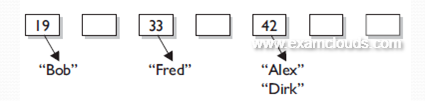
“Bob” goes to bucket 19 and “Fred” to bucket 33, while “Alex” and “Dirk” share hash code 42 and land in the same bucket. This is called a collision, and it is allowed. The real String.hashCode() uses a different formula (s[0]*31^(n-1) + ... + s[n-1]), and a HashSet additionally squeezes the hash code into a bucket index: (h ^ (h >>> 16)) & (capacity - 1). The idea stays the same.
A lookup goes the same way: compute the hash code of the element, find the bucket, and if the bucket holds several elements, pick the right one with equals(). So a HashSet depends on both methods: hashCode() chooses the bucket, equals() finds the element inside it.
The hashCode() and equals() contract
The hashCode() and equals() contract is the rule that HashSet and HashMap rely on: objects that are equal by equals() must return the same hashCode(). If you override only equals(), equal objects end up in different buckets and the set accepts a duplicate.
The full contract from the Object documentation:
- As long as the fields used by
equals()do not change,hashCode()of the same object returns the same number (within one run of the program). - If
a.equals(b), thena.hashCode() == b.hashCode(). - The reverse is not required: equal hash codes do not mean equal objects (that is a collision).
- It follows from rule 2: if the hash codes differ, the objects are definitely not equal.
Here is the example from the start of the lesson in full, together with the fix:
import java.util.HashSet;
import java.util.Objects;
import java.util.Set;

public class HashCodeExample {
    static class User {
        private final String login;
        User(String login) { this.login = login; }

        @Override
        public boolean equals(Object o) {
            return o instanceof User u && login.equals(u.login);
        }
        // hashCode() is not overridden
    }

    static class FixedUser {
        private final String login;
        FixedUser(String login) { this.login = login; }

        @Override
        public boolean equals(Object o) {
            return o instanceof FixedUser u && login.equals(u.login);
        }

        @Override
        public int hashCode() {
            return Objects.hash(login);
        }
    }

    public static void main(String[] args) {
        Set<User> users = new HashSet<>();
        users.add(new User("ann"));
        users.add(new User("ann"));
        System.out.println(users.size());
        System.out.println(users.contains(new User("ann")));

        Set<FixedUser> fixed = new HashSet<>();
        fixed.add(new FixedUser("ann"));
        System.out.println(fixed.add(new FixedUser("ann")));
        System.out.println(fixed.size());
        System.out.println(fixed.contains(new FixedUser("ann")));
    }
}
Output:
2
false
false
1
true
Without an override, hashCode() comes from Object and almost always gives different numbers for different objects. The two “equal” users get different hash codes, equals() is never called, and both stay in the set. With Objects.hash(login) the second add() finds the existing element and returns false.
This implementation is formally correct too — it breaks none of the rules:
@Override
public int hashCode() {
    return 1;
}
But every object of the class lands in the same bucket, and the HashSet loses its main advantage: lookups become linear. A good hash function spreads objects evenly across buckets. You rarely need to write one by hand: IntelliJ IDEA generates both methods (Code → Generate → equals() and hashCode()), Objects.hash(...) combines fields for you, and a record (Java 16) gets both methods automatically. The method itself is explained in the equals() method in Java.
HashSet constructors: initialCapacity and loadFactor
HashSet has four constructors and, since Java 19, the factory method HashSet.newHashSet(int). The initialCapacity parameter (the initial number of buckets) and loadFactor (how full the table may get) decide when the table is rebuilt.
| Constructor / method | What it creates | Edge case |
|---|---|---|
HashSet() | Empty set: capacity 16, loadFactor 0.75 | The table is allocated on the first add() |
HashSet(int initialCapacity) | Given capacity, loadFactor 0.75 | Negative capacity — IllegalArgumentException |
HashSet(int initialCapacity, float loadFactor) | Given capacity and load factor | loadFactor ≤ 0 or NaN — IllegalArgumentException |
HashSet(Collection<? extends E> c) | A set of the elements of c, duplicates dropped | c == null — NullPointerException |
static HashSet.newHashSet(int numElements) | A set sized for numElements elements without rehashing (Java 19) | Negative value — IllegalArgumentException |
Initial capacity is the number of buckets in the hash table. It is always rounded up to a power of two: new HashSet<>(100) creates a table with 128 buckets.
Load factor says how full the table may become. When the number of elements exceeds capacity * loadFactor, the set performs rehashing: it creates a table twice as large and redistributes all elements across the new buckets. With capacity 16 and load factor 0.75 this happens when the 13th element is added.
The default 0.75 is a trade-off between memory and speed. A higher load factor means fewer resizes and less memory, but more collisions and slower lookups. A lower one means faster lookups at the cost of more memory.
Capacity is not the number of elements
new HashSet<>(100) does not mean “100 elements fit without a resize”: a 128-bucket table with load factor 0.75 grows on the 97th element. To reserve room for exactly 100 elements, use HashSet.newHashSet(100) on Java 19+ (for a LinkedHashSet — LinkedHashSet.newLinkedHashSet(100)); on older versions pass the capacity (int) (100 / 0.75f) + 1.
HashSet performance: O(1) and the worst case
The add(), contains() and remove() operations of a HashSet take O(1) time on average: the time barely depends on the size of the set, provided the hash codes are spread evenly. size() and isEmpty() are always O(1) because the size is kept in a field.
The worst case is when all elements fall into one bucket, for example with a hashCode() that returns a constant. Before Java 8 a bucket was a linked list, and searching it took O(n). Since Java 8 a bucket with 8 or more elements is converted into a red-black tree (if the table has at least 64 buckets; otherwise the table is simply enlarged), so the worst-case lookup is O(log n). This works best when the elements implement Comparable. If Big O notation is new to you, start there.
Iterating over a HashSet takes time proportional to its size plus its capacity, because the iterator also walks the empty buckets. A set created with a huge capacity for a handful of elements iterates slowly.
Java HashSet example: in what order are elements printed?
A HashSet prints its elements in bucket order — neither in insertion order nor sorted. For small positive Integer values the hash code equals the number itself, so in a 16-bucket table the bucket index is the remainder of division by 16. What does this code print?
import java.util.HashSet;
import java.util.Set;

public class HashSetExample {
    public static void main(String[] args) {
        Set<Integer> numbers = new HashSet<>();
        numbers.add(30);
        numbers.add(5);
        numbers.add(17);
        numbers.add(1);

        System.out.println(numbers.add(30));
        System.out.println(numbers);
        System.out.println(numbers.contains(5));

        numbers.remove(17);
        numbers.add(null);
        System.out.println(numbers);
        System.out.println(numbers.size());
    }
}
Output:
false
[17, 1, 5, 30]
true
[null, 1, 5, 30]
4
The second add(30) returned false. 30 went to bucket 14, 5 to bucket 5, and both 17 and 1 to bucket 1 (17 % 16 = 1), where they sit in the order they were added. Hence [17, 1, 5, 30]: not insertion order and not sorted. null is allowed and always goes to bucket 0, so it is printed first.
HashSet order can change on its own
The iteration order of a HashSet depends on the table capacity, so it changes after rehashing: add nine more numbers to the example above, the table grows to 32 buckets, and 17 and 1 end up in different buckets. The order may also differ between Java versions. Tests that compare set.toString() with a fixed string break sooner or later — compare sets with equals() or use a LinkedHashSet.
When two sets count as equal (same elements, any implementation, any order) is shown in When two collections are equal.
LinkedHashSet in Java
LinkedHashSet in Java is a subclass of HashSet that also links its elements in a doubly linked list, so it iterates over them in insertion order. Operations stay O(1) on average, like in a HashSet, but each element takes more memory.
Internally a LinkedHashSet uses a LinkedHashMap. Adding an element that is already present does not change its position: add() simply returns false.
import java.util.LinkedHashSet;
import java.util.Set;

public class LinkedHashSetExample {
    public static void main(String[] args) {
        Set<String> set = new LinkedHashSet<>();

        set.add("Beta");
        set.add("Alpha");
        set.add("Eta");
        set.add("Gamma");
        set.add("Epsilon");
        set.add("Omega");

        System.out.println(set.add("Alpha"));
        System.out.println(set);
    }
}
Output:
false
[Beta, Alpha, Eta, Gamma, Epsilon, Omega]
The most common real-world use is removing duplicates from a list while keeping the order of first occurrences:
List<String> tags = List.of("java", "sql", "java", "git", "sql");
List<String> unique = new ArrayList<>(new LinkedHashSet<>(tags));
System.out.println(unique); // Output: [java, sql, git]
A HashSet would remove the duplicates too, but the order of the tags would become arbitrary.
LinkedHashSet in Java 21: getFirst(), addFirst(), reversed()
Before Java 21, LinkedHashSet added no methods of its own to HashSet. In Java 21 it implements the new SequencedSet interface and gets getFirst(), getLast(), addFirst(), addLast(), removeFirst(), removeLast() and reversed(). Unlike add(), the addFirst() and addLast() methods move an existing element to the beginning or the end.
LinkedHashSet<String> recent = new LinkedHashSet<>(List.of("a", "b", "c"));

System.out.println(recent.add("a"));   // false, order unchanged
System.out.println(recent);            // [a, b, c]
recent.addLast("a");                   // Java 21: "a" moves to the end
System.out.println(recent);            // [b, c, a]
System.out.println(recent.getFirst() + " " + recent.reversed());  // b [a, c, b]
The variable must be declared as LinkedHashSet or SequencedSet: the Set interface has none of these methods. On Java 17 the code does not compile — there you take the first element with iterator().next(). The overall picture of the Sequenced interfaces is in Collection hierarchy in Java.
LinkedHashSet vs HashSet: the difference
The key difference between LinkedHashSet and HashSet is iteration order: LinkedHashSet guarantees insertion order, HashSet guarantees no order at all. LinkedHashSet pays for that order with memory (two extra references per element) and slightly slower inserts and removals.
| Property | HashSet | LinkedHashSet |
|---|---|---|
| Iteration order | Not guaranteed, changes after rehashing | Insertion order |
| Inside | HashMap | LinkedHashMap: hash table + doubly linked list |
add(), contains(), remove() | O(1) on average | O(1) on average, slightly slower because of the list |
| Iteration | Proportional to size + capacity | Proportional to size only |
| Memory | Less | More: references to the previous and next element |
null | One | One |
| Java 21 methods | Only Set methods | SequencedSet: getFirst(), addLast(), reversed() |
| When to choose | Order does not matter — the default choice | Predictable order: output for users, removing duplicates from a list |
If you need elements sorted rather than in insertion order, the third implementation, TreeSet, keeps them sorted with O(log n) operations. How an “ordered” collection differs from a “sorted” one, with a LinkedHashSet vs TreeSet example, is shown in Ordered vs sorted collections in Java.
Frequently Asked Questions
How do I get an element from a HashSet?
A Set has no get(int) and no get(Object): you can only ask contains() or iterate with for-each or stream(). If you need an element by position, copy the set into a list: new ArrayList<>(set).get(0), but for a HashSet that “first” element is not defined in advance; a LinkedHashSet gives a predictable one, on Java 21 via getFirst(). If you need to fetch the stored instance that is equal to a lookup key, use a Map<K, K> instead of a set.
What is the difference between Set.of() and new HashSet<>()?
Set.of() creates an unmodifiable set: add() and remove() throw UnsupportedOperationException, and null is rejected. A less obvious detail: a repeated argument such as Set.of("a", "a") throws IllegalArgumentException: duplicate element: a instead of being silently dropped as in a HashSet. The iteration order of Set.of() may also change from one run of the program to the next.
What happens if I modify an object after adding it to a HashSet?
If you change a field that hashCode() depends on, the object stays in its old bucket but is searched for in the new one: contains() returns false, remove() does not remove it, and another add() inserts a “duplicate”. That is why elements of a HashSet should be immutable: String, Integer, a record with immutable fields.
Is HashSet thread-safe?
No: with concurrent writes from several threads elements can be lost, and the iterator throws ConcurrentModificationException. A thread-safe hash-based set is created with ConcurrentHashMap.newKeySet(); the wrapper Collections.synchronizedSet(new HashSet<>()) also works but locks the whole set on every operation. Other concurrent collections are compared in Thread-safe collections in Java.
Comments