
Java String Class: What It Is and Key String Methods
The classic first mistake with strings: calling s.toUpperCase() and expecting the string to change. After String s = "java"; s.toUpperCase(); System.out.println(s); the console still shows java — the method returned a new string "JAVA", and the result was simply thrown away.
A String in Java is an object of the class java.lang.String that holds an immutable sequence of characters. Every string literal in double quotes, such as "Hello", is a String object. String methods (equals(), substring(), replace(), toUpperCase() and others) never modify the original string — they return a new one.
The java.lang package, which is imported automatically, has three classes for working with text: String, StringBuilder and StringBuffer. All three are declared final, so you cannot extend them. This lesson covers the String class; StringBuilder and StringBuffer are the mutable alternatives used when a string has to be changed many times.
String immutability
A Java string is immutable: once a String object is created, its characters cannot be changed. Methods that seem to "modify" a string actually create and return a new object, so you have to assign the result to a variable: s = s.toUpperCase();.
public class ImmutableExample {
    public static void main(String[] args) {
        String s = "java";
        s.toUpperCase();          // the result is lost
        System.out.println(s);    // Output: java

        s = s.toUpperCase();      // s now refers to a new string
        System.out.println(s);    // Output: JAVA
    }
}
That is why String has no methods like setCharAt(), append() or reverse(): they belong to the mutable classes StringBuilder and StringBuffer.
Keep in mind
It is the object that is immutable, not the variable. The string "java" cannot change, but the variable s can be pointed at another object. If you need to modify a string many times in a loop, use StringBuilder: every s = s + x creates a brand-new String object.
Java String methods at a glance
The most frequently used Java String methods fall into four groups: comparison (equals(), compareTo()), searching (indexOf(), contains()), extracting parts (charAt(), substring()) and transforming (replace(), toUpperCase(), trim()). Here is a summary with examples and edge cases:
| Method | What it does | Example → result | Edge case |
|---|---|---|---|
length() | Length of the string (number of char values) | "abc".length() → 3 | "".length() → 0 |
charAt(i) | Character at an index (starting at 0) | "abc".charAt(1) → 'b' | Index out of range → StringIndexOutOfBoundsException |
equals(s) | Compares the content | "Hi".equals("Hi") → true | Called on null → NullPointerException |
equalsIgnoreCase(s) | Case-insensitive comparison | "Hi".equalsIgnoreCase("HI") → true | null argument → false |
compareTo(s) | Lexicographic comparison | "a".compareTo("b") → -1 | Uppercase letters are "less" than lowercase |
indexOf(x) | Index of the first occurrence | "hello".indexOf('l') → 2 | Not found → -1 |
lastIndexOf(x) | Index of the last occurrence | "hello".lastIndexOf('l') → 3 | Not found → -1 |
contains(s) | Whether a substring is present | "Foobar".contains("oo") → true | contains("") → true |
startsWith(s) / endsWith(s) | Checks the beginning / end | "Foobar".endsWith("bar") → true | Case-sensitive |
substring(b, e) | Substring from b to e-1 | "Hello".substring(1, 3) → "el" | b > e → StringIndexOutOfBoundsException |
replace(a, b) | Replaces all occurrences of a char or substring | "Hello".replace('l', 'w') → "Hewwo" | Not a regular expression (use replaceAll() for regex) |
toLowerCase() / toUpperCase() | Changes the case | "Hello".toUpperCase() → "HELLO" | Depends on the default locale |
trim() / strip() | Removes leading and trailing whitespace | " Hi ".trim() → "Hi" | strip() (Java 11) also handles Unicode whitespace |
isEmpty() / isBlank() | Empty / empty or whitespace only | " ".isBlank() → true | " ".isEmpty() → false |
concat(s) | Appends a string | "Hello".concat("!") → "Hello!" | null argument → NullPointerException |
String.join(d, ...) | Joins with a delimiter (Java 8) | String.join("-", "a", "b") → "a-b" | A null element becomes "null" |
String.valueOf(x) | Any value → string | String.valueOf(42) → "42" | (Object) null → "null" |
repeat(n) | Repeats the string n times (Java 11) | "ab".repeat(3) → "ababab" | n < 0 → IllegalArgumentException |
toCharArray() | Copies the characters into a char[] | "abc".toCharArray() → [a, b, c] | Changing the array does not change the string |
split(regex) | Splits the string by a pattern | "a,b".split(",") → [a, b] | The argument is a regular expression: split(".") returns an empty array |
Note that split() and replaceAll() take a regular expression, not plain text — regular expressions and formatted output with String.format() are separate topics and are not covered in this lesson.
Creating strings and string length
A Java string is created with a literal (String s = "abc";) or with a constructor (new String(...)) from a char array, a byte array or another string. The length() method returns the length of a string — it is a method, not a field as with arrays.
The String class has several constructors, for example:
String()— an empty string;String(String original)— a copy of another string;String(char[] value)andString(char[] value, int offset, int count)— from a char array;String(byte[] bytes)andString(byte[] bytes, Charset charset)— from a byte array;String(StringBuffer buffer),String(StringBuilder builder)and others.
Let's look at different ways to create strings:
public class StringExample1 {
    public static void main(String[] args) {
        String str1 = new String();
        System.out.println("str1:[" + str1 + "]");

        char[] chars1 = {'a', 'b', 'c'};
        String str2 = new String(chars1);
        System.out.println("str2:" + str2);

        char[] chars2 = {'a', 'b', 'c', 'd', 'e', 'f'};
        String str3 = new String(chars2, 2, 3);
        System.out.println("str3:" + str3);

        String str4 = "abc";
        System.out.println("str4:" + str4);
        System.out.println("str4.length:" + str4.length());
        System.out.println("abc.length:" + "abc".length());

        String str5 = new String(str4);
        System.out.println("str5:" + str5);
    }
}
str1:[]
str2:abc
str3:cde
str4:abc
str4.length:3
abc.length:3
str5:abcThe next example creates strings from a byte array. The String(byte[]) constructor decodes the bytes with the default charset (UTF-8 since Java 18, JEP 400); if you know the encoding, pass it explicitly: new String(bytes, StandardCharsets.UTF_8).
public class StringExample2 {
    public static void main(String[] args) {
        byte[] bytes = {65, 66, 67, 68, 69, 70};

        String s1 = new String(bytes);
        System.out.println(s1);       // Output: ABCDEF

        String s2 = new String(bytes, 2, 3);
        System.out.println(s2);       // Output: CDE
    }
}
Comparing strings: equals(), equalsIgnoreCase() and ==
To compare the content of two strings in Java, use equals(); to ignore case, use equalsIgnoreCase(). The == operator compares references, not text: it tells you whether two variables point to the same object.
public class EqualsExample {
    public static void main(String[] args) {
        String s1 = "Hello";
        String s2 = "Hello";
        String s3 = "Good-bye";
        String s4 = "HELLO";
        System.out.println(s1 + " equals " + s2 + " -> "
                + s1.equals(s2));
        System.out.println(s1 + " equals " + s3 + " -> "
                + s1.equals(s3));
        System.out.println(s1 + " equals " + s4 + " -> "
                + s1.equals(s4));
        System.out.println(s1 + " equalsIgnoreCase " + s4 + " -> "
                + s1.equalsIgnoreCase(s4));
    }
}
Hello equals Hello -> true
Hello equals Good-bye -> false
Hello equals HELLO -> false
Hello equalsIgnoreCase HELLO -> trueJava has a String Pool — a memory area (located in the heap since Java 7) that stores string literals. When the JVM meets a literal such as "Java", it first looks for that string in the pool and, if it is already there, returns a reference to the existing object instead of creating a new one.
A constructor bypasses the pool: new String("Java") always creates a new object in the heap.
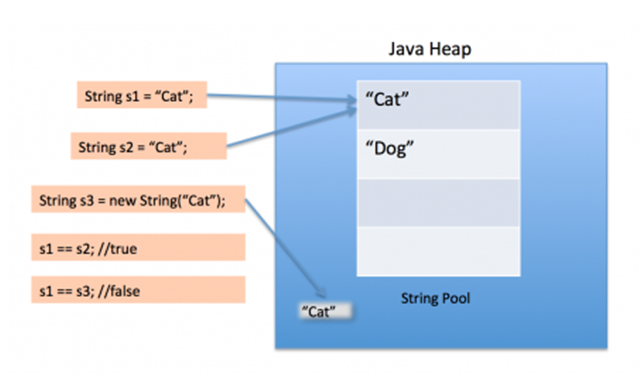
The following example shows comparing strings with == and equals():
public class EqualStrings {
    public static void main(String[] args) {
        String s1 = "Java";
        String s2 = "Java";
        String s3 = new String("Java");
        String s4 = new String(s1);
        System.out.println("s1==s2 : " + (s1 == s2));
        System.out.println("s3==s4 : " + (s3 == s4));
        System.out.println("s1==s3 : " + (s1 == s3));
        System.out.println("s1 equals s2 : " + s1.equals(s2));
        System.out.println("s1 equals s3 : " + s1.equals(s3));
    }
}
s1==s2 : true
s3==s4 : false
s1==s3 : false
s1 equals s2 : true
s1 equals s3 : trueWhat does this code print? Only literals and compile-time constants go into the pool automatically. A string concatenated at runtime is a new object, even if its text matches a literal:
public class StringPoolQuiz {
    public static void main(String[] args) {
        String a = "Java";

        String part = "Ja";
        String b = part + "va";          // concatenated at runtime

        final String constPart = "Ja";
        String c = constPart + "va";     // compile-time constant

        System.out.println(a == b);          // Output: false
        System.out.println(a == c);          // Output: true
        System.out.println(a == b.intern()); // Output: true
        System.out.println(a.equals(b));     // Output: true
    }
}
The intern() method returns the pooled string with the same content (and adds it to the pool if it is not there yet).
Important
Do not compare strings with ==. Such code may "work" with literals and break on strings read from a file, typed by the user or built at runtime. To compare text, always use equals().
Checking parts of a string: startsWith(), endsWith(), contains()
To check part of a string, the String class provides startsWith(), endsWith(), contains() and regionMatches(). All of them return a boolean and are case-sensitive.
- startsWith() checks whether the string begins with the given prefix.
- endsWith() checks whether the string ends with the given suffix.
- contains() checks whether the string contains the given substring.
- regionMatches() compares a region of this string with a region of the argument string.
Example:
public class StringExample5 {
    public static void main(String[] args) {
        System.out.println("Foobar".endsWith("bar"));      // Output: true
        System.out.println("Foobar".startsWith("Foo"));    // Output: true
        System.out.println("Foobar".contains("oo"));       // Output: true
        // 3 chars from index 6 of the string ("wor") vs 3 chars of "world" from index 0 ("wor")
        System.out.println("Hello world!!!".regionMatches(6, "world", 0, 3)); // Output: true
        System.out.println("Foobar".startsWith("foo"));    // Output: false (case)
    }
}
The compareTo() method
The compareTo(str) method compares strings lexicographically (character by character, by Unicode code) and returns a number: negative if the calling string is less than str, positive if it is greater, and zero if they are equal. It is used for sorting, where knowing "equal or not" is not enough.
The result is the difference between the codes of the first mismatching characters; if one string is a prefix of the other, it is the difference of their lengths:
System.out.println("a".compareTo("b"));                 // Output: -1
System.out.println("apple".compareTo("app"));           // Output: 2
System.out.println("Java".compareTo("java"));           // Output: -32 ('J' = 74, 'j' = 106)
System.out.println("Java".compareToIgnoreCase("java")); // Output: 0
The following example sorts an array of strings with a simple exchange sort based on compareTo(). In real code, a single call to Arrays.sort(array) gives the same result.
import java.util.Arrays;

public class SortString {
    private static String[] array = {"banana", "Apple", "cherry", "apple", "Zebra"};

    public static void main(String[] args) {
        for (int j = 0; j < array.length; j++) {
            for (int i = j + 1; i < array.length; i++) {
                if (array[i].compareTo(array[j]) < 0) {
                    String t = array[j];
                    array[j] = array[i];
                    array[i] = t;
                }
            }
        }
        System.out.println(Arrays.toString(array));
    }
}
[Apple, Zebra, apple, banana, cherry]Look at the order: "Zebra" comes before "apple", because all uppercase letters (codes 65–90) come before lowercase ones (97–122). compareTo() compares character codes, not the alphabet of a natural language. For a "human" order, use String.CASE_INSENSITIVE_ORDER, compareToIgnoreCase() or java.text.Collator.
Getting a character: charAt()
The charAt(index) method returns the character (char) at the given index; indexing starts at 0, and the last character has index length() - 1. An index outside this range throws StringIndexOutOfBoundsException.
public class StringExample3 {
    public static void main(String[] args) {
        char ch = "abc".charAt(1);
        System.out.println(ch);              // Output: b

        System.out.println("abc".charAt(3)); // StringIndexOutOfBoundsException
    }
}
Searching a string: indexOf() and lastIndexOf()
To find a character or a substring in a Java string, use two methods: indexOf() finds the first occurrence and lastIndexOf() finds the last one. Both return the index of the character or of the start of the substring, or -1 if nothing is found. The search is case-sensitive.
To find the first or last occurrence of a character:
int indexOf(int ch)
int lastIndexOf(int ch)
Here ch is the character to find (its type is int, so you can pass a char). To find the first or last occurrence of a substring:
int indexOf(String str)
int lastIndexOf(String str)
A second parameter sets the starting position. lastIndexOf() searches backwards from fromIndex:
int indexOf(int ch, int fromIndex)
int lastIndexOf(int ch, int fromIndex)
int indexOf(String str, int fromIndex)
int lastIndexOf(String str, int fromIndex)
Let's see these methods in action:
public class IndexOfExample {
    public static void main(String[] args) {
        String s = "Java has three string classes: String, StringBuilder, StringBuffer.";

        System.out.println("indexOf('S') = " + s.indexOf('S'));
        System.out.println("lastIndexOf('r') = " + s.lastIndexOf('r'));
        System.out.println("indexOf(\"String\") = " + s.indexOf("String"));
        System.out.println("lastIndexOf(\"String\") = " + s.lastIndexOf("String"));
        System.out.println("indexOf(\"string\") = " + s.indexOf("string"));
        System.out.println("indexOf('S', 32) = " + s.indexOf('S', 32));
        System.out.println("lastIndexOf('S', 50) = " + s.lastIndexOf('S', 50));
        System.out.println("indexOf(\"Kotlin\") = " + s.indexOf("Kotlin"));
    }
}
indexOf('S') = 31
lastIndexOf('r') = 65
indexOf("String") = 31
lastIndexOf("String") = 54
indexOf("string") = 15
indexOf('S', 32) = 39
lastIndexOf('S', 50) = 39
indexOf("Kotlin") = -1Note that indexOf("string") and indexOf("String") return different positions — the search does not ignore case. If you only need a yes/no answer, contains() is clearer: s.contains("Java") reads better than s.indexOf("Java") != -1.
concat(), replace(), toLowerCase(), toUpperCase(), trim()
These methods return a modified copy of the string: concat() appends a string to the end, replace() replaces all occurrences of a character or substring, toLowerCase() and toUpperCase() convert the string to lower or upper case, and trim() removes leading and trailing whitespace.
public class ModifyStringExample {
    public static void main(String[] args) {
        System.out.println("Hello".concat(" World"));      // Output: Hello World
        System.out.println("Hello".replace('l', 'w'));     // Output: Hewwo
        System.out.println("Hello".replace("ll", "LL"));   // Output: HeLLo
        System.out.println("Hello".toLowerCase());         // Output: hello
        System.out.println("Hello".toUpperCase());         // Output: HELLO
        System.out.println("[" + "    Hello World ".trim() + "]");  // Output: [Hello World]
        System.out.println("[" + "    Hello World ".strip() + "]"); // Output: [Hello World]
    }
}
replace() does not use regular expressions — pattern-based replacement is done with replaceAll(). strip() (Java 11) works like trim() but also removes Unicode whitespace, while trim() removes only characters with codes up to U+0020 (space).
A subtle detail
toLowerCase() and toUpperCase() without arguments use the default locale. In the Turkish locale, "TITLE".toLowerCase() returns "tıtle" (with a dotless i), so a comparison with "title" fails. For keys, commands and identifiers, write toLowerCase(Locale.ROOT).
Converting values: valueOf() and parseInt()
The static method String.valueOf() converts a value of any type to a string: a primitive, a char array or an object. The reverse conversion — parsing a string into a number — is done by the wrapper classes: Integer.parseInt(), Long.parseLong(), Double.parseDouble().
valueOf() is overloaded for all types, for example:
static String valueOf(int i)
static String valueOf(double d)
static String valueOf(boolean b)
static String valueOf(Object obj)
static String valueOf(char[] data)
public class ValueOfExample {
public static void main(String[] args) {
System.out.println(String.valueOf(42) + 1); // Output: 421 (string + number)
System.out.println(String.valueOf(3.5)); // Output: 3.5
System.out.println(String.valueOf(true)); // Output: true
Object obj = null;
System.out.println(String.valueOf(obj)); // Output: null
int n = Integer.parseInt("42");
System.out.println(n + 1); // Output: 43
double d = Double.parseDouble("2.5");
System.out.println(d * 2); // Output: 5.0
Integer.parseInt("42abc"); // NumberFormatException
}
}Unlike obj.toString(), String.valueOf(obj) is null-safe: it returns the string "null" instead of throwing NullPointerException.
The substring() method
The substring() method returns part of a string. It has two forms: substring(beginIndex) returns everything from the given position to the end, and substring(beginIndex, endIndex) returns characters from beginIndex inclusive to endIndex exclusive. The length of the result is endIndex - beginIndex.
public class SubstringExample {
    public static void main(String[] args) {
        System.out.println("Welcome to Java!!!".substring(11));     // Output: Java!!!
        System.out.println("Welcome to Java!!!".substring(11, 15)); // Output: Java
        System.out.println("Welcome".substring(7));                 // Output: (empty string)
        System.out.println("Welcome".substring(8));                 // StringIndexOutOfBoundsException
    }
}
substring(length()) is a valid call that returns an empty string; the exception is thrown only for an index greater than the length, a negative index or beginIndex > endIndex.
String concatenation: +, concat() and join()
You can concatenate strings in Java with the + operator, the concat() method or the static String.join() method, added in Java 8, which joins several strings with a delimiter. The + operator is the most convenient: it converts numbers, null and objects to strings automatically.
import java.util.List;

public class StringJoinExample {
    public static void main(String[] args) {
        System.out.println("1" + 2 + 3);   // Output: 123
        System.out.println(1 + 2 + "3");   // Output: 33

        String s = null;
        System.out.println("Value: " + s);      // Output: Value: null
        // "Value: ".concat(s);                 // NullPointerException

        String result = String.join(":", "foobar", "foo", "bar");
        System.out.println(result);             // Output: foobar:foo:bar

        System.out.println(String.join(", ", List.of("a", "b", "c"))); // Output: a, b, c
    }
}
The expression is evaluated left to right: in "1" + 2 + 3 the string "12" is built first and then 3 is appended, while in 1 + 2 + "3" the numbers are added first. For repeated concatenation in a loop, use StringBuilder; for formatted output, use String.format().
isEmpty() and isBlank()
The isEmpty() method checks whether a string is empty: it returns true only if its length is 0. The isBlank() method (Java 11) returns true if the string is empty or contains only whitespace (spaces, tabs, line breaks).
public class StringEmpty {
    public static void main(String[] args) {
        System.out.println("".isEmpty());       // Output: true
        System.out.println(" ".isEmpty());      // Output: false
        System.out.println(" ".isBlank());      // Output: true
        System.out.println("\t\n".isBlank());   // Output: true

        String s = null;
        System.out.println(s.isEmpty());       // NullPointerException
    }
}
Neither method checks for null, so a safe "the string is not filled in" check looks like this: s == null || s.isBlank().
Frequently asked questions
Is String a primitive type in Java?
No. Java has eight primitive types (int, char, boolean and so on), and String is not one of them — it is a class, and every string is an object. It just gets special language support: literals in double quotes and the + operator. That is why a String variable can be null, while an int cannot.
Why is String immutable in Java?
Immutability lets many references safely share one string through the String Pool, allows the hashCode to be cached (which makes strings good HashMap keys), lets strings be passed between threads without synchronization, and guarantees that a file name or URL cannot be changed after a security check. What it looks like in code — see String immutability.
How do I compare strings when one of them may be null?
Use Objects.equals(a, b) from java.util: it returns true for two nulls and never throws. If one side is a literal, put it first: "yes".equals(answer). The difference between == and equals() is explained in Comparing strings.
How many objects does new String("Java") create?
Up to two: the literal "Java" goes into the String Pool (if it is not there yet), and new always creates one more object in the heap. If the literal is already pooled, only one new object is created. In practice, new String("...") is almost never needed.
What is the difference between length() of a string and length of an array?
For a string, length is a method: s.length(); for an array, it is a field without parentheses: arr.length. Also, length() counts 16-bit char values, not visible characters: an emoji takes two chars, so "😀".length() is 2. The number of real characters is s.codePointCount(0, s.length()).
How do I convert a string to a number in Java?
Use Integer.parseInt("42"), Long.parseLong() or Double.parseDouble(). If the string is not a number (for example, "42abc" or an empty string), a NumberFormatException is thrown; leading and trailing spaces are not allowed either, so user input is usually cleaned with strip() first. Example — in valueOf() and parseInt().
Practice
Reinforce this lesson with hands-on tasks, each with a level and a time estimate.
All module tasks →
Comments