
Java Collections Framework: Collection Hierarchy and Interfaces
Try writing Collection<String> names = new HashMap<String, String>(); and the compiler stops you with incompatible types: HashMap<String,String> cannot be converted to Collection<String>. HashMap is part of the Java Collections Framework, yet it does not implement the Collection interface. Mistakes like this disappear once you see the collection hierarchy as a whole.
The Java Collections Framework (also called the Collection Framework or the Java Collections API) is a set of interfaces, implementations and algorithms in the java.util package for storing and processing groups of objects: lists, sets, queues and key–value maps. A collection in Java is simply an object that holds other objects. Unlike an array, a collection grows and shrinks dynamically, and ready-made methods let you search, sort and filter elements without writing the loops yourself. Collections appeared in J2SE 1.2 (1998); generics were added to them in Java 5.
What the Java Collections Framework consists of
The Java Collections Framework has three parts: interfaces that describe the behavior of a collection (list, set, queue, map), implementations such as ArrayList and HashMap that provide a concrete data structure, and algorithms, which are static methods for sorting, searching and shuffling.
| Part | What it is | Examples |
|---|---|---|
| Interfaces | A contract: which operations a collection supports | Collection, List, Set, Queue, Deque, Map |
| Implementations | Classes with a specific data structure inside | ArrayList, LinkedList, HashSet, TreeSet, ArrayDeque, HashMap |
| Algorithms | Static methods of the Collections and Arrays utility classes | Collections.sort(), binarySearch(), shuffle(), max(), Arrays.sort() |
By convention, a variable is declared with the interface type, and the implementation appears only after new: List<String> names = new ArrayList<>();. You can then switch to another implementation by changing one line, without touching the rest of the code.
Collection hierarchy in Java
The collection hierarchy in Java has two independent branches. The first starts with the Collection interface (which extends Iterable) and splits into List, Set and Queue. The second is the Map interface for key–value pairs: it belongs to the Collections Framework but does not extend Collection.
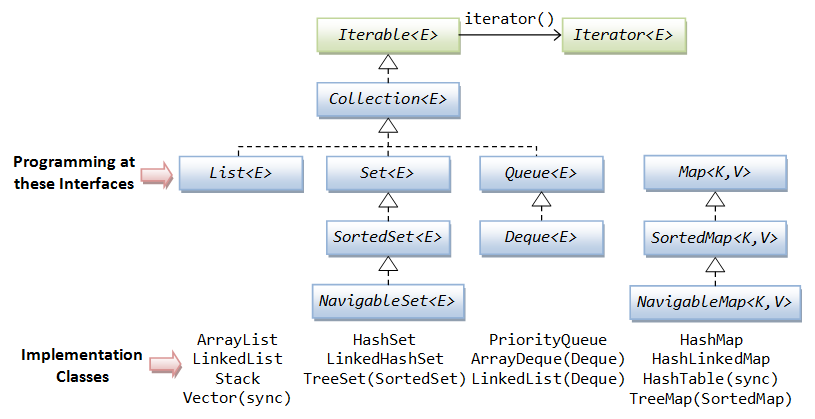
The same hierarchy as text (an arrow → means “extends / implements”; the main classes are listed after the dash):
Iterable<T>
└── Collection<E>
    ├── List<E>            — ArrayList, LinkedList, Vector → Stack
    ├── Set<E>             — HashSet → LinkedHashSet
    │   └── SortedSet<E> → NavigableSet<E>   — TreeSet
    └── Queue<E>           — PriorityQueue
        └── Deque<E>       — ArrayDeque, LinkedList

Map<K,V>                   — HashMap → LinkedHashMap, Hashtable
└── SortedMap<K,V> → NavigableMap<K,V>  — TreeMap
Note that LinkedList appears in two branches: it implements both List and Deque. Vector, Stack and Hashtable date back to Java 1.0 and were fitted into the hierarchy later; new code does not use them.
What changed in Java 21
Java 21 (JEP 431) added the SequencedCollection, SequencedSet and SequencedMap interfaces for collections with a defined encounter order. List, Deque, SortedSet and SortedMap extend them, and LinkedHashSet and LinkedHashMap implement them. That is where a plain ArrayList gets getFirst(), getLast(), removeFirst(), removeLast() and reversed(). On Java 17, list.getFirst() does not compile — use list.get(0) there.
Core collection interfaces in Java
The Java Collections Framework has six core collection interfaces: List (an ordered list with indexes), Set (no duplicates), SortedSet/NavigableSet (a sorted set), Queue, Deque (a double-ended queue that also works as a stack) and Map (key–value pairs). They differ in whether duplicates are allowed and in what order elements come back.
| Interface | What it models | Duplicates | Element order |
|---|---|---|---|
Collection | Root of the branch: add(), remove(), contains(), size(), iterator() | Depends on the subtype | Depends on the subtype |
List | A sequence with index-based access | Yes | Insertion order |
Set | A set of unique elements | No (add() returns false) | Not guaranteed (HashSet) or insertion order (LinkedHashSet) |
SortedSet / NavigableSet | A sorted set with nearest-element lookups | No | Ascending or by a Comparator |
Queue | A queue: add at the tail, remove from the head | Yes | FIFO or by priority (PriorityQueue) |
Deque | A double-ended queue; replaces the Stack class | Yes | FIFO or LIFO, at both ends |
Map | Maps unique keys to values | Keys: no; values: yes | Depends on the implementation |
Uniqueness in a HashSet and in HashMap keys is decided by equals() and hashCode(): if you store your own objects, override both (see the equals() method in Java).
Choosing an implementation: performance comparison
To pick a collection class, answer three questions: do you need index access, does element order matter, and do you need sorting? For most tasks ArrayList, HashSet, HashMap and ArrayDeque are enough. Other classes are for a special order or fast inserts at the ends of a list. The last column shows Java collections performance in Big O notation.
| Class | Inside | Order | null | Main operations |
|---|---|---|---|---|
ArrayList | Resizable array | Insertion | Allowed | get(i) O(1), add to the end O(1) amortized, insert in the middle O(n) |
LinkedList | Doubly linked list | Insertion | Allowed | get(i) O(n), add/remove at the ends O(1) |
ArrayDeque | Circular array | Insertion (at both ends) | No — NullPointerException | Operations at the ends O(1) |
PriorityQueue | Binary heap | By priority when polled | No — NullPointerException | offer()/poll() O(log n), peek() O(1) |
HashSet | Hash table (a HashMap inside) | Not guaranteed | One null | add()/contains() O(1) on average |
LinkedHashSet | Hash table + linked list | Insertion | One null | O(1) on average |
TreeSet | Red-black tree | Sorted | No — NullPointerException with natural ordering | O(log n) |
HashMap | Hash table | Not guaranteed | One null key, any number of null values | get()/put() O(1) on average |
LinkedHashMap | Hash table + linked list | Insertion | Same as HashMap | O(1) on average |
TreeMap | Red-black tree | Sorted by key | null key — NullPointerException with natural ordering | O(log n) |
Ordered vs sorted collections in Java
The “Order” column above mixes two different properties. An ordered collection iterates over its elements in a predictable order that does not depend on their values: by index or by insertion order. A sorted collection arranges elements by their values — in natural ordering (Comparable) or by a Comparator.
| Combination | Possible? | Examples |
|---|---|---|
| Unordered and unsorted | Yes | HashSet, HashMap |
| Ordered but unsorted | Yes | ArrayList, LinkedList, LinkedHashSet, LinkedHashMap |
| Ordered and sorted | Yes | TreeSet, TreeMap |
| Sorted but unordered | No | — sorting defines an order, so every sorted collection is also ordered |
Set<String> linked = new LinkedHashSet<>(List.of("pear", "apple", "fig"));
Set<String> sorted = new TreeSet<>(List.of("pear", "apple", "fig"));
System.out.println(linked); // [pear, apple, fig] - insertion order
System.out.println(sorted); // [apple, fig, pear] - alphabetical
So “ordered” is not enough when you need sorted output: a LinkedHashSet keeps the order you added elements in, but does not sort them. PriorityQueue is a special case: poll() always returns the smallest element, but its iterator walks the heap without sorting.
The O(1) for hash-based classes holds only when hashCode() spreads keys evenly. If every key returns the same hash code, all of them land in one bucket and lookups degrade (since Java 8, a crowded HashMap bucket turns into a tree, so the worst case is O(log n) rather than O(n) for comparable keys).
Generic collections
All interfaces and classes of the Java Collections Framework are generic (since Java 5): you specify the element type in angle brackets, for example List<String>. The compiler then refuses to add an object of another type, and you need no cast when reading. A collection without a type parameter (a raw type) compiles with only a warning and fails at runtime instead.
import java.util.ArrayList;
import java.util.List;

public class RawListExample {
    public static void main(String[] args) {
        List raw = new ArrayList();      // raw type: the compiler only warns
        raw.add("Java");
        raw.add(42);                     // no error: element type is not checked

        for (Object item : raw) {
            String s = (String) item;    // fails on the second element
            System.out.println(s.toUpperCase());
        }
    }
}
Output:
JAVA
Exception in thread "main" java.lang.ClassCastException: class java.lang.Integer cannot be cast to class java.lang.String (java.lang.Integer and java.lang.String are in module java.base of loader 'bootstrap')
	at RawListExample.main(RawListExample.java:11)
With List<String> list = new ArrayList<>(); the line list.add(42) does not compile, so the bug is caught before the program runs. Primitives such as int and double cannot be stored directly: you use a wrapper class (List<Integer>) and autoboxing. Wildcards <? extends T> and <? super T> in method parameters are covered in the lesson on Java generics.
Immutable collections
An immutable (unmodifiable) collection is one whose add(), remove() and set() methods throw UnsupportedOperationException. In modern Java you create them with the factory methods List.of(), Set.of(), Map.of() (Java 9) and List.copyOf() (Java 10). The options differ in details: whether null is allowed and whether the result is linked to the source data.
| Method | Since | What can be changed | null elements | Link to the source |
|---|---|---|---|---|
Arrays.asList(...) | 1.2 | Only set(); add()/remove() throw UnsupportedOperationException | Allowed | A view of the array: changes are visible both ways |
Collections.unmodifiableList(list) | 1.2 | Nothing | Allowed | A view: changes to the original list show through |
List.of(...), Set.of(...), Map.of(...) | 9 | Nothing | No — NullPointerException (even for contains(null)) | None |
List.copyOf(collection) | 10 | Nothing | No — NullPointerException | None, it is a copy |
stream.toList() | 16 | Nothing | Allowed | None |
What does this code print?
import java.util.Arrays;
import java.util.List;

public class UnmodifiableExample {
    public static void main(String[] args) {
        List<String> fixed = Arrays.asList("a", "b");
        fixed.set(0, "z");
        System.out.println(fixed);

        try {
            fixed.add("c");
        } catch (UnsupportedOperationException e) {
            System.out.println("Arrays.asList: add() not allowed");
        }

        List<String> immutable = List.of("a", "b");
        try {
            immutable.set(0, "z");
        } catch (UnsupportedOperationException e) {
            System.out.println("List.of: set() not allowed");
        }
    }
}
[z, b]
Arrays.asList: add() not allowed
List.of: set() not allowedArrays.asList() returns a fixed-size list, not an immutable one: you may replace an element but not change the size. If you need an ordinary mutable list with initial elements, wrap the factory: new ArrayList<>(List.of("a", "b")). Converting a primitive array such as int[] is a separate case — see convert int array to List. The toList() terminal operation belongs to the Stream API.
Thread-safe collections in Java
The standard ArrayList, HashSet and HashMap are not thread-safe: concurrent writes from several threads lose data, and iteration can fail with ConcurrentModificationException. For multithreaded code Java offers three groups of collections: legacy synchronized classes, Collections.synchronizedXxx() wrappers and the classes of the java.util.concurrent package (Java 5).
| Collection | How thread safety is achieved | When to use |
|---|---|---|
Vector, Hashtable | Every method is synchronized | Legacy code only; replace with the classes below |
Collections.synchronizedList(), synchronizedMap() | A wrapper with a single lock for all methods; iteration must be wrapped manually in synchronized (list) { ... } | Occasional access to an existing collection from several threads |
ConcurrentHashMap | Locks individual bins and uses CAS operations; reads take no lock. null keys and values are not allowed | The default choice for a shared Map (caches, counters) |
CopyOnWriteArrayList, CopyOnWriteArraySet | Each write copies the internal array; the iterator works on a snapshot and never throws ConcurrentModificationException | Many reads, rare writes (listener lists) |
ConcurrentLinkedQueue, ConcurrentLinkedDeque | Non-blocking CAS-based algorithms | A shared queue without waiting |
ArrayBlockingQueue, LinkedBlockingQueue (the BlockingQueue interface) | put() waits for free space, take() waits for an element | Producer–consumer pattern |
ConcurrentSkipListMap, ConcurrentSkipListSet | Skip list without a global lock | Thread-safe replacement for TreeMap/TreeSet |
Example: two threads each increment a shared counter in a ConcurrentHashMap 10,000 times. The merge() method reads and writes atomically, so no increment is lost (Integer::sum is a method reference):
import java.util.Map;
import java.util.concurrent.ConcurrentHashMap;

public class ConcurrentCounter {
    public static void main(String[] args) throws InterruptedException {
        Map<String, Integer> counts = new ConcurrentHashMap<>();
        Runnable task = () -> {
            for (int i = 0; i < 10_000; i++) {
                counts.merge("clicks", 1, Integer::sum);
            }
        };

        Thread t1 = new Thread(task);
        Thread t2 = new Thread(task);
        t1.start();
        t2.start();
        t1.join();
        t2.join();

        System.out.println(counts.get("clicks")); // Output: 20000
    }
}
Replace ConcurrentHashMap with HashMap and the result becomes unpredictable: usually less than 20000, because the threads overwrite each other’s updates.
Topics of the Collections module
The Collections module goes from general to specific: first the root interface and basic data structures, then each branch of the hierarchy — lists, sets, queues and maps — and finally the tools for working with them.
| Topic | What it covers |
|---|---|
| The Collection interface | Methods shared by all collections |
| Data structures | List, stack, queue and set as concepts, without specific classes |
| List and ArrayList | List methods, how ArrayList works, toArray() |
| Set, HashSet, LinkedHashSet | Hash tables, the equals() and hashCode() contract |
| SortedSet and TreeSet | Sorted sets, subSet(), headSet() |
| Comparable and Comparator | How to define the sort order of objects |
| NavigableSet | ceiling(), floor(), higher(), lower() |
| Queue and Deque | Queue methods: offer(), poll(), peek(), push(), pop() |
| ArrayDeque | A queue and a stack backed by an array |
| LinkedList | Doubly linked list, comparison with ArrayList |
| PriorityQueue | A priority queue |
| The PECS principle | Wildcards extends and super in collections |
| Iterator | Iterating over collections, ConcurrentModificationException |
| Map | HashMap, TreeMap, LinkedHashMap, SortedMap, NavigableMap |
| Collections class methods | sort(), binarySearch(), shuffle(), frequency() |
| Backed collections | Collection views and Arrays.asList() |
| Legacy classes | Vector, Stack, Hashtable, Properties, Enumeration |
Frequently Asked Questions
What is the difference between Collection and Collections in Java?
Collection is an interface, the root of the branch of lists, sets and queues. Collections is a utility class with static methods such as sort(), reverse(), unmodifiableList() and synchronizedMap(). You cannot create a Collections object, while every list, set and queue implements Collection.
Why does Map not extend the Collection interface?
An element of a Map is a key–value pair, while Collection methods work with single elements: add(E) makes no sense for a pair. So Map is a separate branch of the hierarchy, connected to other collections through the keySet(), values() and entrySet() views.
Can a Java collection store int values?
Not directly: List<int> does not compile, so you use List<Integer> with autoboxing. This is easy to get wrong: for a List<Integer>, list.remove(1) removes the element at index 1, not the number 1. To remove the value, write list.remove(Integer.valueOf(1)).
Which collections should I use by default?
ArrayList for a list, HashSet for a set, HashMap for a map, and ArrayDeque for a queue or stack instead of the legacy Stack. Choose other implementations when you need insertion order, sorting or thread safety. See the comparison in Choosing an implementation.
Comments