
Wrapper Classes in Java
Two comparisons that look identical give different results: with Integer a = 127, b = 127; the expression a == b is true, but with Integer c = 128, d = 128; the expression c == d is false. The reason lies in how wrapper classes and their cache work, and it is one of the most frequently asked Java interview questions.
Wrapper classes in Java are classes from the java.lang package whose objects hold a single value of a primitive type: Integer for int, Double for double, Boolean for boolean, and so on. You need them wherever an object is required instead of a primitive: in collections and generics, to represent a missing value with null, and as a toolbox of static methods for converting and comparing values.
What Are Wrapper Classes and Why Use Them
Primitive types (int, double, boolean and others) are fast and compact, but they are not objects: they have no methods, they cannot be null, and they cannot be stored in a collection. So that nobody has to write a container class for a number, Java SE ships ready-made wrapper classes.
A Java wrapper class lets you:
- store primitives in collections and generic classes:
List<Integer>,Map<String, Double>— generics work only with objects; - represent a missing value with
null(for example, anInteger agefield that has not been filled in yet, or a nullable database column); - convert strings to numbers and back:
Integer.parseInt("42"),Integer.toString(42); - use constants and utility methods:
Integer.MAX_VALUE,Integer.compare(),Character.isDigit(),Double.isNaN().
The name of a wrapper class matches the name of its primitive type, capitalized. The exceptions are Integer (primitive int) and Character (primitive type char).
Wrapper objects are immutable: the value passed at creation cannot be changed. The i++ operation on an Integer variable does not modify the old object — it creates (or takes from the cache) a new one and assigns its reference to the variable:
Integer i = 10;
Integer before = i;
i++;                          // i = Integer.valueOf(i.intValue() + 1)
System.out.println(before);   // 10 - the old object is unchanged
System.out.println(i);        // 11 - the variable now points to another object
Every wrapper class overrides the equals(Object) method: it compares the stored values, not references. The type matters too, though: Integer.valueOf(1).equals(1L) returns false, because 1L is boxed into a Long.
Primitive Types and Their Wrapper Classes
Java has eight primitive types, and each has its own wrapper class (also called a boxed type). The Void class stands apart: it corresponds to the void keyword, holds no value and cannot be instantiated. It is used in generics when a result type is formally required but there is nothing to return, for example Callable<Void> or CompletableFuture<Void> (the only allowed value is null).
| Primitive type | Wrapper class | Extends Number | valueOf() cache |
|---|---|---|---|
| byte | Byte | yes | all values (-128..127) |
| short | Short | yes | -128..127 |
| int | Integer | yes | -128..127 (upper bound can be raised) |
| long | Long | yes | -128..127 |
| float | Float | yes | none |
| double | Double | yes | none |
| char | Character | no | 0..127 |
| boolean | Boolean | no | Boolean.TRUE and Boolean.FALSE |
| void | Void | no | no instances are created |
Autoboxing and Unboxing in Java
Autoboxing is the automatic conversion of a primitive into an object of its wrapper class. Unboxing is the reverse conversion of a wrapper object into a primitive. The compiler has performed both conversions since Java 5, so you almost never need to call Integer.valueOf() or intValue() by hand.
import java.util.ArrayList;
import java.util.List;

public class AutoboxingExample {
    public static void main(String[] args) {
        Integer boxed = 42;          // autoboxing: Integer.valueOf(42)
        int primitive = boxed;       // unboxing: boxed.intValue()

        List<Integer> numbers = new ArrayList<>();
        numbers.add(5);              // autoboxing when adding to a collection
        int first = numbers.get(0);  // unboxing when reading

        Integer sum = boxed + first; // both unboxed, int addition, result boxed
        System.out.println(sum);     // 47
    }
}
Boxing and unboxing happen on assignment, when passing an argument to a method, when returning from a method and in arithmetic expressions. It is convenient, but convenience has a price: every boxing outside the cache creates a new object, so in hot loops prefer primitives (long sum, not Long sum).
NullPointerException on unboxing
Unboxing is a method call such as intValue(). If the reference is null, you get a NullPointerException on a line that seems to contain no method calls at all: Integer count = null; int n = count;. The ternary operator is especially sneaky: in Integer x = flag ? map.get(key) : 0; the 0 operand forces map.get(key) to be unboxed, so a missing key throws an NPE.
Creating Objects: valueOf() Instead of Constructors
Wrapper objects used to be created with constructors: new Integer(42), new Integer("42"), new Boolean("true"). All these constructors have been deprecated since Java 9, and since Java 16 they are marked @Deprecated(forRemoval = true) (JEP 390), which means they may be removed in a future release. The compiler issues a warning when you use them.
What not to write in modern code:
// Outdated - these constructors are deprecated for removal
Integer i1 = new Integer(42);
Integer i2 = new Integer("42");
Boolean b1 = new Boolean("true");
What to write instead:
Integer i1 = 42;                     // autoboxing
Integer i2 = Integer.valueOf("42");  // from a string
Float f1 = Float.valueOf(3.14f);
Float f2 = Float.valueOf("3.14");
Character c1 = 'c';                  // or Character.valueOf('c')
Boolean b1 = Boolean.valueOf("true");
The key difference: a constructor always creates a new object, while valueOf() may return an existing object from the cache (for Integer, in the range -128 to 127). This saves memory, and it is exactly why autoboxing is compiled into a valueOf() call.
Outdated material
Many older Java books and mock exams (including certification questions for Java 6–8) create wrappers with new Integer(...). You should recognize this syntax to read legacy code, but in new code use autoboxing or valueOf().
If a string does not contain a valid number, valueOf(String) throws a NumberFormatException. Boolean behaves differently: it never throws. The string "true" in any letter case gives true; any other string (even null) gives false:
public class WrapperExample1 {
    public static void main(String[] args) {
        Boolean boolean1 = Boolean.valueOf(true);
        Boolean boolean2 = Boolean.valueOf("Some String");
        boolean boolean3 = Boolean.parseBoolean("TRUE");

        System.out.println(boolean1); // true
        System.out.println(boolean2); // false
        System.out.println(boolean3); // true
    }
}
Integer Cache: Comparing with == vs equals()
For objects, the == operator compares references, not values. Integer.valueOf() (and therefore autoboxing) returns pre-created objects from the internal IntegerCache for numbers from -128 to 127, so two boxings of 127 point to the same object. For 128, a new object is created each time:
public class IntegerCacheExample {
    public static void main(String[] args) {
        Integer a = 127;
        Integer b = 127;
        System.out.println(a == b);       // true  - same cached object

        Integer c = 128;
        Integer d = 128;
        System.out.println(c == d);       // false - two different objects
        System.out.println(c.equals(d));  // true  - the values are equal

        int e = 128;
        System.out.println(c == e);       // true  - c is unboxed, two ints are compared
    }
}
The rule is simple: compare wrappers with equals() (or Objects.equals(a, b) if either may be null), and for ordering use compareTo() or Integer.compare(). Using == between a wrapper and a primitive works correctly, because the wrapper gets unboxed.
Good to know
The -128..127 range is guaranteed by the Java Language Specification, but the upper bound of the Integer cache can be raised with the JVM option -XX:AutoBoxCacheMax=1000. So the result of c == d for 128 formally depends on launch settings — one more reason never to rely on == for wrappers.
Wrapper Class Methods
Besides holding a value, wrapper classes provide many static and instance methods. First, a quick cheat sheet of the conversion methods that are mixed up most often:
| Method | Takes | Returns | Example |
|---|---|---|---|
| Integer.valueOf() | int or String | Integer object | Integer.valueOf("6") |
| Integer.parseInt() | String | primitive int | Integer.parseInt("6") |
| intValue(), doubleValue(), etc. | nothing (instance method) | primitive | boxed.intValue() |
| Integer.toString() | int (and radix) | String | Integer.toString(254, 16) |
| toString() | nothing (instance method) | String | boxed.toString() |
valueOf() Methods
The valueOf() method is the recommended way to obtain a wrapper object. It is overloaded: one version takes a value of the matching primitive type, another takes a String. The exception is Character, which has only valueOf(char).
The integer classes Byte, Short, Integer and Long have a third version: it takes a string with a number in any numeral system plus the base of that system (radix) as the second argument:
public class WrapperValueOf {
    public static void main(String[] args) {
        Integer integer1 = Integer.valueOf("6");
        Integer integer2 = Integer.valueOf(6);
        // converts binary 101011 to decimal 43
        Integer integer3 = Integer.valueOf("101011", 2);

        System.out.println(integer1); // 6
        System.out.println(integer2); // 6
        System.out.println(integer3); // 43
    }
}
parseXxx() Methods
Every numeric wrapper class (and Boolean) has a static method that converts a string into a primitive value: Integer.parseInt(), Long.parseLong(), Double.parseDouble(), Boolean.parseBoolean() and so on. Byte, Short, Integer and Long also have a version with a radix:
public class WrapperExample3 {
    public static void main(String[] args) {
        Long long1 = Long.valueOf("45");
        long long2 = Long.parseLong("67");
        long long3 = Long.parseLong("101010", 2);

        System.out.println("long1 = " + long1); // long1 = 45
        System.out.println("long2 = " + long2); // long2 = 67
        System.out.println("long3 = " + long3); // long3 = 42
    }
}
valueOf() vs parseInt()
Both methods parse a string, and both throw NumberFormatException on invalid input. The difference is the return type: Integer.valueOf("42") returns an Integer object (possibly from the cache), while Integer.parseInt("42") returns a primitive int. Internally, valueOf(String) simply calls parseInt() and then boxes the result. Rule of thumb: if you need an int, call parseInt() and avoid creating an unnecessary object; if you need an Integer (for a collection or a nullable field), call valueOf().
int count = Integer.parseInt("42");         // primitive, no object
Integer boxed = Integer.valueOf("42");      // Integer object
List<Integer> ids = List.of(Integer.valueOf("7"));
NumberFormatException When Parsing Strings
If a string is not a valid number, parseXxx() and valueOf(String) throw a NumberFormatException. It is an unchecked exception, so the compiler will not force you to handle it — when parsing user input, wrap the call in try-catch:
public class ParseExample {
    public static void main(String[] args) {
        String[] inputs = {"42", "+42", " 42", "4.2", "abc"};
        for (String s : inputs) {
            try {
                System.out.println(Integer.parseInt(s));
            } catch (NumberFormatException e) {
                System.out.println("Not a number: \"" + s + "\"");
            }
        }
    }
}
Output:
42
42
Not a number: " 42"
Not a number: "4.2"
Not a number: "abc"
Note that whitespace is not trimmed automatically (use s.trim() or s.strip()), and a decimal number cannot be parsed as an int. Calling Integer.parseInt(null) also throws NumberFormatException, not NullPointerException.
toString() Methods
- All wrapper classes override the instance method
toString(). It returns the string representation of the value, which is why you can pass a wrapper straight toprintln():Double double1 = Double.valueOf("4.6"); System.out.println(double1); // 4.6 - All numeric wrappers provide a static
toString()method that takes a primitive value and returns aString:String string1 = Double.toString(3.14); // "3.14" IntegerandLongprovide a thirdtoString()version that represents a number in any numeral system. The method is static: the first argument is the number, the second is the radix:String string2 = Long.toString(254, 16); // string2 = "fe"
toHexString(), toOctalString(), toBinaryString()
Integer and Long can convert a decimal number to hexadecimal, octal and binary:
public class WrapperToXString {
    public static void main(String[] args) {
        String string1 = Integer.toHexString(254);
        System.out.println("254 in base 16 = " + string1);

        String string2 = Long.toOctalString(254);
        System.out.println("254 in base 8 = " + string2);

        String string3 = Long.toBinaryString(254);
        System.out.println("254 in base 2 = " + string3);
    }
}
Output:
254 in base 16 = fe
254 in base 8 = 376
254 in base 2 = 11111110
From this group, Double and Float have only toHexString().
Comparison and Arithmetic: compare(), sum(), max(), min()
Java 7 and 8 added static methods to the numeric wrappers that are handy as method references in the Stream API and in comparators:
System.out.println(Integer.compare(5, 10));  // -1 (negative: 5 < 10)
System.out.println(Integer.sum(5, 10));      // 15
System.out.println(Integer.max(5, 10));      // 10
System.out.println(Integer.min(5, 10));      // 5
System.out.println(Double.compare(0.0, -0.0)); // 1

// method reference instead of a lambda
int total = List.of(1, 2, 3).stream().reduce(0, Integer::sum); // 6
Integer.compare(x, y) is safer than subtraction x - y in a comparator: subtraction can overflow for large values.
Useful Character Methods
Character does not extend Number, but it offers a set of static methods for analyzing characters:
System.out.println(Character.isDigit('7'));          // true
System.out.println(Character.isLetter('é'));         // true
System.out.println(Character.isLetterOrDigit('_'));  // false
System.out.println(Character.isWhitespace(' '));     // true
System.out.println(Character.isUpperCase('a'));      // false
System.out.println(Character.toUpperCase('a'));      // A
System.out.println(Character.getNumericValue('7'));  // 7
The Number Class
All numeric wrapper classes (Byte, Short, Integer, Long, Float, Double) extend the abstract class Number. BigInteger, BigDecimal and the atomic AtomicInteger and AtomicLong extend it as well. Character and Boolean are not subclasses of Number.
Number declares methods that return the object's value in each numeric format: byteValue(), shortValue(), intValue(), longValue(), floatValue(), doubleValue().
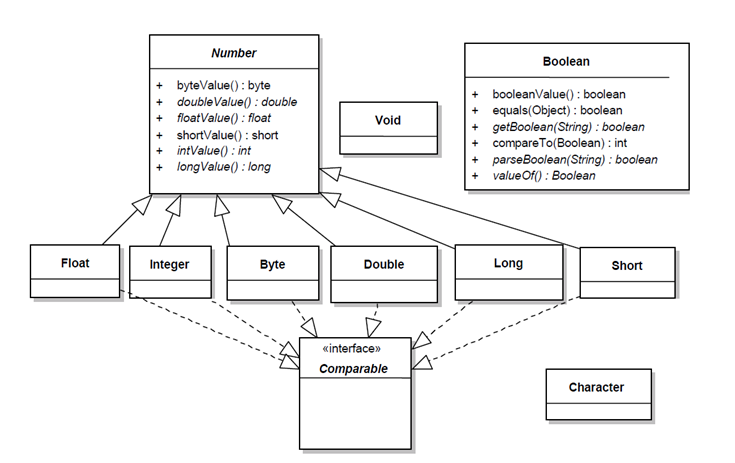
Type Conversion with Number Methods
public class WrapperExample2 {
    public static void main(String[] args) {
        Integer iOb = 1000;
        System.out.println(iOb.byteValue());
        System.out.println(iOb.shortValue());
        System.out.println(iOb.intValue());
        System.out.println(iOb.longValue());
        System.out.println(iOb.floatValue());
        System.out.println(iOb.doubleValue());
    }
}
Output:
-24
1000
1000
1000
1000.0
1000.0
The xxxValue() methods behave like ordinary primitive casts: byteValue() for 1000 returns -24, because narrowing to 8 bits discards the higher-order bits.
Constants: MIN_VALUE, MAX_VALUE, Infinity and NaN
Every numeric wrapper class (and Character) contains static constants with the minimum and maximum value of the type. For example, Integer.MIN_VALUE is the smallest int (-2147483648) and Integer.MAX_VALUE is the largest (2147483647). There are also SIZE (size in bits) and BYTES (size in bytes).
The floating-point wrappers Float and Double additionally define:
NEGATIVE_INFINITY— negative infinity;POSITIVE_INFINITY— positive infinity;NaN— «Not a Number».
Note that Double.MIN_VALUE is not the most negative number but the smallest positive value (about 4.9E-324). The most negative double is -Double.MAX_VALUE.
Integer division by zero throws an ArithmeticException. Floating-point division by zero, however, is not an error under IEEE 754: the result is positive or negative infinity. Multiplying infinity by zero gives NaN:
public class InfinityExample {
    public static void main(String[] args) {
        int a = 7;
        double b = 0.0;
        double c = -0.0;
        double g = Double.NEGATIVE_INFINITY;
        System.out.println("7 / 0.0 = " + a / b);
        System.out.println("7 / -0.0 = " + a / c);
        System.out.println("0.0 == -0.0 = " + (b == c));
        System.out.println("-Infinity * 0 = " + g * 0);
    }
}
Output:
7 / 0.0 = Infinity
7 / -0.0 = -Infinity
0.0 == -0.0 = true
-Infinity * 0 = NaN
NaN is not equal to anything, not even itself: Double.NaN == Double.NaN is false. Use Double.isNaN(x) to check for it and Double.isInfinite(x) for infinity. Double.equals() behaves differently from ==: Double.valueOf(Double.NaN).equals(Double.NaN) returns true, while Double.valueOf(0.0).equals(-0.0) returns false.
Wrappers in Collections and Generics
A generic type parameter can only be a reference type, so List<int> does not compile — you have to write List<Integer>. Thanks to autoboxing, working with such a collection looks almost like working with primitives:
// List<int> list = new ArrayList<>(); // compilation error
List<Integer> list = new ArrayList<>();
list.add(10);                 // autoboxing
list.add(20);
int sum = 0;
for (int n : list) {          // each element is unboxed
    sum += n;
}

Map<String, Integer> ages = new HashMap<>();
ages.put("Alice", 30);
Integer age = ages.get("Bob"); // null - no such key, unboxing to int is unsafe
When performance matters for large amounts of numbers, use primitive arrays (int[]) or the specialized streams IntStream, LongStream, DoubleStream — they do not create an object per value.
remove() in List<Integer>
List has two methods: remove(int index) and remove(Object o). Calling list.remove(10) removes the element at index 10 (no autoboxing happens, because the overload with a primitive parameter matches first). To remove the value 10, write list.remove(Integer.valueOf(10)).
Where Developers Get Tripped Up
- Comparing wrappers with ==. It works for cached values (-128..127) and breaks outside that range. Use
equals(). - Unboxing null.
int x = map.get(key);throws aNullPointerExceptionwhen the key is missing. - equals() across types.
Long.valueOf(5).equals(5)returnsfalse:5is boxed into anInteger, not aLong. - Deprecated constructors.
new Integer(5)triggers a compiler warning and always creates a new object; useInteger.valueOf(5)or autoboxing. - Expecting an exception from Boolean.
Boolean.parseBoolean("yes")andBoolean.valueOf("Some String")returnfalsewithout throwing. - Boxing inside a loop.
Long sum = 0L; for (...) sum += i;creates millions of needless objects; declarelong suminstead. - Synchronizing on a wrapper.
synchronized (count)on anIntegeris dangerous: aftercount++the variable points to a different object, and cached objects are shared across the whole application.
Frequently Asked Questions
What is the difference between int and Integer in Java?
int is a primitive type: it stores the value itself, cannot be null, and a class field of this type defaults to 0. Integer is a wrapper class: the variable holds a reference to an object, it can be null (a field defaults to null), and the object takes more memory, but it can be used in collections and generics.
Is String a wrapper class?
No. String is also an immutable class from java.lang, but it does not wrap any primitive type. There are eight wrapper classes: Byte, Short, Integer, Long, Float, Double, Character, Boolean; Void is sometimes listed with them.
Can a method change the value of an Integer passed to it?
No. Wrapper objects are immutable, and the reference is passed to the method by value. The assignment param = param + 1 inside the method creates a new object and changes only the local copy of the reference — the caller's variable stays the same. To change the value, return the result from the method or use a mutable holder such as AtomicInteger or an array.
What happens when you call Integer.parseInt(null)?
It throws a NumberFormatException with the message «Cannot parse null string». By contrast, Double.parseDouble(null) throws a NullPointerException, and Boolean.parseBoolean(null) simply returns false. Check external input for null and emptiness before parsing.
Should I use int or Integer for fields and parameters?
Default to the primitive: it is faster, uses less memory and cannot cause a NullPointerException. Use Integer when the value may be absent (for example, an optional JPA entity field or a DTO property) and wherever an object is required: in collections, generics and Optional.
Comments