
Java Map Interface: Methods, Map.Entry and Examples
A word counter in three lines looks harmless: counts.put(w, counts.get(w) + 1). Yet it crashes on the very first word with NullPointerException: Cannot invoke "java.lang.Integer.intValue()" because the return value of "java.util.Map.get(Object)" is null. For a new key, get() returns null, and null cannot be unboxed to an int. Since Java 8 the same task takes one line, counts.merge(w, 1, Integer::sum), and merge() is only one of the Map methods many developers never learn.
The Map interface (java.util.Map<K, V>) is a collection of key–value pairs in which each key appears at most once and a value is looked up by its key. A map is also called a dictionary or an associative array. The main implementations are HashMap, LinkedHashMap and TreeMap; they differ in the order of keys and in the speed of operations.
What is the Map interface in Java
Map in Java is an interface for storing key–value pairs: keys are unique, values may repeat, and you reach a value by its key rather than by an index. Map is part of the Java Collections Framework, but it does not extend the Collection interface — it is a separate branch of the hierarchy with its own methods.
The interface is generic and is declared like this:
public interface Map<K, V>The first type parameter K is the key type, the second V is the value type. For example, Map<String, Integer> stores a salary by last name, and Map<Long, Person> stores a person by ID. Keys and values must be objects: primitives are boxed automatically into Integer, Long and other wrapper classes.
import java.util.HashMap;
import java.util.Map;

public class MapExample {
    public static void main(String[] args) {
        Map<String, Integer> salaries = new HashMap<>();
        salaries.put("Smith", 1300);
        salaries.put("Johnson", 1200);
        salaries.put("Williams", 3400);

        System.out.println(salaries.get("Williams"));
        System.out.println(salaries);
    }
}
Output:
3400
{Johnson=1200, Williams=3400, Smith=1300}
The output order is neither insertion order nor alphabetical: a HashMap iterates over its hash-table buckets. Here “Johnson” and “Williams” share bucket 3 and “Smith” sits in bucket 7. How the bucket index is computed is explained in How HashMap works internally.
How to create a Map. To create a new empty Map in Java, write new HashMap<>() (or new LinkedHashMap<>(), new TreeMap<>()) and declare the variable with the interface type Map. A small read-only map with initial data is created with Map.of(...), and a modifiable map with initial data with new HashMap<>(Map.of(...)) — see Map.of, Map.ofEntries and Map.copyOf.
How uniqueness of a key is checked depends on the implementation: HashMap and LinkedHashMap compare keys with hashCode() and equals(), TreeMap with compareTo() or a Comparator, and IdentityHashMap with the == operator. Whether null keys and values are allowed is also up to the implementation (see the implementations table).
The place of Map in the Collections Framework:
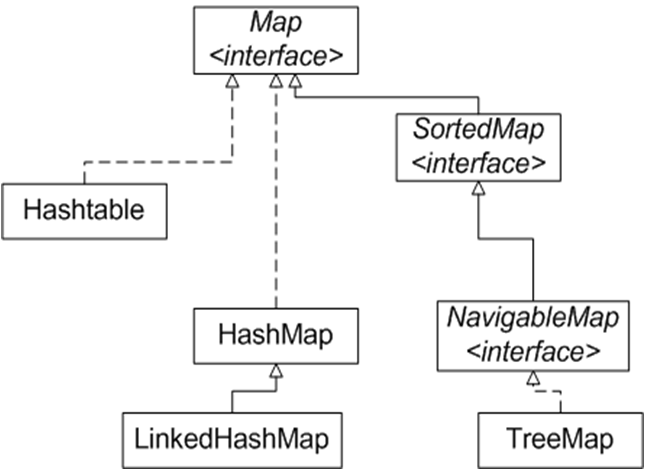
Map is extended by SortedMap and NavigableMap (their methods are covered in TreeMap, SortedMap and NavigableMap) and, since Java 21, by SequencedMap. The whole collection diagram and the reason why Map does not extend Collection are in Collection hierarchy in Java.
Basic Map methods: put, get, remove
The basic Map methods are: put() adds or replaces a pair, get() returns the value for a key, remove() deletes a pair, containsKey() and containsValue() check presence, and size() and isEmpty() report the size. When the key already exists, put() overwrites the value and returns the old one.
| Method | What it does | Edge case |
|---|---|---|
V put(K key, V value) | Adds a pair; if the key is already there, replaces its value | Returns the old value, or null if the key was absent |
V get(Object key) | Returns the value for the key | Missing key — null; the same null comes back for a key mapped to null |
boolean containsKey(Object key) | Checks whether the key is present | The only reliable way to tell “no key” from “value is null” |
boolean containsValue(Object value) | Checks whether the value is present | Scans every pair — O(n) even in a HashMap |
V remove(Object key) | Removes the pair for the key | Returns the removed value or null; no exception |
V replace(K key, V value) | Replaces the value only if the key already exists (Java 8) | Missing key — adds nothing and returns null |
void putAll(Map<? extends K, ? extends V> m) | Copies all pairs from m | Matching keys are overwritten with the values from m |
int size(), boolean isEmpty() | Number of pairs / whether the map is empty | Counts pairs, not keys and values separately |
void clear() | Removes all pairs | On a Map.of() map — UnsupportedOperationException |
All of these methods in one program:
import java.util.HashMap;
import java.util.Map;

public class MapMethodsExample {
    public static void main(String[] args) {
        Map<String, Integer> salaries = new HashMap<>();

        System.out.println(salaries.isEmpty());
        System.out.println(salaries.put("Smith", 1300));
        salaries.put("Johnson", 1200);
        salaries.put("Williams", 3400);
        System.out.println(salaries.put("Smith", 1500));

        System.out.println(salaries.get("Johnson"));
        System.out.println(salaries.get("Miller"));
        System.out.println(salaries.containsKey("Williams"));
        System.out.println(salaries.containsValue(1200));
        System.out.println(salaries.containsValue(1200L));
        System.out.println(salaries.replace("Miller", 900));

        System.out.println(salaries.remove("Johnson"));
        System.out.println("Size: " + salaries.size());
        System.out.println(salaries);
    }
}
Output:
true
null
1300
1200
null
true
true
false
null
1200
Size: 2
{Williams=3400, Smith=1500}
The first put("Smith", ...) returned null because the key did not exist yet; the second returned the old salary 1300 and replaced it with 1500. replace() added nothing for the missing Miller. The tricky line is containsValue(1200L): the literal 1200L is boxed into a Long, and a Long is never equals() to an Integer, so the answer is false. The compiler does not catch this, because the parameter type is Object.
Map.Entry, keySet(), values() and entrySet() in Java
Map.Entry<K, V> is a nested interface that represents one pair of a map, with the methods getKey(), getValue() and setValue(). The entrySet() method returns a set of these pairs, keySet() returns a set of keys, and values() returns a collection of values. All three are views of the map itself, not copies.
| Method | Returns | What you can do | Quirk |
|---|---|---|---|
Set<K> keySet() | A set of keys | Iterate, remove (remove, removeIf, retainAll) | add() — UnsupportedOperationException: there is no value for a new key |
Collection<V> values() | A collection of values | Iterate, remove pairs by value | Type is Collection, not Set: values can repeat |
Set<Map.Entry<K, V>> entrySet() | A set of pairs | Iterate, remove, change a value with entry.setValue() | The fastest way to walk keys and values together |
import java.util.HashMap;
import java.util.Map;

public class EntrySetExample {
    public static void main(String[] args) {
        Map<String, Integer> salaries = new HashMap<>();
        salaries.put("Smith", 1300);
        salaries.put("Johnson", 1200);
        salaries.put("Williams", 3400);

        System.out.println("Keys: " + salaries.keySet());
        System.out.println("Values: " + salaries.values());

        for (Map.Entry<String, Integer> entry : salaries.entrySet()) {
            System.out.println(entry.getKey() + ": " + entry.getValue());
            entry.setValue(entry.getValue() + 100);   // changes the map itself
        }
        System.out.println(salaries);

        salaries.keySet().remove("Johnson");           // removes the pair from the map
        System.out.println(salaries);
    }
}
Output:
Keys: [Johnson, Williams, Smith]
Values: [1200, 3400, 1300]
Johnson: 1200
Williams: 3400
Smith: 1300
{Johnson=1300, Williams=3500, Smith=1400}
{Williams=3500, Smith=1400}
Changes made through a view go straight into the map, and the other way round: after keySet().remove("Johnson") the Johnson pair is gone from salaries as well. To create a standalone pair without a map, use Map.entry("Smith", 1300) (Java 9, immutable) or new AbstractMap.SimpleEntry<>("Smith", 1300) (mutable).
How to iterate over a Map
There are three ways to iterate over a Map in Java: a for-each loop over entrySet() when you need both key and value; a loop over keySet() or values() when you need only one of them; and the Java 8 method forEach((k, v) -> ...). To remove pairs while iterating, use removeIf() or an iterator, not map.remove().
Map<String, Integer> salaries = new HashMap<>();
salaries.put("Smith", 1300);
salaries.put("Johnson", 1200);
salaries.put("Williams", 3400);

salaries.forEach((name, salary) -> System.out.println(name + " = " + salary));

salaries.entrySet().removeIf(e -> e.getValue() < 1250);
System.out.println(salaries);
Output:
Johnson = 1200
Williams = 3400
Smith = 1300
{Williams=3400, Smith=1300}
Looping over keySet() and calling get(key) inside works, but looks every key up a second time — entrySet() and forEach() hand you the pair directly. If you call salaries.remove(key) inside a for-each loop, the next step of the iterator usually throws ConcurrentModificationException. Why that happens is explained in the Iterator lesson; the safe options are entrySet().removeIf(), keySet().removeIf(), values().removeIf() or iterator.remove().
Java 8 Map methods: merge, compute, getOrDefault
Java 8 added default methods to the Map interface that replace the usual “check the key – read – write” sequence with a single call: getOrDefault(), putIfAbsent(), computeIfAbsent(), computeIfPresent(), compute(), merge(), replaceAll() and forEach(). If the function passed to compute* or merge returns null, the pair is removed.
| Method | What it does | Non-obvious behaviour |
|---|---|---|
getOrDefault(key, defaultValue) | The value for the key, or defaultValue if the key is absent | For a key mapped to null it returns null, not defaultValue |
putIfAbsent(key, value) | Adds the pair only if the key is absent | Returns the current value; a key mapped to null counts as absent |
computeIfAbsent(key, k -> value) | If the key is absent, computes a value, stores it and returns it | The function runs only when the key is absent — handy for new ArrayList<>() |
computeIfPresent(key, (k, v) -> newV) | If the key is present, recomputes its value | The function returns null — the pair is removed |
compute(key, (k, v) -> newV) | Recomputes the value in any case; v == null if the key is absent | You must handle v == null yourself, otherwise NullPointerException |
merge(key, value, (old, v) -> newV) | Key absent — stores value; present — combines the old and the new value | value == null — NullPointerException; the function returns null — the pair is removed |
replace(key, value), replace(key, oldValue, newValue) | Replaces the value of an existing key; the second form only if the old value matches | Never adds new keys |
replaceAll((k, v) -> newV) | Recomputes every value | Keys stay the same |
remove(key, value) | Removes the pair only if the key is mapped to exactly this value | Returns boolean, not the value |
forEach((k, v) -> ...) | Runs an action for every pair | Structural changes to the map inside — ConcurrentModificationException |
How these methods behave on one map:
import java.util.HashMap;
import java.util.Map;

public class Java8MapMethods {
    public static void main(String[] args) {
        Map<String, Integer> stock = new HashMap<>();
        stock.put("apple", 5);

        System.out.println(stock.getOrDefault("pear", 0));
        System.out.println(stock.putIfAbsent("apple", 10));
        System.out.println(stock.putIfAbsent("pear", 3));
        System.out.println(stock.computeIfPresent("apple", (k, v) -> v - 5));
        System.out.println(stock.compute("kiwi", (k, v) -> v == null ? 1 : v + 1));
        System.out.println(stock.merge("pear", 2, Integer::sum));
        System.out.println(stock.computeIfPresent("apple", (k, v) -> v == 0 ? null : v));
        System.out.println(stock);
    }
}
Output:
0
5
null
0
1
5
null
{kiwi=1, pear=5}
putIfAbsent("apple", 10) returned the current 5 and changed nothing. merge("pear", 2, Integer::sum) added 3 and 2. The last computeIfPresent returned null, so the apple pair disappeared from the map — a convenient way to drop counters that reach zero.
getOrDefault does not protect you from null values
The method returns defaultValue only when the key is missing entirely. After phones.put("Anna", null), the call phones.getOrDefault("Anna", "no number") returns null, while phones.getOrDefault("Oliver", "no number") returns “no number”. If null values are possible, write Objects.requireNonNullElse(map.get(key), defaultValue) (Java 9) — or simply do not store null in a map.
Counting word frequency with merge()
Here is the fixed counter from the start of the lesson. merge() stores 1 for a new word and adds 1 to an existing count — no get(), no checks, no NullPointerException:
Map<String, Integer> counts = new HashMap<>();
for (String w : "to be or not to be".split(" ")) {
    counts.merge(w, 1, Integer::sum);
}
System.out.println(counts);
Output:
{not=1, be=2, or=1, to=2}Grouping values with computeIfAbsent()
When a map value is a list, computeIfAbsent() creates the list on the first access to a key and returns it right away, so you can add an element in the same line:
Map<Integer, List<String>> byLength = new HashMap<>();
for (String name : List.of("Amy", "Brian", "Eve", "Mark", "Lisa")) {
    byLength.computeIfAbsent(name.length(), k -> new ArrayList<>()).add(name);
}
System.out.println(byLength);
Output:
{3=[Amy, Eve], 4=[Mark, Lisa], 5=[Brian]}With putIfAbsent(key, new ArrayList<>()) the code would be longer: the method returns null for a new key, and a new list is created on every call, even when the key already exists and the list is thrown away.
Map.of, Map.ofEntries and Map.copyOf
Since Java 9 a small immutable map is created with the factory method Map.of(k1, v1, k2, v2, ...), which takes up to 10 pairs; for more pairs there is Map.ofEntries(Map.entry(k, v), ...). Map.copyOf(map) (Java 10) makes an immutable copy. These maps reject null, duplicate keys and any modification.
import java.util.HashMap;
import java.util.Map;

public class MapOfExample {
    public static void main(String[] args) {
        Map<String, Integer> codes = Map.of("US", 1, "CA", 1, "GB", 44);
        System.out.println(codes.get("GB"));

        try {
            codes.put("FR", 33);
        } catch (UnsupportedOperationException e) {
            System.out.println("put: " + e);
        }

        try {
            Map.of("US", 1, "US", 2);
        } catch (IllegalArgumentException e) {
            System.out.println("Map.of: " + e.getMessage());
        }

        Map<String, Integer> editable = new HashMap<>(codes);
        editable.put("FR", 33);
        System.out.println(editable.size());
    }
}
Output:
44
put: java.lang.UnsupportedOperationException
Map.of: duplicate key: US
4
Map.of("a", null) and codes.get(null) throw NullPointerException. The iteration order of a Map.of() map is unspecified and may change from one run to the next, so do not compare its toString() in tests. A mutable map with initial data is a wrapper: new HashMap<>(Map.of(...)). All the ways to get an unmodifiable collection are compared in Immutable collections.
How Map changed across Java versions
The Map interface appeared in Java 1.2 together with the Collections Framework. The biggest update came in Java 8 (default methods merge, compute*, getOrDefault), followed by the factories Map.of (Java 9) and Map.copyOf (Java 10). Java 11 changed nothing in Map, Java 17 added only Map.Entry.copyOf(), and the next big change is SequencedMap in Java 21.
| Version | What changed |
|---|---|
| Java 1.2 | Map, Map.Entry, SortedMap, the classes HashMap, TreeMap, WeakHashMap; Hashtable retrofitted to implement Map |
| Java 1.4 | LinkedHashMap, IdentityHashMap |
| Java 5 | Generic Map<K, V>; ConcurrentHashMap, EnumMap |
| Java 6 | NavigableMap — see TreeMap and NavigableMap |
| Java 8 | Default methods getOrDefault, putIfAbsent, compute, computeIfAbsent, computeIfPresent, merge, replace, replaceAll, remove(key, value), forEach; Map.Entry.comparingByKey() and comparingByValue() |
| Java 9 | Map.of(), Map.ofEntries(), Map.entry() |
| Java 10 | Map.copyOf() |
| Java 17 | Map.Entry.copyOf(entry) — an immutable snapshot of a pair, not linked to the map |
| Java 19 | HashMap.newHashMap(n), LinkedHashMap.newLinkedHashMap(n) — a map sized for n pairs without resizing |
| Java 21 | SequencedMap: firstEntry(), lastEntry(), pollFirstEntry(), reversed() for LinkedHashMap and TreeMap; putFirst()/putLast() work only in LinkedHashMap (in TreeMap — UnsupportedOperationException) — see LinkedHashMap in Java |
The full description of every method is in the official Java Map API documentation: Map interface Javadoc (Java 21).
Map implementations: which one to choose
The default choice is HashMap: the fastest get() and put(), with no guaranteed key order. Use LinkedHashMap when insertion order matters, TreeMap when keys must be sorted, and ConcurrentHashMap when several threads access the map.
| Class | Key order | null key / null values | Thread safety | get()/put() | More |
|---|---|---|---|---|---|
HashMap | Not guaranteed | One null key / yes | No | O(1) on average | How HashMap works |
LinkedHashMap | Insertion order (or access order) | Same as HashMap | No | O(1) on average | LinkedHashMap and LRU cache |
TreeMap | Sorted by key | null key — NullPointerException / yes | No | O(log n) | TreeMap and NavigableMap |
ConcurrentHashMap | Not guaranteed | No / no — NullPointerException | Yes, without a global lock | O(1) on average | Thread-safe collections |
Hashtable | Not guaranteed | No / no — NullPointerException | Yes, every method is synchronized | O(1) on average | A legacy class from Java 1.0; not used in new code |
EnumMap | Declaration order of the enum constants | No / yes | No | O(1), an array inside | Keys are constants of a single enum |
IdentityHashMap | Not guaranteed | Yes / yes | No | O(1) on average | Keys are compared with ==, not equals() |
WeakHashMap | Not guaranteed | Yes / yes | No | O(1) on average | A pair disappears once no ordinary references to its key remain |
IdentityHashMap is the only standard implementation that deliberately breaks the general Map contract: two keys new String("id") are different for it, so after two put() calls its size() is 2, while a HashMap with the same keys has size 1. It is used in framework-level code where object identity matters: deep copying of an object graph, serialization, tracking already visited nodes.
By convention the variable is declared with the interface type: Map<String, Integer> map = new HashMap<>();. Switching to LinkedHashMap or TreeMap is then a one-line change. Declare the type as NavigableMap or SequencedMap only when you need their own methods. The difference between an ordered and a sorted collection is explained in Ordered vs sorted collections in Java.
What makes a good Map key
A HashMap key must override equals() and hashCode() consistently and must not change while it is in the map. That is why keys are usually immutable objects: String, Integer, an enum, a record. If you change a field that hashCode() depends on, get() with the same object returns null, although the pair is still in the map.
How exactly a modified key gets “lost” and why it is tied to buckets is shown step by step in How HashMap works internally; the equals()/hashCode() contract itself is covered in The hashCode() and equals() contract. For a TreeMap the rule is different: the key must be Comparable or be compared by the Comparator you pass in (see Comparable and Comparator). A common practical approach is to use an immutable field of the value object as the key: Map<String, Product> keyed by the product SKU instead of Map<Product, ...>.
Frequently Asked Questions
How do I sort a Map by values in Java?
A map itself cannot be sorted by values — you sort a stream of its entries and collect the result into a LinkedHashMap to keep that order: map.entrySet().stream().sorted(Map.Entry.comparingByValue()).collect(Collectors.toMap(Map.Entry::getKey, Map.Entry::getValue, (a, b) -> a, LinkedHashMap::new)). For descending order use Map.Entry.comparingByValue(Comparator.reverseOrder()). Sorting by keys is what a TreeMap does.
How do I get a key by its value in a Map?
There is no direct method: values are not unique, and one value may belong to several keys. You find the keys by scanning entrySet(): map.entrySet().stream().filter(e -> e.getValue().equals(value)).map(Map.Entry::getKey).toList(). This is O(n); if you need lookups by value often, keep a second, reverse map.
What is the difference between putIfAbsent() and computeIfAbsent()?
putIfAbsent(key, value) receives a ready value that is created on every call, and returns the previous value (null for a new key). computeIfAbsent(key, k -> ...) calls the function only when the key is absent and returns the current value — that is why it is used to group values into lists. See the example in Grouping values with computeIfAbsent().
Does HashMap keep insertion order?
No: a HashMap iterates over pairs in bucket order, and that order can change after the table grows. Insertion order is guaranteed by LinkedHashMap, sorted keys by TreeMap. How they differ inside is covered in LinkedHashMap in Java.
How do I create and initialize a Map in one line?
Map.of("US", 1, "GB", 44) creates a read-only map (Java 9, up to 10 pairs). If you need to modify it later, wrap it: new HashMap<>(Map.of("US", 1, "GB", 44)). Avoid the “double brace” idiom new HashMap<>() {{ put(...); }}: it creates an anonymous subclass that keeps a reference to the enclosing object. Details and edge cases are in Map.of, Map.ofEntries and Map.copyOf.
Comments