
Legacy Classes in Java: Vector, Stack, Hashtable and Enumeration
Store a port number as an integer — props.put("port", 8080) — and props.getProperty("port") returns null, even though props.get("port") happily shows 8080. The reason is history: Properties dates back to Java 1.0 and extends Hashtable<Object, Object>, so it accepts any object, while getProperty() only sees strings. Legacy classes in Java are full of surprises like this one.
Legacy classes in Java are the classes and the interface of the java.util package that appeared in Java 1.0, before the Collections Framework (Java 1.2): Vector, Stack, Dictionary, Hashtable, Properties and the Enumeration interface. Java 1.2 retrofitted them into the new collection hierarchy, and Java 5 made most of them generic. None of them is marked @Deprecated, but new code uses ArrayList, ArrayDeque, HashMap and ConcurrentHashMap instead.
What is a legacy class in Java
A legacy class in Java is one of six types from Java 1.0 that stored objects before the Collections Framework existed: the dynamic array Vector, the stack Stack, the abstract dictionary Dictionary, the hash table Hashtable, the string settings store Properties and the iteration interface Enumeration. They were kept for backward compatibility, so that old code still compiles and runs on new Java versions.
These classes had no common foundation: each used its own method names (addElement(), elementAt(), keys()), and iteration went through Enumeration. Every method of Vector and Hashtable is synchronized, so single-threaded code pays for locks it does not need. Their modern counterparts are covered in Java Collections Framework.
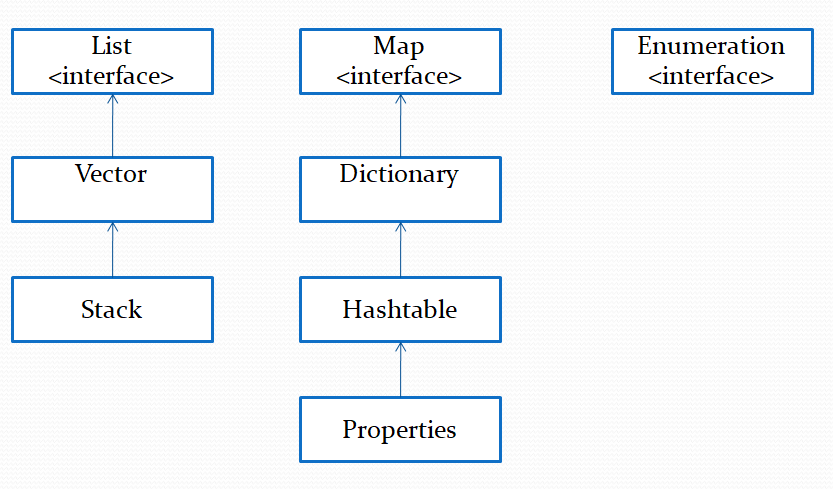
| Class / interface | What it is | Place in the hierarchy since Java 1.2 | Modern replacement |
|---|---|---|---|
Vector<E> | Synchronized dynamic array | Extends AbstractList, implements List | ArrayList |
Stack<E> | LIFO stack | Subclass of Vector | ArrayDeque through the Deque interface |
Dictionary<K, V> | Abstract class for key-value pairs | Outside the Collections Framework | The Map interface |
Hashtable<K, V> | Synchronized hash table, null not allowed | Subclass of Dictionary, implements Map | HashMap; in multithreaded code — ConcurrentHashMap |
Properties | “String → string” settings, reading and writing .properties files | Subclass of Hashtable<Object, Object> | No replacement — still in use |
Enumeration<E> | Interface for sequential iteration | Outside the Collections Framework | Iterator |
You still run into these classes today: in code written before the 2000s, in APIs that return Enumeration (ClassLoader.getResources(), NetworkInterface.getNetworkInterfaces()), in System.getProperties() and in DriverManager.getConnection(url, properties) from JDBC.
Legacy classes vs utility classes
A utility class is a class with only static methods that you never instantiate: Collections, Arrays, Objects, Math. “Legacy” describes the age of a class, “utility” describes its design. Collections arrived in Java 1.2 together with the new framework and is not considered legacy; its methods are covered in Collections Class in Java.
The Vector class
Vector is a dynamic array from Java 1.0, similar to ArrayList with two differences: all of its methods are synchronized, and besides the List methods it keeps old ones such as addElement() and elementAt(). The default capacity is 10 elements; when the array fills up, it doubles.
In Java 1.2 Vector was reworked into a subclass of AbstractList that implements the List interface, and in Java 5 it became generic. Through List it also implements Iterable, so you can loop over it with for-each:
public class Vector<E> extends AbstractList<E>
        implements List<E>, RandomAccess, Cloneable, Serializable
The old methods work side by side with the List methods. Two of them take their arguments in reverse order — an easy mistake when porting code:
| Vector method | List counterpart | Gotcha |
|---|---|---|
addElement(E obj) | add(E e) | Returns void, not boolean |
elementAt(int index) | get(int index) | Invalid index — ArrayIndexOutOfBoundsException |
setElementAt(E obj, int index) | set(int index, E e) | Element first, then index; returns nothing |
insertElementAt(E obj, int index) | add(int index, E e) | Element first, then index |
removeElement(Object obj), removeElementAt(int index) | remove(Object o), remove(int index) | Distinct names avoid the remove(1) confusion of a List<Integer> |
firstElement(), lastElement() | getFirst(), getLast() (Java 21) | Empty vector — NoSuchElementException |
elements() | iterator() | Returns an Enumeration that is not fail-fast (see Enumeration) |
capacity() | None | Current length of the internal array |
How the capacity grows and how the old methods behave:
import java.util.Vector;

public class VectorExample {
    public static void main(String[] args) {
        Vector<Integer> v = new Vector<>();
        System.out.println(v.capacity());
        for (int i = 0; i < 11; i++) {
            v.add(i);
        }
        System.out.println(v.capacity());   // the 11th element doubled the array

        Vector<Integer> step = new Vector<>(3, 2);  // capacity 3, growth step 2
        for (int i = 0; i < 4; i++) {
            step.addElement(i);
        }
        System.out.println(step.capacity());
        step.setElementAt(99, 0);           // element first, then index
        System.out.println(step);
        System.out.println(step.elementAt(3) + " " + step.lastElement());
    }
}
Output:
10
20
5
[99, 1, 2, 3]
3 3
The Vector(initialCapacity, capacityIncrement) constructor sets a fixed growth step: instead of doubling, the array grew from 3 to 5. ArrayList has no such parameter and grows by a factor of 1.5.
Synchronized does not mean thread-safe
Each Vector method is synchronized on its own, but a combination of calls is not. The code if (!v.contains(x)) v.add(x); running in two threads can add x twice: another thread can slip in between contains() and add(). Iterating over a vector also has to be wrapped manually in synchronized (v) { ... }. That is why the built-in synchronization of Vector and Hashtable rarely saves multithreaded code — use the classes from java.util.concurrent instead (overview of thread-safe collections).
The Stack class
Stack is a subclass of Vector that implements a LIFO stack (“last in, first out”) with five methods: push(), pop(), peek(), empty() and search(). It has a single no-argument constructor that creates an empty stack. Since Java 5 the class is generic: public class Stack<E> extends Vector<E>.
The Java documentation recommends the Deque interface and the ArrayDeque class instead of Stack. Methods with the same names behave differently there on an empty stack, and search() has no counterpart at all:
| Stack method | What it does | Empty stack | Deque counterpart |
|---|---|---|---|
E push(E item) | Puts an element on top and returns it | — | push(e), returns void; null in ArrayDeque — NullPointerException |
E pop() | Removes and returns the top element | EmptyStackException | pop() — NoSuchElementException |
E peek() | Returns the top element without removing it | EmptyStackException | peek() — returns null, no exception |
boolean empty() | Checks whether the stack is empty | true | isEmpty() |
int search(Object o) | Position of the element, counting from 1 at the top | -1 | None |
What does this code print?
import java.util.Stack;

public class StackExample {
    public static void main(String[] args) {
        Stack<String> stack = new Stack<>();
        stack.push("A");
        stack.push("B");
        stack.push("C");

        System.out.println(stack.peek());
        System.out.println(stack.search("C"));
        System.out.println(stack.search("A"));
        System.out.println(stack.search("Z"));
        System.out.println(stack.pop());
        System.out.println(stack.get(0));   // Vector method: access to the bottom of the stack

        stack.clear();
        stack.pop();
    }
}
Output:
C
1
3
-1
C
A
Exception in thread "main" java.util.EmptyStackException
search() counts positions not from 0, like Vector indexes, but from 1 and from the top: the last pushed "C" is at position 1, the bottom "A" at 3. The inherited get(0) reaches the bottom of the stack and breaks the LIFO principle. This is the main design complaint about Stack; how it compares with ArrayDeque and LinkedList is covered in the ArrayDeque lesson.
The Dictionary class
Dictionary<K, V> is an abstract class from Java 1.0 for storing key-value pairs: a value is stored under a key and retrieved by the same key, as in the Map interface. Its Javadoc explicitly calls the class obsolete: new implementations should implement Map rather than extend Dictionary.
Dictionary has only abstract methods: put(K, V), get(Object), remove(Object), size(), isEmpty(), plus keys() and elements(), which return an Enumeration of keys and values. It is a class, not an interface, so a subclass cannot extend anything else — one of the reasons the Map interface appeared in Java 1.2. The class carries no @Deprecated annotation, and the compiler gives no warnings. Since Java 5 it is generic:
public abstract class Dictionary<K, V>In practice Dictionary only shows up as the parent of Hashtable: modern code never declares variables of this type.
The Hashtable class
Hashtable<K, V> is a concrete implementation of Dictionary that stores key-value pairs in a hash table. In Java 1.2 the class was adapted to the Map interface, so it works like HashMap with two differences: all methods are synchronized, and neither a key nor a value can be null — an attempt throws NullPointerException.
public class Hashtable<K, V> extends Dictionary<K, V>
        implements Map<K, V>, Cloneable, Serializable
Let us compare it with HashMap on the same data:
import java.util.HashMap;
import java.util.Hashtable;
import java.util.Map;

public class HashtableExample {
    public static void main(String[] args) {
        Hashtable<String, Integer> table = new Hashtable<>();
        table.put("Java", 1995);

        System.out.println(table.contains(1995));     // searches VALUES
        System.out.println(table.containsKey(1995));

        try {
            table.put("Kotlin", null);
        } catch (NullPointerException e) {
            System.out.println("Hashtable: null value - NullPointerException");
        }
        try {
            table.put(null, 2011);
        } catch (NullPointerException e) {
            System.out.println("Hashtable: null key - NullPointerException");
        }

        Map<String, Integer> map = new HashMap<>();
        map.put(null, 2011);
        map.put("Kotlin", null);
        System.out.println(map);
    }
}
Output:
true
false
Hashtable: null value - NullPointerException
Hashtable: null key - NullPointerException
{null=2011, Kotlin=null}
The old contains(value) method is the same as containsValue(value), although its name suggests a key lookup. The old way to iterate over keys and values is keys() and elements(), which return an Enumeration. In single-threaded code Hashtable is replaced with HashMap, in multithreaded code with ConcurrentHashMap. The internals of HashMap and how it differs from TreeMap and Hashtable are explained in How HashMap works internally.
The Properties class
Properties is a subclass of Hashtable for storing settings where both the key and the value are strings. It reads and writes .properties files, can return a default value and can look up missing keys in a separate set of defaults. It is the only legacy class that is still routinely used in new code.
The class declaration explains the example at the start of this lesson:
public class Properties extends Hashtable<Object, Object>Properties did not become generic in Java 5: it extends Hashtable<Object, Object>, so the inherited put() and putAll() accept any object. The methods of Properties itself expect strings only: getProperty() returns null for a value that is not a String, and store() throws ClassCastException on such a value. Write settings only through setProperty(String, String). Since Java 9 the data is stored internally in a ConcurrentHashMap, but the inheritance from Hashtable is kept for compatibility.
| Method | What it does | Edge case |
|---|---|---|
String getProperty(String key) | Value for the key; if absent, looks it up in the defaults | Not found anywhere or not a String — null |
String getProperty(String key, String defaultValue) | The same, but returns defaultValue instead of null | The default value is not stored in the Properties object |
Object setProperty(String key, String value) | Stores a string pair, returns the previous value | null key or value — NullPointerException |
void load(Reader reader), void load(InputStream in) | Reads pairs from text in the .properties format | load(InputStream) reads ISO-8859-1: characters outside Latin-1 without \uXXXX escapes get corrupted |
void store(Writer writer, String comments) | Writes the pairs and a comment with the date | A non-string key or value — ClassCastException |
Set<String> stringPropertyNames() | All string keys, including keys from the defaults (Java 6) | Skips pairs with non-string keys or values |
Enumeration<?> propertyNames() | The old way to iterate over keys, including the defaults | A non-string key — ClassCastException |
The typical usage is default settings plus a loaded file. To make the example runnable without a file, the text is read from a StringReader:
import java.io.IOException;
import java.io.StringReader;
import java.util.Properties;

public class PropertiesExample {
    public static void main(String[] args) throws IOException {
        Properties defaults = new Properties();
        defaults.setProperty("port", "80");

        Properties config = new Properties(defaults);
        config.load(new StringReader("""
                host=localhost
                port=8080
                # comment
                user = Anna
                """));

        System.out.println(config.getProperty("port"));
        System.out.println(config.getProperty("user"));
        config.remove("port");
        System.out.println(config.getProperty("port"));          // taken from defaults
        System.out.println(config.getProperty("timeout", "30"));
        System.out.println(config.size());                      // defaults are not counted

        Properties props = new Properties();
        props.put("port", 8080);                                 // Integer, not String
        System.out.println(props.get("port") + " / " + props.getProperty("port"));
    }
}
Output:
8080
Anna
80
30
2
8080 / null
A line starting with # is a comment, and spaces around = are dropped. Defaults are not copied into the object: after remove("port") the value comes from defaults, and size() counts only the object’s own pairs host and user. The """ text block compiles starting with Java 15; on older versions, join the lines with \n.
Non-Latin characters in a .properties file
props.load(new FileInputStream("app.properties")) reads the file as ISO-8859-1, so a line like city=München saved in UTF-8 turns into garbage (München), and Cyrillic, Greek or Chinese text is corrupted the same way. Read the file through a UTF-8 Reader instead: try (Reader r = Files.newBufferedReader(Path.of("app.properties"))) { props.load(r); } — Files.newBufferedReader() uses UTF-8 by default.
The Enumeration interface
Enumeration<E> is a Java 1.0 interface for iterating over elements one at a time: hasMoreElements() checks whether elements remain, and nextElement() returns the next one. It was superseded by Iterator, but Vector, Hashtable, Properties and a number of other APIs still return Enumeration, which is why Java 5 made it generic.
public interface Enumeration<E>| Method | What it does | Edge case |
|---|---|---|
boolean hasMoreElements() | Whether more elements remain | Can be called any number of times in a row |
E nextElement() | Returns the next element | No elements left — NoSuchElementException |
default Iterator<E> asIterator() | Turns an Enumeration into an Iterator (Java 9) | remove() on that iterator — UnsupportedOperationException |
Enumeration cannot remove elements, and the enumerations returned by Vector.elements() and Hashtable.keys()/elements() are not fail-fast: they do not notice changes to the collection. What does this code print?
import java.util.Collections;
import java.util.Enumeration;
import java.util.List;
import java.util.Vector;

public class EnumerationExample {
    public static void main(String[] args) {
        Vector<String> v = new Vector<>(List.of("A", "B", "C"));

        Enumeration<String> en = v.elements();
        while (en.hasMoreElements()) {
            String s = en.nextElement();
            if (s.equals("A")) {
                v.remove(s);
            }
            System.out.print(s + " ");
        }
        System.out.println();
        System.out.println(v);

        // Bridging the old and new APIs
        List<String> copy = Collections.list(v.elements());   // Enumeration -> ArrayList
        Enumeration<String> back = Collections.enumeration(copy); // Collection -> Enumeration
        back.asIterator().forEachRemaining(System.out::print);  // Java 9
    }
}
Output:
A C
[B, C]
BC
Element "B" is skipped without any error: after "A" was removed, "B" shifted to position 0, while the enumeration had already moved on to position 1. An iterator over the same vector would throw ConcurrentModificationException here (the mechanism is explained in the Iterator lesson). A silent skip is more dangerous than an exception: you notice the bug only from wrong data.
| Feature | Enumeration | Iterator |
|---|---|---|
| Introduced in | Java 1.0 | Java 1.2 |
| Traversal methods | hasMoreElements(), nextElement() | hasNext(), next() |
| Removal during traversal | No | remove() |
| Reaction to collection changes | For Vector and Hashtable — does not notice, result is undefined | Fail-fast: ConcurrentModificationException |
| Where you meet it | Legacy classes, StringTokenizer, ClassLoader.getResources(), SequenceInputStream | All collections of the Collections Framework |
Enumeration is not marked @Deprecated: the documentation only advises new implementations to prefer Iterator. If an API returns an Enumeration, convert it right away into an Iterator with asIterator() or into a list with Collections.list().
What to use instead of legacy classes
Replace Vector with ArrayList, Stack with ArrayDeque through the Deque interface, Hashtable with HashMap or ConcurrentHashMap, Dictionary with the Map interface, and Enumeration with Iterator. Keep Properties: the JDK has no direct replacement for settings files. The switch usually comes down to changing a declaration, but a few behavioral differences are worth checking in advance.
| Legacy class | Single-threaded replacement | Multithreaded replacement | What to check when migrating |
|---|---|---|---|
Vector | ArrayList | CopyOnWriteArrayList or Collections.synchronizedList() | Calls to addElement(), elementAt(), setElementAt() — set() takes its arguments in reverse order |
Stack | ArrayDeque (variable type — Deque) | ConcurrentLinkedDeque, LinkedBlockingDeque | peek() on an empty stack returns null instead of throwing; null elements are not allowed; iteration starts at the top |
Hashtable | HashMap | ConcurrentHashMap | HashMap accepts null: code that relied on NullPointerException will silently store null; contains() → containsValue() |
Dictionary | The Map interface | The ConcurrentMap interface | Your own subclasses of Dictionary are rewritten as implements Map or extends AbstractMap |
Enumeration | Iterator, for-each | — | Third-party APIs that return Enumeration are wrapped with asIterator() |
Properties | Stays Properties | Stays Properties (its methods are thread-safe) | put() → setProperty(), get() → getProperty() |
After the switch, declare the variable with the interface type: List<String> names = new ArrayList<>();, Deque<Integer> stack = new ArrayDeque<>();, Map<String, Integer> counts = new HashMap<>();. Then the implementation can be swapped in a single line if needed.
Frequently Asked Questions
Which other Java classes are considered legacy, apart from collections?
The Javadoc explicitly calls StringTokenizer a legacy class: use String.split() or Scanner instead. java.util.Date and Calendar are the legacy date API, replaced by the java.time package (Java 8). BitSet, on the other hand, also dates from Java 1.0 but is not legacy and is still in use.
Are Vector, Stack and Hashtable marked @Deprecated?
No. The compiler gives no warnings when you use them, and there are no plans to remove them from the JDK. Only the documentation says they are outdated: the Stack Javadoc recommends Deque, and the Dictionary Javadoc calls the class obsolete. That is why static analyzers (SonarQube, IntelliJ IDEA inspections), not the compiler, help you find such classes in a project.
What is the difference between Hashtable and HashMap?
A classic interview question. Hashtable appeared in Java 1.0, is synchronized and forbids null keys and values; HashMap appeared in Java 1.2, is not synchronized, allows one null key and any number of null values and is faster in a single thread. Iterators of both are fail-fast, but Hashtable also has the non-fail-fast Enumeration from keys() and elements(). A runnable comparison is in the section The Hashtable class.
Can I pass an ArrayList to a method that expects a Vector?
Not directly: ArrayList does not extend Vector, they are unrelated classes. You have to make a copy: new Vector<>(list). The reverse conversion is new ArrayList<>(vector), and if an old method expects an Enumeration, use Collections.enumeration(list). If you own the method, change the parameter type to List so that both implementations fit.
Comments