
Java Exception Hierarchy: Throwable, Error, Exception
Why does Integer.parseInt("abc") compile without any try-catch, while NumberFormat.getInstance().parse("abc") does not — the compiler reports unreported exception java.text.ParseException; must be caught or declared to be thrown? Both methods parse a string, and both fail on bad input. The only difference is where their exceptions sit in the hierarchy: NumberFormatException extends RuntimeException, while ParseException extends Exception directly.
The Java exception hierarchy is a tree of classes rooted at java.lang.Throwable, which has two direct subclasses: Error (serious JVM failures) and Exception (problems a program can handle). A subclass of Exception, RuntimeException, groups errors in program logic. The position of a class in this tree determines whether the compiler requires you to handle the exception: checked or unchecked.
Exception class hierarchy: Throwable, Error, Exception
Every exception and error in Java inherits from the Throwable class — only its objects can be thrown with throw and caught in catch. Throwable splits into two branches, Error and Exception, and inside Exception there is a separate RuntimeException branch. These three branches are the types of exceptions in Java you meet in practice.
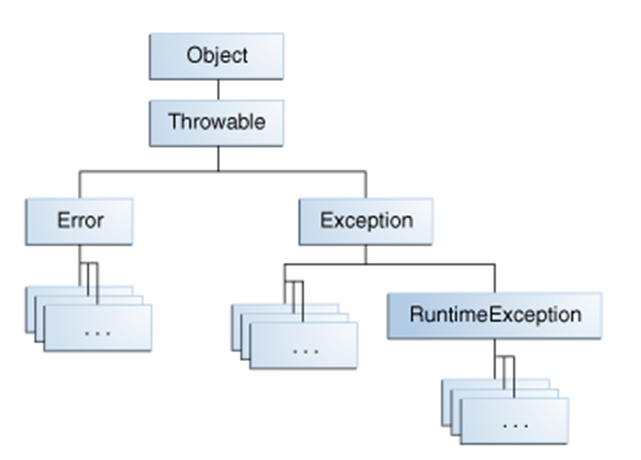
The same Java exception tree in text form, with the most common classes:
java.lang.Object
└── java.lang.Throwable
    ├── java.lang.Error                          unchecked
    │   └── VirtualMachineError
    │       ├── OutOfMemoryError
    │       └── StackOverflowError
    └── java.lang.Exception                      checked
        ├── java.io.IOException
        │   └── java.io.FileNotFoundException
        ├── java.text.ParseException
        ├── java.sql.SQLException
        ├── InterruptedException
        ├── ClassNotFoundException
        └── java.lang.RuntimeException           unchecked
            ├── ArithmeticException
            ├── NullPointerException
            ├── ClassCastException
            ├── IllegalStateException
            ├── IllegalArgumentException
            │   └── NumberFormatException
            └── IndexOutOfBoundsException
                └── ArrayIndexOutOfBoundsException
Errors are JVM-level failures: the heap is exhausted (OutOfMemoryError), the call stack overflows (StackOverflowError), a class cannot be found while loading (NoClassDefFoundError). Handling errors of this kind in your own program is not recommended, because your code usually cannot fix their cause: no catch block can give the JVM more memory.
Exceptions are problems that are predictable and can, in principle, be dealt with by the program: a file is missing, a string is not a number, the network is down. They are caught and handled.
RuntimeException is an important subclass of Exception. Its subclasses signal bugs in program logic: integer division by zero, an array index out of bounds, a method call on null. Such exceptions are better prevented with checks in the code than caught.
Checked vs unchecked exceptions in Java
Checked exceptions are Exception and all its subclasses except the RuntimeException branch; the compiler requires you to catch them or declare them in throws. Unchecked exceptions are RuntimeException, Error and their subclasses; the compiler does not check whether they are handled.
| Criterion | Checked | Unchecked |
|---|---|---|
| Which classes | Exception and its subclasses, except RuntimeException | RuntimeException, Error and their subclasses |
| Checked by the compiler | Yes: without catch or throws you get the compile-time error unreported exception | No: the code compiles without any handling |
| Typical cause | External conditions: a file, the network, a database, the format of input data | A programmer mistake or a JVM failure |
| What to do with them | Handle them or explicitly pass them to the caller | Fix the code (check for null, array bounds); Error is usually not caught |
| Examples | IOException, FileNotFoundException, ParseException, SQLException, InterruptedException | NullPointerException, ArithmeticException, NumberFormatException, OutOfMemoryError |
How to handle an exception and in which order to write several catch blocks is explained in the lesson Java Try Catch Finally. Declaring an exception in a method signature with throws and the rules for checked exceptions when overriding methods are covered in separate lessons of this module.
A compiler-only rule
The checked/unchecked split exists only for the javac compiler. At runtime the JVM treats both kinds the same way: an unhandled exception of any type propagates up the call stack and terminates the thread, printing the stack trace.
Example 1. Checked ParseException declared in main
The NumberFormat.parse() method declares throws ParseException, so the calling code must either catch it or pass it on. Here the exception is passed on from main:
import java.text.NumberFormat;
import java.text.ParseException;
import java.util.Locale;

public class ParseExceptionExample {
    public static void main(String[] args) throws ParseException {
        NumberFormat nf = NumberFormat.getInstance(Locale.US);
        System.out.println(nf.parse("1234.567"));
        nf.setParseIntegerOnly(true);
        System.out.println(nf.parse("1234.567"));
    }
}
1234.567
1234The locale is set explicitly because without it the result depends on system settings. In German, French or Russian locales the decimal separator is a comma, while in the US locale the comma separates groups of digits: there the string "1234,567" becomes 1234567.
Example 2. Checked ParseException with handling
import java.text.NumberFormat;
import java.text.ParseException;

public class ExceptionExample4 {
    public static void main(String[] args) {
        try {
            parseNumber("sss");
        } catch (ParseException e) {
            System.out.println(e.getMessage());
        }
        System.out.println("End of program.");
    }

    public static void parseNumber(String str) throws ParseException {
        NumberFormat nf = NumberFormat.getInstance();
        System.out.println(nf.parse(str));
    }
}
Unparseable number: "sss"
End of program.If you remove the throws ParseException declaration from parseNumber(), the program does not compile: error: unreported exception ParseException; must be caught or declared to be thrown.
Common Java exceptions
In practice, the exceptions you see most often are unchecked ones from the RuntimeException branch: NullPointerException, ArrayIndexOutOfBoundsException, ClassCastException, NumberFormatException, ArithmeticException. Among checked ones, it is IOException and its subclasses. The table shows what causes each of them and which message the JVM prints.
| Exception | Kind | When it occurs | Message (example) |
|---|---|---|---|
NullPointerException | unchecked | A method call or field access through null | Cannot invoke "String.length()" because ... is null |
ArrayIndexOutOfBoundsException | unchecked | An array index is negative or not less than the length | Index 4 out of bounds for length 3 |
ArithmeticException | unchecked | Integer division by zero (see the lesson Java Exceptions) | / by zero |
ClassCastException | unchecked | Casting an object to an incompatible type | class [I cannot be cast to class java.lang.String |
NumberFormatException | unchecked | Integer.parseInt() receives a string that is not a number | For input string: "abc" |
IllegalArgumentException | unchecked | A method receives an invalid argument | Set by the author of the method |
IOException, FileNotFoundException | checked | An input/output failure, a file is not found | data.txt (No such file or directory) |
StackOverflowError | unchecked (Error) | Too deep or infinite recursion | Usually no message |
OutOfMemoryError | unchecked (Error) | Not enough heap memory | Java heap space |
Example 3. Unchecked ArrayIndexOutOfBoundsException
public class ExceptionExample2 {
    public static void main(String[] args) {
        int[] array = new int[3];
        System.out.println(array[4]);
    }
}
Exception in thread "main" java.lang.ArrayIndexOutOfBoundsException: Index 4 out of bounds for length 3
at ExceptionExample2.main(ExceptionExample2.java:4)Example 4. Unchecked StackOverflowError
public class StackOverflowErrorExample {
    public static void main(String[] args) {
        System.out.println("1");
        main(args);
    }
}
1
1
...
Exception in thread "main" java.lang.StackOverflowErrorThe main method calls itself with no exit condition. Every call takes space on the stack, and after several thousand calls the stack overflows.
Example 5. Unchecked ClassCastException
public class ClassCastExceptionExample {
    public static void main(String[] args) {
        method(new int[0]);
    }

    private static void method(Object arg) {
        String x = (String) arg;
    }
}
Exception in thread "main" java.lang.ClassCastException: class [I cannot be cast to class java.lang.String ([I and java.lang.String are in module java.base of loader 'bootstrap')[I is the internal class name of the int[] array. The compiler accepts the cast because the parameter is declared as Object, so the error is detected only at runtime.
Example 6. Unchecked NullPointerException
public class NullPointerExceptionExample {
    public static void main(String[] args) {
        String str = null;
        System.out.println(str.length());
    }
}
Exception in thread "main" java.lang.NullPointerException: Cannot invoke "String.length()" because "<local1>" is nullDetailed NPE messages (helpful NullPointerExceptions) appeared in Java 14 and are enabled by default since Java 15. The variable name str is printed instead of <local1> if the class was compiled with the -g option. In Java 8 the message was empty: just java.lang.NullPointerException.
What does this code print: catch (Exception e) and StackOverflowError
A catch (Exception e) block does not catch StackOverflowError or OutOfMemoryError, because Error and Exception are sibling branches of the hierarchy, not parent and child. Their only common ancestor is Throwable. Try to predict the output before you look at it:
public class CatchExceptionDemo {
    static void recurse() {
        recurse();
    }

    public static void main(String[] args) {
        try {
            recurse();
        } catch (Exception e) {
            System.out.println("Caught: " + e);
        }
        System.out.println("End of program");
    }
}
Exception in thread "main" java.lang.StackOverflowError
at CatchExceptionDemo.recurse(CatchExceptionDemo.java:3)
at CatchExceptionDemo.recurse(CatchExceptionDemo.java:3)
...Neither «Caught» nor «End of program» is printed: the error passes by catch (Exception e) and terminates the program. It would be caught by catch (StackOverflowError e), catch (Error e) or catch (Throwable e), but catching Throwable «just in case» is a common mistake: it also silences JVM failures after which the program cannot work correctly.
Methods of the Throwable class
The Throwable class defines the methods that every exception and error inherits: getting the message, the cause and the stack trace. Subclasses such as Exception add almost no methods of their own, so once you know these methods, you can work with any exception. The full list is in the Throwable documentation.
| Method | Returns | What it does |
|---|---|---|
getMessage() | String | The exception description; null if no message was set |
getLocalizedMessage() | String | A localized description; by default the same as getMessage() |
toString() | String | The class name and the message: java.lang.NumberFormatException: For input string: "abc". Called when the exception object is passed to println() |
getCause() | Throwable | The exception that caused the current one; null if there is no cause |
initCause(Throwable cause) | Throwable | Sets the cause if it was not passed to the constructor; a second call throws IllegalStateException |
getStackTrace() | StackTraceElement[] | The stack trace; element [0] is the method where the exception was thrown. Each StackTraceElement holds the class, method and file names and the line number |
printStackTrace() | void | Prints the stack trace to System.err |
printStackTrace(PrintStream s), printStackTrace(PrintWriter s) | void | Prints the stack trace to the given stream |
getSuppressed() | Throwable[] | Suppressed exceptions, for example those thrown while closing resources in try-with-resources (Java 7+) |
public class ThrowableMethodsDemo {
    public static void main(String[] args) {
        try {
            Integer.parseInt("abc");
        } catch (NumberFormatException e) {
            System.out.println(e.getMessage());
            System.out.println(e);
            System.out.println(e.getCause());
        }
    }
}
For input string: "abc"
java.lang.NumberFormatException: For input string: "abc"
nullHow to create your own exception class and which branch of the hierarchy to put it in, as well as how to throw an exception manually with throw, is covered in separate lessons of this module.
Frequently Asked Questions
Is the Exception class itself checked or unchecked?
Checked. The code throw new Exception("...") does not compile unless the method declares throws Exception or the exception is caught. Only the RuntimeException branch inside Exception is unchecked.
How can I quickly tell whether an exception is checked or unchecked?
Look at its ancestors: if RuntimeException or Error is among them, the exception is unchecked; otherwise it is checked. In IntelliJ IDEA, Ctrl+H shows the hierarchy of a class, and the Javadoc page of every class starts with its inheritance chain. A diagram of the main classes is in the section Exception class hierarchy.
Is Throwable a class or an interface?
A class: java.lang.Throwable extends Object and implements Serializable. That is why a custom exception cannot be an interface — it must extend Throwable or, in practice, Exception or RuntimeException.
Can you catch OutOfMemoryError?
Syntactically yes: catch (OutOfMemoryError e) compiles. But recovering from it rarely works, because memory can run out in any thread at any point. Such a catch is usually used only for logging and a clean shutdown, and the problem itself is solved by increasing -Xmx or by finding the memory leak.
Why is IOException checked but NumberFormatException is not?
The cause of an IOException is external (a missing file, a dropped connection) and cannot be ruled out by a check in the code, so the compiler demands a plan for it. NumberFormatException is treated as a programmer mistake: the input string can be validated in advance, so the Java designers made it a subclass of RuntimeException.
Comments