
SQL. Practical Tasks
Store the phone number 0501234567 in an INT column and it turns into 501234567 — and the query WHERE phone_number LIKE '0%' no longer finds it. You only notice things like this when you write queries against your own table by hand, so this page is pure practice.
Here are 9 SQL exercises for beginners: creating tables and INSERT, filtering with WHERE, LIKE and ORDER BY, counting with GROUP BY and HAVING, INNER, LEFT and RIGHT JOIN, and a foreign key. The first eight exercises use one practice database of three tables in MySQL; the last one is a part of the Online Store project, where you design the database for your own store. Every exercise has a hint.
The Practice Database Schema
The exercises work with three related tables: users, phones (the users’ phones) and rooms (the rooms where the phones are). A user can have several phones, and each phone belongs to a room, so you can get from a last name through phones to a room number.
| Table | Columns | Relationship |
|---|---|---|
| users | id INT PRIMARY KEY, first_name VARCHAR(50), last_name VARCHAR(50) | — |
| phones | id INT PRIMARY KEY, user_id INT, phone_number VARCHAR(10) | user_id → users.id |
| rooms | id INT PRIMARY KEY, phone_id INT, room_number INT | phone_id → phones.id |
The phone number is stored as VARCHAR, not as a number: nobody does arithmetic with it, and the leading zero must survive.
What to Review Before You Start
Everything these exercises need is covered in the lessons of the SQL module. If an exercise does not work out, open the lesson on its topic:
| Lesson | What you need from it |
|---|---|
| Relational Databases and DBMS | installing and starting MySQL |
| MySQL Data Types | INT, VARCHAR, DECIMAL and which column type to choose |
| SQL DDL Commands | CREATE TABLE, ALTER TABLE |
| SQL INSERT, UPDATE and DELETE | filling the tables with data |
| SQL SELECT Statement | WHERE, LIKE, AND/OR, ORDER BY |
| SQL Aggregate Functions, GROUP BY and HAVING | COUNT, grouping, filtering groups |
| SQL JOIN Types and UNION | INNER, LEFT and RIGHT JOIN, IS NULL after an outer join |
| Keys and Relationships Between Tables | primary and foreign keys, one-to-many |
Create the users, phones and rooms Tables
Create the practice database of three tables — all exercises on this page except the last one work with it.
- Create the table users with the columns: id — INT, PRIMARY KEY; first_name — VARCHAR(50); last_name — VARCHAR(50).
Create the table phones with the columns: id — INT, PRIMARY KEY; user_id — INT; phone_number — VARCHAR(10).
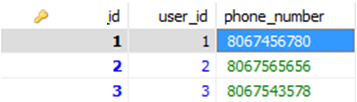
- Create the table rooms with the columns: id — INT, PRIMARY KEY; phone_id — INT; room_number — INT.
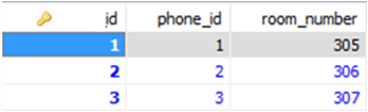
- Fill the tables with data. So that the next exercises return a non-empty result, include: several numbers starting with ‘0’; at least two users with the same last name; a user without a phone; a room without a phone (phone_id = NULL).
About INT(5)
The number in parentheses after INT is the display width, not a range limit: an INT(5) column happily stores 1000000. The diagrams above show INT(5), but since MySQL 8.0.17 the display width of integer types is deprecated and produces a warning, so in new tables just write INT.
SELECT with LIKE and ORDER BY
- Select all rows from the phones table where the phone number starts with ‘0’.
- Sort the result by phone number.
Hint
«Starts with 0» is written as phone_number LIKE '0%': % matches any number of characters, _ exactly one. MySQL can use an index for a pattern with a fixed beginning, but not for LIKE '%0': such a query scans the whole table.
Filtering by Two Conditions: AND
Select the rows from the phones table where id > 2 and user_id > 1.
A Subtlety
AND is evaluated before OR: the condition id > 2 AND user_id > 1 OR user_id = 5 reads as (id > 2 AND user_id > 1) OR user_id = 5. When you mix AND and OR, add the parentheses explicitly.
Counting Namesakes: GROUP BY and HAVING
- Count the namesakes in the users table: for each last name, show how many users have it.
- Show the count only for the last names that occur more than once.
WHERE or HAVING
A condition on an aggregate function (COUNT(*) > 1) goes into HAVING, not WHERE: WHERE filters rows before grouping, when COUNT has not been calculated yet. For a query with WHERE COUNT(*) > 1 MySQL reports Invalid use of group function.
INNER JOIN: Room Number by Last Name
- Show the room number for the user with a given last name.
- Use INNER JOIN.
Hint
The last name is in users, the room number is in rooms, and phones connects them. You need two INNER JOINs in a row: users → phones on user_id, then phones → rooms on phone_id.
LEFT JOIN: Users Without a Phone
- Show the users who have no phone.
- Use LEFT JOIN with an IS NULL check.
A Common Mistake
Check for a missing row with IS NULL: the comparison phones.id = NULL evaluates to UNKNOWN and returns no rows at all. And check a column that is never NULL in the phones table itself — the primary key id.
RIGHT JOIN: Rooms Without a Phone
- Show all rooms that have no phone.
- Use RIGHT JOIN with an IS NULL check.
Which Table Goes on the Right
RIGHT JOIN keeps all rows of the table written to the right of JOIN. For all rooms to appear in the result, rooms must be on the right: FROM phones RIGHT JOIN rooms ON ....
A Foreign Key for the rooms Table
Add a foreign key to the rooms table: the phone_id column must reference phones.id. As an extra, add the key phones.user_id → users.id.
If the Key Is Not Created
ALTER TABLE ... ADD FOREIGN KEY fails with error 1452 (Cannot add or update a child row) if rooms already contains a phone_id that does not exist in phones. Another common cause is different column types: rooms.phone_id and phones.id must have the same type.
Online Store Database: Products, Catalogs and Users
Online Store · part 12 of 15 · ← part 11 · part 13 →
So far the Online Store has kept its products, catalogs and users in Java collections and files. Design a database for it.
- Create a database for your online store in MySQL.
- It can include the tables products, catalogs and users; take the columns from the fields of your Java classes.
- Fill the tables with data and write a query that lists the products of one catalog sorted by price.
Hint
The relationship «catalog — products» is one-to-many: the products table needs a catalog_id column with a foreign key to the catalogs table. Store the price as DECIMAL, not DOUBLE: a binary fraction cannot hold cents exactly, and a DECIMAL column maps to BigDecimal in Java.
Check Yourself: COUNT After LEFT JOIN
After a LEFT JOIN, COUNT(*) also counts the row padded with NULLs, so a user without phones gets 1, not 0. To get an honest zero, count a column of the right table — COUNT(p.id): COUNT on a column skips NULL.
Take two users and one phone:
INSERT INTO users (id, first_name, last_name) VALUES (1, 'John', 'Smith'), (2, 'Peter', 'Brown');
INSERT INTO phones (id, user_id, phone_number) VALUES (1, 1, '0501234567');

SELECT u.last_name, COUNT(*) AS phones_count
FROM users u
LEFT JOIN phones p ON p.user_id = u.id
GROUP BY u.id, u.last_name
ORDER BY u.id;
What does the query return? Brown has no phone, yet the result is:
-- Output:
-- Smith | 1
-- Brown | 1
The LEFT JOIN kept a row for Brown with p.id = NULL, and COUNT(*) counted it. The fixed query:
SELECT u.last_name, COUNT(p.id) AS phones_count
FROM users u
LEFT JOIN phones p ON p.user_id = u.id
GROUP BY u.id, u.last_name
ORDER BY u.id;
-- Output:
-- Smith | 1
-- Brown | 0
Frequently Asked Questions
Which database should I use for these SQL exercises?
The queries are written for MySQL 8 — it is used in all lessons of the module, and the installation is described in Relational Databases and DBMS. Almost everything works the same in PostgreSQL, but INT(5) is a syntax error there — just write INT.
Why learn RIGHT JOIN if any query can be rewritten with LEFT JOIN?
The query a RIGHT JOIN b returns the same rows as b LEFT JOIN a, and production code usually uses LEFT JOIN. You still need to read RIGHT JOIN: it shows up in other people’s queries, and interviewers ask which table keeps all its rows. With RIGHT JOIN, it is the right one.
How do I check my solution without a reference answer?
Build the answer into the data in advance: add a row that must appear in the result and a row that must not. For finding users without a phone, that is one user with no rows in phones and one with two phones. If the query returns exactly the first one, the condition is right.
Does a Java developer need SQL if there is Hibernate?
Yes. JDBC works with SQL directly, and Hibernate and Spring Data generate SQL for you — when a query is slow or returns extra rows, it is the generated SQL you have to debug. JOIN and GROUP BY exercises are also common in Java developer interviews.
Comments