
SQL JOIN Types and UNION with Examples
The query SELECT p.name, c.name FROM products p, categories c runs without a single error and returns 12 rows instead of the expected three: the apple shows up under fruits, vegetables and berries. The join condition was forgotten, so the database returned a Cartesian product. To keep queries like this from slipping through, you need to know exactly what each type of JOIN returns.
A JOIN is an SQL operation that combines rows from two tables into one result row by a condition, usually the equality of a key and a foreign key. UNION is an operator that stacks the results of two SELECT queries into one set: JOIN adds the columns of another table to a row, UNION adds rows. This lesson covers every type of JOIN — INNER, LEFT, RIGHT, FULL OUTER, CROSS and SELF — and UNION on the same two tables, with the output of every query.
Relationships Between Tables
Tables in a relational database can be related in three ways: one-to-one, one-to-many and many-to-many. The type of relationship decides how many rows a JOIN returns: with a one-to-many link, one row of the parent table is repeated in the result once for every child row it has.
- One-to-one (1:1) — each row of table A matches at most one row of table B, and the other way round.
- One-to-many (1:N) — each row of table A can match zero, one or several rows of table B, while a row of B belongs to only one row of A.
- Many-to-many (M:N) — rows of A and B can match several rows on the other side, in both directions.
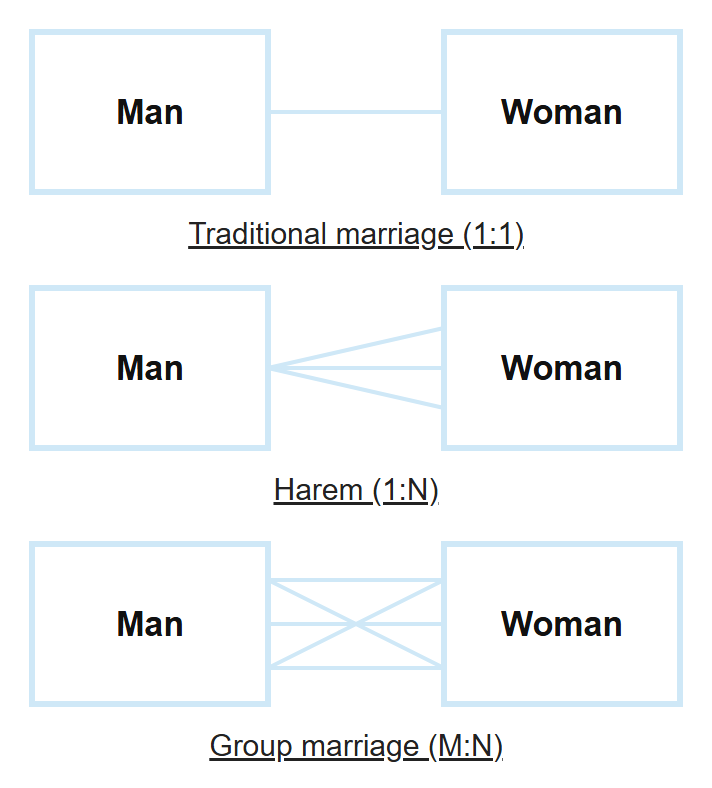
How each relationship is implemented with foreign keys and a junction table is covered in the lesson on keys and relationships between tables in SQL.
SQL JOIN Types
SQL has six ways to combine tables: INNER JOIN returns only the matching rows, LEFT, RIGHT and FULL OUTER JOIN add the unmatched rows of one or both tables padded with NULL, CROSS JOIN pairs every row with every row, and SELF JOIN joins a table to itself.
In web applications backed by a database, you constantly combine tables to get the data you need. The summary table below shows how many rows each type returns for the products table (4 rows) and the categories table (3 rows) from the next section.
| JOIN type | What it returns | Rows in the example |
|---|---|---|
INNER JOIN (or just JOIN) | Only the rows that have a match in the other table | 3 |
LEFT JOIN (LEFT OUTER JOIN) | All rows of the left table; NULL on the right where there is no match | 4 |
RIGHT JOIN (RIGHT OUTER JOIN) | All rows of the right table; NULL on the left where there is no match | 4 |
FULL OUTER JOIN | All rows of both tables; MySQL has no such join, it is emulated with UNION | 5 |
CROSS JOIN | Every row of the left table with every row of the right one, no condition | 4 × 3 = 12 |
| SELF JOIN | Not a separate keyword: any join above where both sides are the same table under different aliases | — |
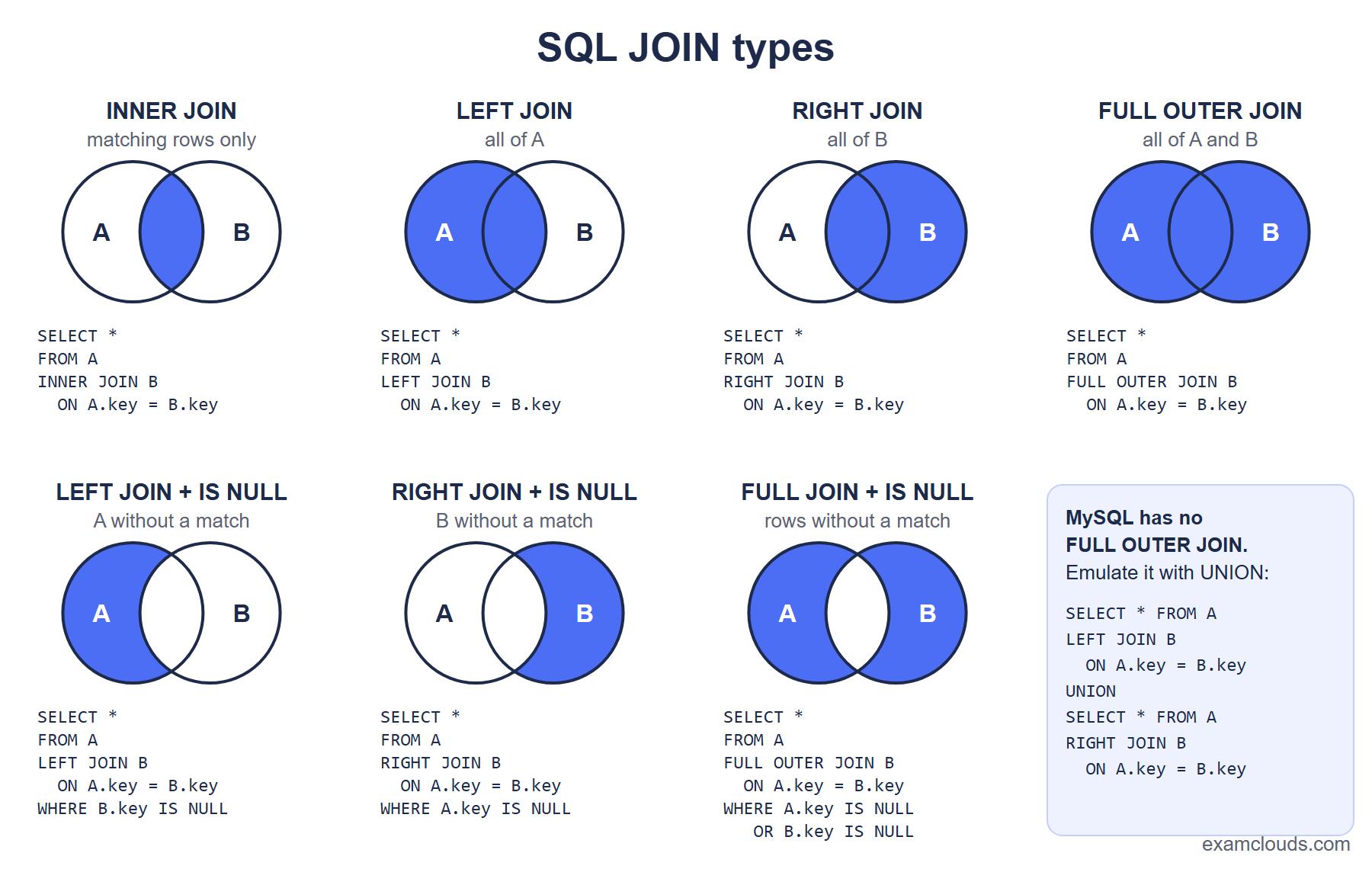
The same ideas in set theory terms:
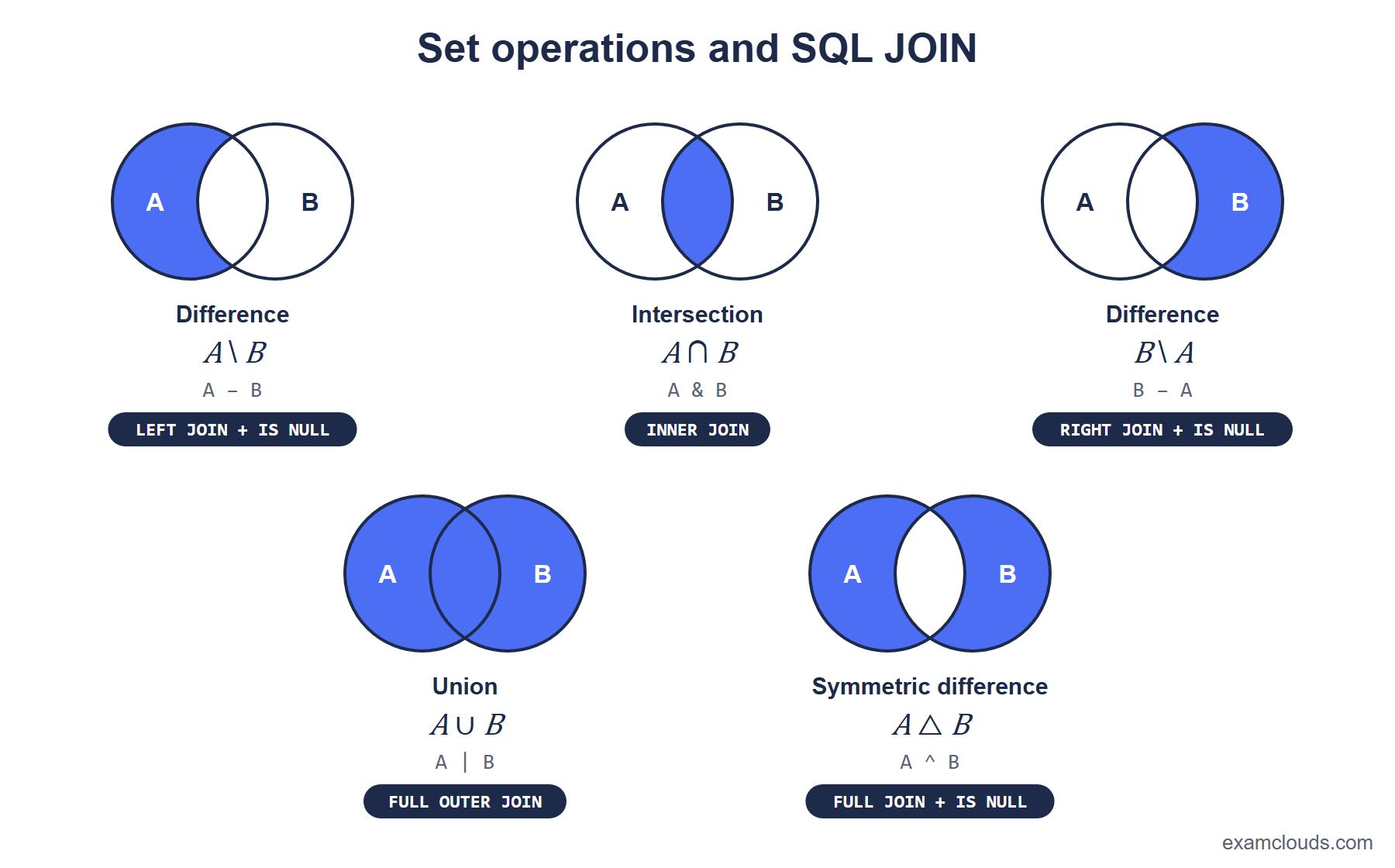
The syntax is the same for every type except CROSS JOIN: after FROM you name the left table, then the join type, the right table and the condition in ON:
SELECT columns
FROM left_table
[INNER | LEFT [OUTER] | RIGHT [OUTER]] JOIN right_table
ON join_condition;
The Example Tables
All examples in this lesson run on two tables: products and categories. The products.category_id column stores the id of a category. The sausage has category_id = 0, a category that does not exist, and no product belongs to the berries category — these two rows are where the JOIN types differ.
products:
+----+---------+-------------+
| id | name    | category_id |
+----+---------+-------------+
|  1 | apple   |           1 |
|  2 | pear    |           1 |
|  3 | tomato  |           2 |
|  4 | sausage |           0 |
+----+---------+-------------+
categories:
+----+------------+
| id | name       |
+----+------------+
|  1 | fruits     |
|  2 | vegetables |
|  3 | berries    |
+----+------------+
Use this script to repeat the examples in MySQL:
CREATE TABLE products (
    id          INT PRIMARY KEY,
    name        VARCHAR(50),
    category_id INT
);

CREATE TABLE categories (
    id   INT PRIMARY KEY,
    name VARCHAR(50)
);

INSERT INTO products VALUES (1, 'apple', 1), (2, 'pear', 1), (3, 'tomato', 2), (4, 'sausage', 0);
INSERT INTO categories VALUES (1, 'fruits'), (2, 'vegetables'), (3, 'berries');
There is deliberately no foreign key on products.category_id: with one, the row with category_id = 0 could not be inserted (error 1452, see the foreign key section). A JOIN does not need a foreign key — you can join on any columns with compatible values. Without an ORDER BY the database does not promise any row order; the outputs below are shown in the order MySQL normally returns them for these tiny tables.
INNER JOIN
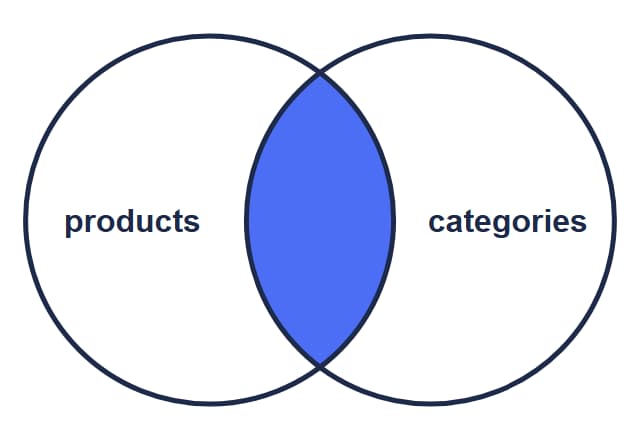
INNER JOIN is a join that returns only the rows for which the ON condition is true in both tables. Rows without a match — the sausage with category_id = 0 and the berries category — do not make it into the result.
Only the records that match in both tables are selected. The word INNER is optional: a plain JOIN is the same INNER JOIN.
SELECT p.name AS product, c.name AS category
FROM products p INNER JOIN categories c
ON p.category_id = c.id;
+---------+------------+
| product | category |
+---------+------------+
| apple | fruits |
| pear | fruits |
| tomato | vegetables |
+---------+------------+An INNER JOIN can be rewritten with the join condition in WHERE:
SELECT p.name AS product, c.name AS category
FROM products p, categories c
WHERE p.category_id = c.id;
Both queries return the same result, and the MySQL optimizer builds the same plan for them. The explicit JOIN ... ON is still better: the join condition sits next to the table instead of getting lost among the filters in WHERE, and it is harder to forget. Table aliases (p, c) are explained in the SQL aliases section of the SELECT lesson.
LEFT JOIN
LEFT OUTER JOIN (LEFT JOIN) is an outer join that returns all rows of the left table and only the matching rows of the right one. If a row of the left table has no match, the columns of the right table in the result are NULL.
LEFT JOIN makes the left table (here products) the driving one: it takes every row from it and looks for matching records in categories. If none are found, the categories columns are NULL. The word OUTER is optional.
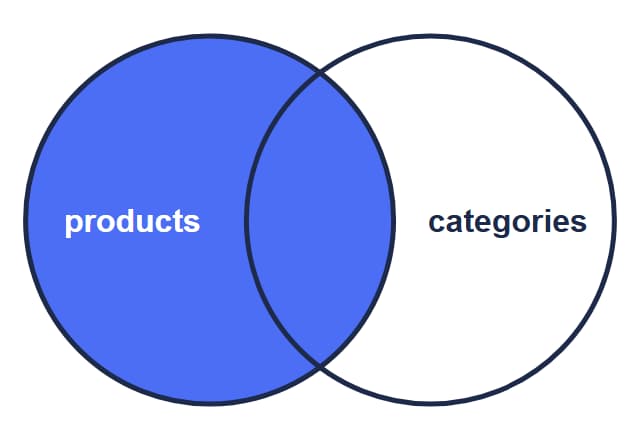
SELECT p.name AS product, c.name AS category
FROM products p LEFT JOIN categories c
ON p.category_id = c.id;
+---------+------------+
| product | category |
+---------+------------+
| apple | fruits |
| pear | fruits |
| tomato | vegetables |
| sausage | NULL |
+---------+------------+The sausage is in the result with NULL instead of a category, and the berries category is not: it has no products, and it is on the right.
LEFT JOIN with WHERE ... IS NULL
A LEFT JOIN ... WHERE c.id IS NULL query finds the rows of the left table that have no match in the right one: products without a category, customers without orders. This is an anti-join, and it is a favorite interview question.
To select the records of products that do not exist in categories, run a LEFT JOIN and keep only the rows where c.id is NULL: for them no match was found in categories. Why IS NULL and not = NULL is explained in the NULL section of the SELECT lesson.
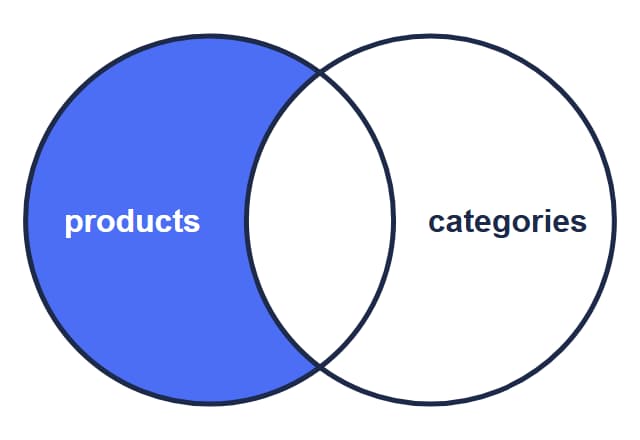
SELECT p.name AS product, c.name AS category
FROM products p LEFT JOIN categories c
ON p.category_id = c.id
WHERE c.id IS NULL;
+---------+----------+
| product | category |
+---------+----------+
| sausage | NULL |
+---------+----------+Which column you test matters. Pick one that can never be NULL in the right table by itself, and the primary key c.id is the safe choice. With WHERE c.name IS NULL, a product whose category exists but has no name would also land in the result, although it does have a match.
RIGHT JOIN
RIGHT OUTER JOIN (RIGHT JOIN) is an outer join that returns all rows of the right table and only the matching rows of the left one. If a row of the right table has no match, the columns of the left table are NULL.
RIGHT JOIN does the same job as LEFT JOIN with the tables swapped: A RIGHT JOIN B is equivalent to B LEFT JOIN A. In practice most developers write LEFT JOIN only and reorder the tables, which keeps all queries in one style.
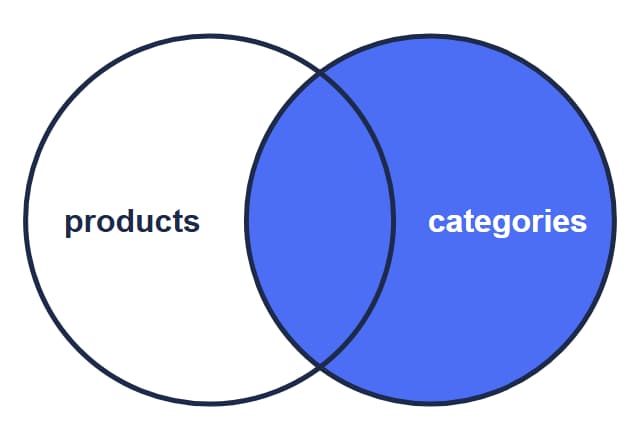
SELECT p.name AS product, c.name AS category
FROM products p RIGHT JOIN categories c
ON p.category_id = c.id;
+---------+------------+
| product | category |
+---------+------------+
| apple | fruits |
| pear | fruits |
| tomato | vegetables |
| NULL | berries |
+---------+------------+Now the berries category is in the result with NULL instead of a product, and the sausage is gone.
FULL OUTER JOIN and How to Emulate It in MySQL
FULL OUTER JOIN (FULL JOIN) is an outer join that returns all rows of both tables: matching rows are joined, and for the rest the missing side is filled with NULL. In effect it is a LEFT JOIN and a RIGHT JOIN in one result.
PostgreSQL, Oracle and SQL Server accept it directly:
SELECT p.name AS product, c.name AS category
FROM products p FULL OUTER JOIN categories c
ON p.category_id = c.id;
+---------+------------+
| product | category |
+---------+------------+
| apple | fruits |
| pear | fruits |
| tomato | vegetables |
| sausage | NULL |
| NULL | berries |
+---------+------------+MySQL (including 8.4 and 9.x) has no FULL OUTER JOIN. You assemble it from two queries: the LEFT JOIN returns all products, the RIGHT JOIN returns all categories, and UNION stacks the results and removes the rows that appeared in both:
SELECT p.name AS product, c.name AS category
FROM products p LEFT JOIN categories c ON p.category_id = c.id
UNION
SELECT p.name, c.name
FROM products p RIGHT JOIN categories c ON p.category_id = c.id;
The result is the same 5 rows as in the table above. The LEFT JOIN returned 4 rows, the RIGHT JOIN returned 4, the three matching pairs (apple, pear, tomato) appeared twice, and UNION kept one of each.
This version has a flaw: UNION removes any identical rows, including real duplicates. If products held two rows named “apple” with the same category, only one would survive. The accurate emulation takes only the unmatched rows from the second query and stacks them with UNION ALL, which removes nothing:
SELECT p.name AS product, c.name AS category
FROM products p LEFT JOIN categories c ON p.category_id = c.id
UNION ALL
SELECT p.name, c.name
FROM products p RIGHT JOIN categories c ON p.category_id = c.id
WHERE p.id IS NULL;
The second query here returns a single row (NULL, berries), so the total is again 5 rows. This version is also faster, because MySQL does not have to look for duplicates.
FULL JOIN in MySQL does not always raise an error
FULL OUTER JOIN in MySQL fails at once with syntax error 1064. The short FULL JOIN is worse: FULL is not a reserved word in MySQL, so the parser reads it as an alias of the first table. A query such as SELECT * FROM products FULL JOIN categories ON products.category_id = categories.id becomes FROM products AS FULL JOIN categories, which is a plain INNER JOIN. It fails with Unknown column 'products.category_id' in 'on clause' because the table is now called FULL, and if the columns are not qualified with a table name it silently returns the INNER JOIN result without the NULL rows. (With a table alias, products p FULL JOIN ... is a syntax error instead.)
CROSS JOIN (Cartesian Product)
CROSS JOIN is a join without a condition in which every row of the first table is paired with every row of the second. The result is called a Cartesian product (also a cartesian join): if the tables have N and M rows, the result has N × M rows.
You can write it two ways — with an explicit CROSS JOIN, or by listing the tables separated by a comma in FROM with no condition. Standard SQL and MySQL have no CARTESIAN JOIN keyword; that is only a name for the result.
SELECT p.name AS product, c.name AS category
FROM products p CROSS JOIN categories c
ORDER BY p.id, c.id;
SELECT p.name AS product, c.name AS category
FROM products p, categories c
ORDER BY p.id, c.id;Both queries return 4 × 3 = 12 rows:
+---------+------------+
| product | category   |
+---------+------------+
| apple   | fruits     |
| apple   | vegetables |
| apple   | berries    |
| pear    | fruits     |
| pear    | vegetables |
| pear    | berries    |
| tomato  | fruits     |
| tomato  | vegetables |
| tomato  | berries    |
| sausage | fruits     |
| sausage | vegetables |
| sausage | berries    |
+---------+------------+
Add WHERE p.category_id = c.id to this Cartesian product and 3 of the 12 rows remain — exactly the INNER JOIN result. Logically an INNER JOIN is a Cartesian product with a filter, although the database never actually builds all N × M rows to run it.
A deliberate CROSS JOIN is useful for generating combinations: every size for every color, every employee for every day of a schedule, or a calendar of dates joined with a list of stores to find the days with no sales. Always check the row count first: a CROSS JOIN of two tables with a thousand rows each returns a million.
CROSS JOIN in MySQL vs standard SQL
In standard SQL a CROSS JOIN is always a Cartesian product without ON, and PostgreSQL rejects CROSS JOIN ... ON with a syntax error. MySQL is more lenient: JOIN, INNER JOIN and CROSS JOIN are interchangeable there, so CROSS JOIN ... ON works as an INNER JOIN and INNER JOIN without ON returns a Cartesian product. Write what the standard expects — CROSS JOIN without a condition, INNER JOIN with one — and the query will move to another database unchanged.
SELF JOIN
SELF JOIN is a join of a table with itself. It has no keyword of its own: you list the table twice under different aliases and join them with an ordinary INNER or LEFT JOIN. This is how you query hierarchies stored in one table.
The classic example is employees and their managers. A manager is an employee too, so the manager_id column refers to the id of the same table:
employees:
+----+-------+------------+
| id | name  | manager_id |
+----+-------+------------+
|  1 | Anna  | NULL       |
|  2 | Ben   |          1 |
|  3 | Carol |          1 |
|  4 | Dan   |          2 |
+----+-------+------------+
Use this script to repeat the example:
CREATE TABLE employees (
    id         INT PRIMARY KEY,
    name       VARCHAR(50),
    manager_id INT
);

INSERT INTO employees VALUES (1, 'Anna', NULL), (2, 'Ben', 1), (3, 'Carol', 1), (4, 'Dan', 2);
The alias e stands for the table in the role of the employee, m in the role of the manager. Without aliases MySQL cannot tell which instance of the table a column belongs to and returns ERROR 1066 (42000): Not unique table/alias: 'employees'.
SELECT e.name AS employee, m.name AS manager
FROM employees e
LEFT JOIN employees m ON e.manager_id = m.id
ORDER BY e.id;
+----------+---------+
| employee | manager |
+----------+---------+
| Anna | NULL |
| Ben | Anna |
| Carol | Anna |
| Dan | Ben |
+----------+---------+Anna, the head of the company, has no manager, so e.manager_id is NULL and nothing matches. A LEFT JOIN keeps her row with NULL in the manager column; with an INNER JOIN she would disappear from the result and you would get 3 rows instead of 4.
UNION and UNION ALL
UNION is an operator that combines the results of two or more SELECT queries into one set of rows and removes duplicate rows. UNION ALL does the same but keeps every row, duplicates included, and therefore runs faster.
Three rules must hold for the queries to be stacked:
- every
SELECTreturns the same number of columns, otherwise MySQL raisesERROR 1222 (21000): The used SELECT statements have a different number of columns; - the column types in the same positions are compatible: on a mismatch MySQL silently converts the values to a common type (a number and a string give a string), while PostgreSQL raises
UNION types integer and text cannot be matched; - the result column names come from the first
SELECT, and oneORDER BYgoes at the very end and sorts the whole result.
The difference between UNION and UNION ALL is easy to see on the category numbers. products.category_id holds 1, 1, 2, 0, and categories.id holds 1, 2, 3:
SELECT category_id AS n FROM products
UNION
SELECT id FROM categories
ORDER BY n;
+---+
| n |
+---+
| 0 |
| 1 |
| 2 |
| 3 |
+---+Four rows: the duplicates are removed. With UNION ALL nothing is removed:
SELECT category_id AS n FROM products
UNION ALL
SELECT id FROM categories
ORDER BY n;
+---+
| n |
+---+
| 0 |
| 1 |
| 1 |
| 1 |
| 2 |
| 2 |
| 3 |
+---+Seven rows, which is 4 + 3. The column in the second SELECT is called id, but the result column is named n, after the first query, and ORDER BY n works by that name.
The second example is a single list of names from both tables with a label showing where each row came from. The constant 'product' or 'category' becomes an ordinary column:
SELECT name, 'product' AS kind FROM products
UNION ALL
SELECT name, 'category' FROM categories
ORDER BY name;
+------------+----------+
| name | kind |
+------------+----------+
| apple | product |
| berries | category |
| fruits | category |
| pear | product |
| sausage | product |
| tomato | product |
| vegetables | category |
+------------+----------+JOIN and UNION are often confused because both “combine tables”. The difference is the direction:
| Feature | JOIN | UNION / UNION ALL |
|---|---|---|
| What it does | Matches rows of two tables by a condition | Stacks the rows of one query under the rows of another |
| What grows | Columns: the row gets the columns of the other table | Rows: the number of columns stays the same |
| What it needs | A join condition in ON (except CROSS JOIN) | The same number of compatible columns in every SELECT |
| Duplicates | Not removed | UNION removes them, UNION ALL keeps them |
| Rows in the example | 3 to 12, depending on the type | 4 or 7 (UNION or UNION ALL on the ids) |
| Typical task | A product and the name of its category in one row | One list from several sources, such as archived and current orders |
Common JOIN Mistakes
A JOIN query most often returns something other than expected for two reasons: the condition on the right table of an outer join was put in WHERE instead of ON, or the join condition was forgotten altogether. In neither case does the database raise an error.
What does this query print? We want all products, but to show the category only when it is not vegetables:
SELECT p.name AS product, c.name AS category
FROM products p LEFT JOIN categories c ON p.category_id = c.id
WHERE c.name <> 'vegetables';
Result: 2 rows instead of 4
+---------+----------+
| product | category |
+---------+----------+
| apple   | fruits   |
| pear    | fruits   |
+---------+----------+
The tomato is filtered out as expected, but the sausage disappeared unexpectedly. Its c.name is NULL, and NULL <> 'vegetables' is not true but UNKNOWN, and WHERE discards such a row. A filter on the right table in WHERE turned the LEFT JOIN into an INNER JOIN. If the condition should only affect what gets joined, move it to ON:
SELECT p.name AS product, c.name AS category
FROM products p LEFT JOIN categories c
ON p.category_id = c.id AND c.name <> 'vegetables';
Result: all 4 products
+---------+----------+
| product | category |
+---------+----------+
| apple   | fruits   |
| pear    | fruits   |
| tomato  | NULL     |
| sausage | NULL     |
+---------+----------+
The tomato stays in the result but without a category: the pair “tomato — vegetables” failed the ON condition, and the LEFT JOIN filled the right side with NULL. The rule is simple: put join conditions in ON and the filter for the final rows in WHERE. For an INNER JOIN it makes no difference; for outer joins it changes the result. When you add GROUP BY on top of a JOIN, the same rules apply — see SQL GROUP BY and HAVING.
The second mistake is a forgotten join condition in a comma-separated query, the one this lesson opened with. FROM products, categories without a WHERE is a CROSS JOIN, and on real tables you get millions of rows instead of a hundred. The explicit JOIN ... ON syntax guards against this: in standard SQL and PostgreSQL an INNER JOIN without ON is a syntax error (MySQL, as noted above, lets such a query through).
Frequently Asked Questions
Is there a difference between JOIN and INNER JOIN, or LEFT JOIN and LEFT OUTER JOIN?
No. A bare JOIN is an INNER JOIN, and the word OUTER is optional in LEFT, RIGHT and FULL OUTER JOIN. The short and the long forms run identically; which one to write is a team convention.
What is a CROSS JOIN and when do you actually use it?
A CROSS JOIN pairs every row of one table with every row of the other, with no join condition, so tables with N and M rows give N × M rows. It is used on purpose to generate combinations: every size × every color of a product, every employee × every day of the month. An example with the output is in the CROSS JOIN section.
How do you do a FULL OUTER JOIN in MySQL?
Combine a LEFT JOIN and a RIGHT JOIN with UNION. If the data can contain identical rows, UNION ALL is more accurate: the second query then keeps only the rows without a match (WHERE p.id IS NULL). Both variants with their output are in the FULL OUTER JOIN section.
Which is faster, UNION or UNION ALL?
UNION ALL. After running the queries, UNION also has to find and remove duplicates, and MySQL builds a temporary table for that. If duplicates cannot occur (for example, the queries select non-overlapping data) or you want them in the result, use UNION ALL.
What is the difference between UNION and JOIN?
JOIN matches the rows of two tables by a condition and adds columns; UNION stacks the rows of one query under the rows of another. UNION needs the same number of compatible columns in every SELECT, JOIN needs a join condition. A comparison table is in the UNION and UNION ALL section.
Practice
Reinforce this lesson with hands-on tasks, each with a level and a time estimate.
- INNER JOIN: Room Number by Last Name
- LEFT JOIN: Users Without a Phone
- RIGHT JOIN: Rooms Without a Phone
Comments