
JDBC Drivers and Connecting Java to a Database
The line DriverManager.getConnection("jdbc:mysql://localhost:3306/shop", "root", "admin") compiles without a single warning, then fails at runtime with java.sql.SQLException: No suitable driver found for jdbc:mysql://localhost:3306/shop. The code is fine. The JDK ships only the JDBC interfaces, and the implementation for MySQL has to come from a driver that is missing from the project.
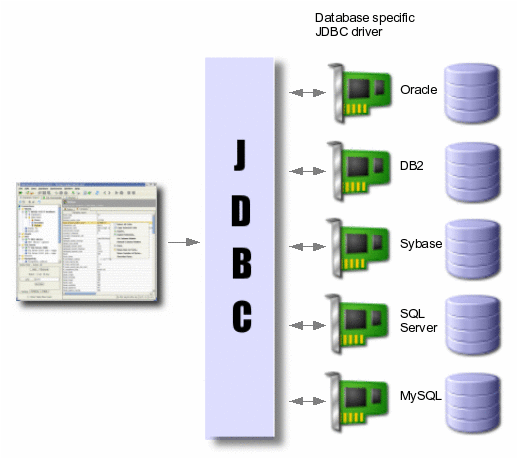
JDBC (Java Database Connectivity) is the platform-independent industry standard for how Java applications talk to relational databases (DBMS). It is implemented as the java.sql package, part of Java SE, plus the javax.sql extension. These packages contain mostly interfaces, such as Connection, Statement and ResultSet. A JDBC driver for a specific database implements them.
1. What Is JDBC
JDBC is the standard Java API for connecting to a relational database and running SQL queries. The application is written against the JDBC interfaces and does not depend on one particular DBMS: to move from MySQL to PostgreSQL you change the driver and the URL, and the code that works with Connection stays the same.
In everyday speech JDBC is simply “the Java database connection API”, and for good reason: everything starts with getting a java.sql.Connection object. Through it you later create statements, manage transactions and read database metadata. ORM frameworks such as Hibernate, Spring Data JPA and MyBatis are built on top of JDBC too.
2. What a JDBC Driver Does
A JDBC driver is a library (a JAR file) from the database vendor or the community. It implements the java.sql interfaces and knows how to talk to one specific database over its network protocol. Without a driver, JDBC cannot connect to any database.
JDBC is built around drivers: each driver accepts connection requests for a specially formatted URL. Drivers can be loaded dynamically, while the program is running. Once loaded, a driver registers itself and is called automatically when the program asks for a URL with the protocol that this driver handles.
Since JDBC 4.0 (Java 6) this works through ServiceLoader: the driver JAR contains a file META-INF/services/java.sql.Driver with the driver class name. On the first use of DriverManager, all such drivers found on the classpath register themselves. When you call getConnection(url, ...), DriverManager calls connect() on the registered drivers one by one. A driver that does not handle this URL returns null, and the first real connection wins. If every driver says no, you get the “No suitable driver found” error from the beginning of the lesson.
3. Types of JDBC Drivers
The JDBC specification divides drivers into four types by the way they reach the database. Today almost every driver in use is type 4: written entirely in Java and talking to the DBMS directly over its network protocol. The other types survive in legacy systems and in interview questions.
| Type | How it works | Example | Status today |
|---|---|---|---|
| Type 1: JDBC-ODBC bridge | Translates JDBC calls into ODBC; needs an ODBC driver in the OS | sun.jdbc.odbc.JdbcOdbcDriver | Removed from the JDK in Java 8 |
| Type 2: Native API | Partly Java, partly a native client library of the DBMS | Oracle OCI (jdbc:oracle:oci:) | Rare, requires a DBMS client installed |
| Type 3: Network protocol | The driver talks to a middleware server, which talks to the database | Middleware products | Practically unused |
| Type 4: Thin (pure Java) | Entirely in Java, speaks the DBMS protocol directly | MySQL Connector/J, PostgreSQL JDBC, Oracle thin | The standard: use it |
4. How to Add a JDBC Driver to a Project
A JDBC driver is not part of the JDK; you add it to the classpath as a dependency. In a Maven project the MySQL driver is the artifact com.mysql:mysql-connector-j. After the build the driver registers itself, and you do not need Class.forName.
<dependency>
    <groupId>com.mysql</groupId>
    <artifactId>mysql-connector-j</artifactId>
    <version>9.1.0</version>
    <scope>runtime</scope>
</dependency>
The examples in this lesson use version 9.1.0; take the current one from Maven Central. The runtime scope fits because your code compiles only against the java.sql interfaces, and the driver classes are needed only at run time. If the code refers to driver classes directly (for example MysqlDataSource from the DataSource section below), remove the scope. How scopes work is explained in the lesson on Maven dependencies.
In Gradle the same dependency looks like this:
runtimeOnly 'com.mysql:mysql-connector-j:9.1.0'Older tutorials refer to the artifact mysql:mysql-connector-java. It was renamed to com.mysql:mysql-connector-j in version 8.0.31, and new versions are published only under the new name. A project without Maven or Gradle works too: download the JAR from the MySQL website and add it to the classpath (java -cp .;mysql-connector-j-9.1.0.jar Main on Windows, with : instead of ; on Linux and macOS). For the basics of relational databases and DBMS, see the lesson on relational databases and DBMS.
5. Steps to Connect Java to a Database
Working with a database through JDBC takes four steps: the driver is in memory, the program gets a connection (the JDBC connection) by URL, user name and password, creates objects for queries through that connection, and finally closes all resources.
- Load the driver into memory (not needed since JDBC 4.0, that is Java 6: a driver on the classpath is registered automatically):
Class.forName("com.mysql.cj.jdbc.Driver"); - Open a connection to the database:
Connection connection = DriverManager.getConnection( "jdbc:mysql://localhost:3306/my_db", "login", "password"); - Create an object for sending queries (
StatementorPreparedStatement) withconnection.createStatement()orconnection.prepareStatement(sql). Running queries and reading their results is beyond this lesson. - Close everything. Use try-with-resources: resources are closed automatically and in reverse order, even if a query throws an exception. See the lesson on try-with-resources.
Outdated class name
Old code uses Class.forName("com.mysql.jdbc.Driver"). Since Connector/J 8.0 that name is kept only for compatibility, and loading it prints: Loading class `com.mysql.jdbc.Driver'. This is deprecated. The new driver class is `com.mysql.cj.jdbc.Driver'. The driver is automatically registered via the SPI and manual loading of the driver class is generally unnecessary. The correct name is com.mysql.cj.jdbc.Driver, and in most cases you can simply delete the Class.forName line.
A complete example: the program connects to the shop database, prints information about the DBMS and the driver from DatabaseMetaData, and checks that the connection is alive.
import java.sql.Connection;
import java.sql.DatabaseMetaData;
import java.sql.DriverManager;
import java.sql.SQLException;

public class ConnectionExample {
    private static final String URL = "jdbc:mysql://localhost:3306/shop";
    private static final String USER = "root";
    private static final String PASSWORD = "admin";

    public static void main(String[] args) {
        try (Connection connection = DriverManager.getConnection(URL, USER, PASSWORD)) {
            DatabaseMetaData meta = connection.getMetaData();
            System.out.println("Database: " + meta.getDatabaseProductName()
                    + " " + meta.getDatabaseProductVersion());
            System.out.println("Driver: " + meta.getDriverName()
                    + " " + meta.getDriverVersion());
            System.out.println("Connection is alive: " + connection.isValid(2));
        } catch (SQLException e) {
            System.out.println("Connection error: " + e.getMessage());
        }
    }
}
Output with MySQL running and the driver on the classpath (version numbers depend on your server and driver):
Database: MySQL 8.4.3
Driver: MySQL Connector/J mysql-connector-j-9.1.0 (Revision: ...)
Connection is alive: true
The same code without the driver JAR on the classpath:
Connection error: No suitable driver found for jdbc:mysql://localhost:3306/shopThe isValid(2) method sends a lightweight check to the database and waits at most 2 seconds for the answer. Connection pools use it so that they do not hand the application a connection that the server has already closed after a timeout.
6. JDBC Connection URL and Driver Class Names
A JDBC connection URL always starts with jdbc:, followed by the driver subprotocol (mysql, postgresql, sqlserver), the server address and the database name. DriverManager uses the subprotocol to pick the right driver. The general template:
jdbc:<subprotocol>:[//host[:port]/]<database name>[?parameters]After ? the driver parameters are passed separated by &, for example jdbc:mysql://localhost:3306/shop?useSSL=false&serverTimezone=UTC. The parameter format differs between databases: SQL Server, for example, separates them with semicolons.
| Database | Driver class | Example URL |
|---|---|---|
| MySQL | com.mysql.cj.jdbc.Driver | jdbc:mysql://localhost:3306/shop |
| PostgreSQL | org.postgresql.Driver | jdbc:postgresql://localhost:5432/shop |
| MariaDB | org.mariadb.jdbc.Driver | jdbc:mariadb://localhost:3306/shop |
| Oracle | oracle.jdbc.OracleDriver | jdbc:oracle:thin:@//localhost:1521/ORCLPDB1 |
| MS SQL Server | com.microsoft.sqlserver.jdbc.SQLServerDriver | jdbc:sqlserver://localhost:1433;databaseName=shop |
| IBM DB2 | com.ibm.db2.jcc.DB2Driver | jdbc:db2://localhost:50000/shop |
| H2 (in memory) | org.h2.Driver | jdbc:h2:mem:test |
| H2 (server) | org.h2.Driver | jdbc:h2:tcp://localhost/~/test |
| SQLite | org.sqlite.JDBC | jdbc:sqlite:shop.db |
You need the driver class name only for Class.forName and for pool settings such as driverClassName. In ordinary code with DriverManager the URL is enough. Oracle has two URL styles: @//host:1521/service_name (by service name, the modern one) and @host:1521:SID (by SID, the old one).
7. DriverManager vs DataSource
DriverManager opens a new physical connection on every getConnection call, which is enough for learning programs. Real applications take connections from javax.sql.DataSource: a connection factory that is configured once and usually backed by a connection pool.
| Feature | DriverManager | DataSource |
|---|---|---|
| Package | java.sql | javax.sql |
| Where URL and password are set | In every getConnection call | Once, when the object is configured |
| Connection pool | No, every connection is new | Yes, if it is a pool (HikariCP and others) |
What close() does | Closes the physical connection | In a pool, returns the connection to the pool |
| Where it is used | Learning examples, utilities, tests | Web applications, Spring, application servers |
The simplest DataSource implementation comes with the MySQL driver itself:
import com.mysql.cj.jdbc.MysqlDataSource;

import java.sql.Connection;
import java.sql.SQLException;

public class DataSourceExample {
    public static void main(String[] args) throws SQLException {
        MysqlDataSource dataSource = new MysqlDataSource();
        dataSource.setURL("jdbc:mysql://localhost:3306/shop");
        dataSource.setUser("root");
        dataSource.setPassword("admin");

        try (Connection connection = dataSource.getConnection()) {
            System.out.println(connection.getCatalog());
        }
    }
}
// Output: shop
MysqlDataSource keeps no pool; it is only a convenient way to pass the settings in one place. A pool comes from a separate library, most often HikariCP, which Spring Boot uses by default. Opening a new TCP connection with authentication for every query is expensive, while a pool keeps several connections open and hands them out to threads. Code that gets a Connection from a DataSource then uses it exactly as it would one from DriverManager.
8. JDBC Connection Errors and How to Fix Them
Almost every JDBC connection problem comes down to a few error messages. The exception text usually shows right away what is wrong: no driver, the server is not running, a wrong password or a database that does not exist.
| Message | Cause | What to do |
|---|---|---|
SQLException: No suitable driver found for jdbc:mysql://... | The driver JAR is not on the classpath, or the start of the URL has a typo (jdbc:mysq://, missing jdbc:) | Add mysql-connector-j to the dependencies, check the URL |
ClassNotFoundException: com.mysql.cj.jdbc.Driver | The same missing driver, but found by Class.forName | Add the driver; the Class.forName call itself can be deleted |
com.mysql.cj.jdbc.exceptions.CommunicationsException: Communications link failure | The server is not running, wrong host or port, the port is blocked by a firewall | Check that MySQL is running and listening on port 3306 |
SQLException: Access denied for user 'root'@'localhost' (using password: YES) | Wrong user name or password, or the user has no rights on this database | Check the credentials, grant rights with GRANT |
SQLSyntaxErrorException: Unknown database 'shop' | A database with this name has not been created | Run CREATE DATABASE shop or fix the name in the URL |
SQLNonTransientConnectionException: Public Key Retrieval is not allowed | MySQL 8+ with the caching_sha2_password plugin and useSSL=false | Enable SSL or add allowPublicKeyRetrieval=true to the URL |
For a local database only
The combination useSSL=false&allowPublicKeyRetrieval=true removes the error on a home computer, but on a production server it exposes the password to interception. Enable SSL there. And do not keep the password in code as the learning examples do: move it to environment variables or a settings file.
Frequently Asked Questions
How is JDBC different from Hibernate and JPA?
JDBC is a low-level API: you write the SQL yourself and copy values from a ResultSet into objects. JPA is an ORM specification and Hibernate is its implementation: they build SQL from entity classes and fill the objects for you. Under the hood Hibernate still works through a JDBC driver and a DataSource, so the driver and the connection URL are needed in both cases.
Is the JDBC driver part of the JDK?
No. The JDK contains only the java.sql and javax.sql interfaces, and the driver for each DBMS is added as a separate JAR. How to add it with Maven or Gradle is shown in the section How to Add a JDBC Driver to a Project.
Can I open one Connection and use it across the whole application?
For a single-threaded utility, yes; for a server, no. One connection runs queries one after another, transactions from different threads get mixed up on it, and if the server closes the connection after a timeout, every later query fails. Use a connection pool and take a Connection for one operation, closing it in try-with-resources.
Can one program connect to two different databases, for example MySQL and PostgreSQL?
Yes. Put both drivers on the classpath: they register themselves automatically, and DriverManager picks the right one by the URL prefix (jdbc:mysql: or jdbc:postgresql:). Each getConnection call returns a separate Connection to its own database.
Comments