
Java Calendar Class and Date: get(), add(), roll() and Conversion
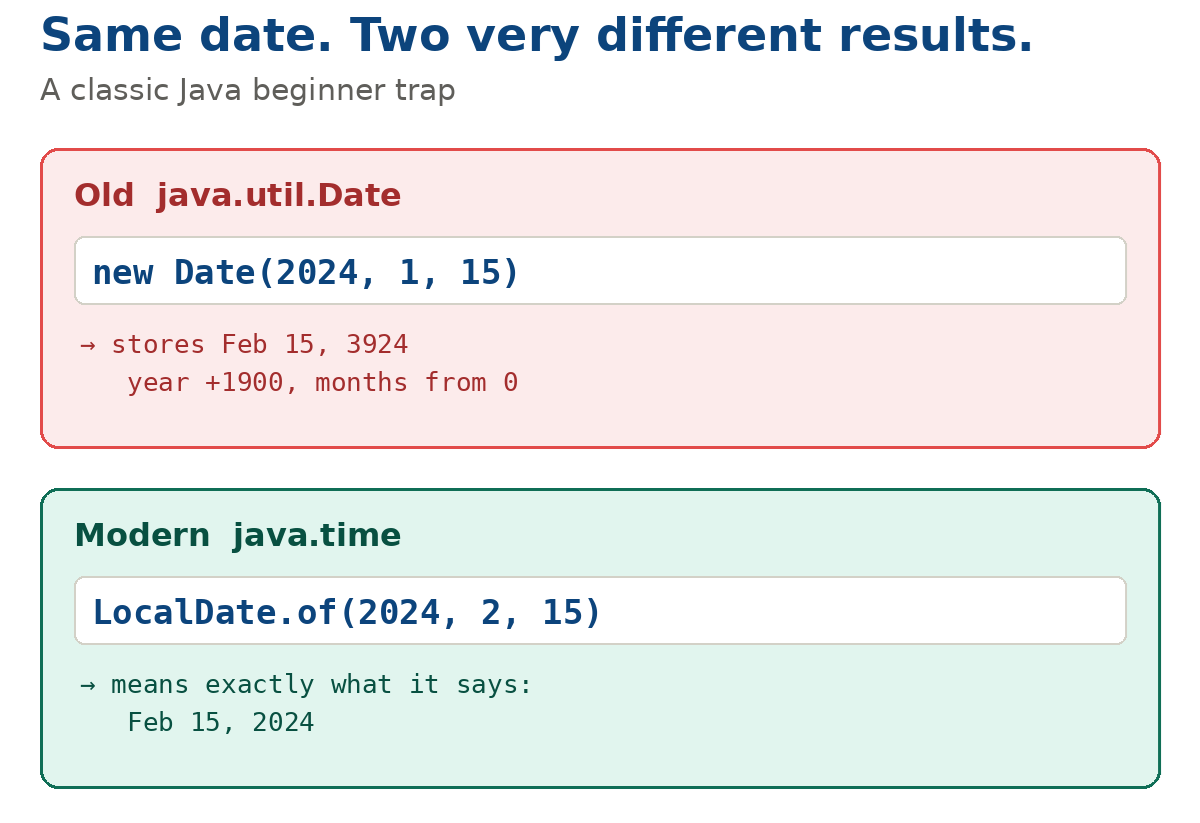
Run Calendar.getInstance().get(Calendar.MONTH) on 18 October 2026 and Java prints 9, not 10. The Calendar class counts months from 0 (January) to 11 (December), and the older Date class goes further: new Date(2024, 1, 15) creates 15 February of the year 3924. Both quirks still break real code, from server-side reports to Android date pickers.
The Java Calendar class (java.util.Calendar) is an abstract class that converts a moment in time into fields — year, month, day, hour, minute, week number — and lets you read them with get() and change them with set(), add() and roll(). The Date class (java.util.Date) stores that moment as milliseconds since 1970-01-01T00:00:00 UTC. Together they form the legacy date-time API of Java. New code uses the Date-Time API (java.time), but Calendar and Date are still everywhere in older projects, JDBC code, Android apps and third-party libraries.
1. Java Calendar class and GregorianCalendar
Calendar is an abstract class, so you never call new Calendar(). You get an instance with Calendar.getInstance() (current moment, default time zone and locale) or create a GregorianCalendar directly, then read individual fields with calendar.get(Calendar.FIELD).
GregorianCalendar is the only public subclass of Calendar in java.util, but not the only one in the JDK. For the th_TH locale, Calendar.getInstance() returns sun.util.BuddhistCalendar (Buddhist calendar, the year is 543 higher), and for ja_JP_JP it returns java.util.JapaneseImperialCalendar (Japanese imperial eras, a package-private class). Code that casts (GregorianCalendar) Calendar.getInstance() fails with ClassCastException on those locales.
Java Calendar get(): the most used fields
| Field | What get() returns | Range / note |
|---|---|---|
Calendar.YEAR | Year | The real year, for example 2026 (no 1900 offset) |
Calendar.MONTH | Month | 0 (JANUARY) to 11 (DECEMBER) — add 1 for display |
Calendar.DAY_OF_MONTH | Day of the month | 1 to 31 — days start from 1 |
Calendar.DAY_OF_WEEK | Day of the week | 1 (SUNDAY) to 7 (SATURDAY) in every locale |
Calendar.HOUR_OF_DAY / Calendar.HOUR | Hour | 0 to 23 / 0 to 11 together with AM_PM |
Calendar.WEEK_OF_YEAR, WEEK_OF_MONTH | Week number | Depends on the locale (first day of week, minimal days in first week) |
The same constants work with set(): calendar.set(Calendar.MONTH, Calendar.MARCH) changes one field, and calendar.set(2026, Calendar.OCTOBER, 18) sets year, month and day at once.
Example: reading date fields with get()
import java.util.Calendar;

public class CalendarExample2 {
    public static void main(String[] args) {
        Calendar calendar = Calendar.getInstance();
        System.out.println("Month " + calendar.get(Calendar.MONTH));
        System.out.println("Year " + calendar.get(Calendar.YEAR));
        System.out.println("Week of month "
                + calendar.get(Calendar.WEEK_OF_MONTH));
        System.out.println("Week of year "
                + calendar.get(Calendar.WEEK_OF_YEAR));
        System.out.println("Day of year " + calendar.get(Calendar.DAY_OF_YEAR));
        System.out.println("Day of month "
                + calendar.get(Calendar.DAY_OF_MONTH));
        if (Calendar.MONDAY == calendar.getFirstDayOfWeek()) {
            System.out.println("First day of week is Monday");
        }
    }
}
Output when run on 18 October 2026 with the en_US locale (the result depends on the current date and locale):
Month 9
Year 2026
Week of month 4
Week of year 43
Day of year 291
Day of month 18
"Month 9" is October, not September: Calendar.MONTH returns 0 for January and 11 for December. Add 1 to get the usual month number, and compare with constants such as Calendar.OCTOBER instead of plain numbers.
Same code, different week numbers. Week fields depend on the locale. In en_US the week starts on Sunday and week 1 is the week that contains 1 January, so the Monday line is not printed. Run the same program on the same day with ru_RU (which follows ISO 8601: weeks start on Monday, week 1 must contain at least 4 days of the new year) and three lines change:
Week of month 3
Week of year 42
First day of week is Monday
If week numbers go into reports or file names, pass the locale explicitly — Calendar.getInstance(Locale.US) — instead of relying on the default locale of the server.
2. How to convert Calendar to Date and back
To convert Calendar to Date in Java, call calendar.getTime(); to go from Date to Calendar, call calendar.setTime(date). Both classes hold the same moment in milliseconds, so the conversion is lossless, and calendar.getTimeInMillis() returns the same number as date.getTime().
import java.util.Calendar;
import java.util.Date;
import java.util.GregorianCalendar;

public class CalendarToDate {
    public static void main(String[] args) {
        Calendar calendar = new GregorianCalendar(2026, Calendar.OCTOBER, 18, 14, 30);
        Date date = calendar.getTime();            // Calendar -> Date
        long millis = calendar.getTimeInMillis();  // same as date.getTime()

        Calendar other = Calendar.getInstance();
        other.setTime(date);                       // Date -> Calendar

        System.out.println(date);
        System.out.println(millis == date.getTime());
        System.out.println(other.get(Calendar.MONTH) + 1);
    }
}
Output (JVM time zone UTC):
Sun Oct 18 14:30:00 UTC 2026
true
10
getTime() returns a new Date object: later changes to the calendar through add() or set() do not affect it, and changing the Date does not affect the calendar.
3. add() vs roll(): changing a date
add(field, amount) adds a value to a field and carries the overflow into larger fields: 10 days after 26 November is 6 December. roll(field, amount) cycles only the given field within its range and leaves month and year untouched: the same 10 days after 26 November give 6 November.
import java.util.Calendar;
import java.util.GregorianCalendar;

public class CalendarExample1 {
    public static void main(String[] args) {
        // calendar for the current date
        Calendar calendar1 = new GregorianCalendar();
        System.out.println("Calendar for today: " + calendar1.getTime());

        // calendar for 25 Dec 2013 (months from 0: DECEMBER == 11)
        Calendar calendar2 = new GregorianCalendar(2013, Calendar.DECEMBER, 25);
        calendar2.add(Calendar.DAY_OF_YEAR, 1); // plus 1 day
        System.out.println("Calendar for 26 Dec 2013: " + calendar2.getTime());

        calendar2.add(Calendar.MONTH, -1);      // minus 1 month
        System.out.println("Calendar for 26 Nov 2013: " + calendar2.getTime());

        calendar2.roll(Calendar.DAY_OF_MONTH, 10);
        System.out.println("Calendar after roll: " + calendar2.getTime());

        Calendar calendar3 = new GregorianCalendar(2013, Calendar.NOVEMBER, 26);
        calendar3.add(Calendar.DAY_OF_MONTH, 10);
        System.out.println("Calendar after add: " + calendar3.getTime());
    }
}
Output (JVM time zone UTC; the first line depends on when you run it):
Calendar for today: Sun Oct 18 12:00:00 UTC 2026
Calendar for 26 Dec 2013: Thu Dec 26 00:00:00 UTC 2013
Calendar for 26 Nov 2013: Tue Nov 26 00:00:00 UTC 2013
Calendar after roll: Wed Nov 06 00:00:00 UTC 2013
Calendar after add: Fri Dec 06 00:00:00 UTC 2013| Method | What it does | 26 Nov 2013 + 10 days | When to use it |
|---|---|---|---|
add(DAY_OF_MONTH, 10) | Adds with carry into month and year | 6 Dec 2013 | Normal date arithmetic: deadlines, due dates, "in one week" |
roll(DAY_OF_MONTH, 10) | Cycles the field within its own range | 6 Nov 2013 | Rarely: spinning a value in a UI widget where the month must not change |
set(DAY_OF_MONTH, 36) | Stores the value; in lenient mode it is normalized when read | 6 Dec 2013 | Setting a specific field rather than shifting it |
4. The Date class: a moment in milliseconds
The Date class holds a single long value — the number of milliseconds since 1970-01-01T00:00:00 UTC (the Unix epoch). The no-argument constructor new Date() captures the current moment, and getTime() returns that internal number of milliseconds.
| Constructor / method | What it does | Note |
|---|---|---|
new Date() | Creates an object for the current moment | Millisecond precision |
new Date(long ms) | The moment ms milliseconds after the epoch | A negative value means a date before 1970 |
getTime() | Returns milliseconds since the epoch | For new Date() equals System.currentTimeMillis() |
setTime(long ms) | Changes the stored moment | Date is mutable: everyone holding the reference sees the change |
before(), after(), compareTo(), equals() | Compare two dates | Comparison is by milliseconds, not by calendar day |
toInstant(), Date.from(Instant) | Bridge to java.time (since Java 8) | On java.sql.Date, toInstant() throws UnsupportedOperationException |
Example: using the Date class
import java.util.Date;

public class DateExample1 {
    public static void main(String[] args) {
        Date date1 = new Date();
        System.out.println("Current date: " + date1);
        System.out.println("Milliseconds: " + date1.getTime());
        System.out.println();

        Date date2 = new Date(12121212);
        System.out.println("Date set: " + date2);
        date2.setTime(34343434);
        System.out.println("Date changed: " + date2);
    }
}
Output with the JVM time zone set to UTC (the first two lines depend on when you run it — here 18 October 2026, 12:00 UTC):
Current date: Sun Oct 18 12:00:00 UTC 2026
Milliseconds: 1792324800000

Date set: Thu Jan 01 03:22:01 UTC 1970
Date changed: Thu Jan 01 09:32:23 UTC 1970
12,121,212 ms is 3 hours 22 minutes 1.212 seconds after the epoch, and 34,343,434 ms is 9 hours 32 minutes 23.434 seconds. toString() does not print milliseconds.
Date has no time zone
A Date contains only milliseconds since the epoch in UTC. The time zone appears only when the date is printed: toString() uses the default zone of the JVM (TimeZone.getDefault()). The same new Date(12121212) prints as Thu Jan 01 06:22:01 MSK 1970 on a machine in Moscow and as 03:22:01 UTC on a UTC server. For predictable output, format the date with an explicitly set time zone instead of relying on toString().
5. Why new Date(2024, 1, 15) is the year 3924
The deprecated constructor Date(int year, int month, int date) takes the year as an offset from 1900 and the month as a number from 0 to 11. So new Date(2024, 1, 15) means 1900 + 2024 = the year 3924, and month 1 is February. The day of the month is counted normally, starting from 1.
import java.time.LocalDate;
import java.util.Date;

public class DateYear1900 {
    public static void main(String[] args) {
        Date wrong = new Date(2024, 1, 15);   // deprecated
        System.out.println(wrong);
        System.out.println(wrong.getYear());  // year minus 1900

        Date right = new Date(124, 1, 15);    // 124 = 2024 - 1900, 1 = February
        System.out.println(right);
        System.out.println(right.getYear() + " " + right.getMonth());

        System.out.println(LocalDate.of(2024, 2, 15));
    }
}
Output (JVM time zone UTC):
Fri Feb 15 00:00:00 UTC 3924
2024
Thu Feb 15 00:00:00 UTC 2024
124 1
2024-02-15
Look at the second line: getYear() returns 2024 for the year 3924. If your test checks only that method, the bug slips through.
Where 1900 comes from. Date appeared in Java 1.0 (1996) and copied the conventions of struct tm from the C standard library: tm_year is the number of years since 1900, and tm_mon is a number from 0 to 11, convenient as an index into an array of month names. That is why getYear() returns the year minus 1900 (2024 → 124) and getMonth() returns 0..11.
In Java 1.1 these constructors and methods (Date(int, int, int), getYear(), getMonth(), setHours() and others) were marked @Deprecated in favor of Calendar. Calendar dropped the 1900 offset but kept zero-based months: Calendar.JANUARY == 0. A human-friendly model — the year is the year, January is 1 — arrived only with java.time in Java 8.
6. Where developers get tripped up
Most bugs with Calendar and Date are not exceptions but silently wrong dates: a month off by one, a year off by 1900, 30 February quietly turning into 2 March. The compiler catches none of them, so it pays to know these cases in advance.
| Mistake | What happens | Fix |
|---|---|---|
new GregorianCalendar(2024, 3, 15) meant as "15 March" | You get 15 April: months start from 0 | Constants such as Calendar.MARCH, or LocalDate.of(2024, 3, 15) |
new Date(2024, 1, 15) | Year 3924 (offset from 1900) | LocalDate.of(2024, 2, 15), converted to Date if an old API needs it |
| 30 February in a Calendar | Lenient mode is on by default: the date silently becomes 2 March | setLenient(false) — then getTime() throws IllegalArgumentException |
set(Calendar.HOUR, 15) | HOUR is the 12-hour field used with AM_PM; 15 hours overflow with a carry | Calendar.HOUR_OF_DAY for 0..23 |
Android: month from DatePickerDialog used as is in a date | In onDateSet(view, year, month, dayOfMonth) the month is 0 to 11 — the date shifts by one month | Pass month unchanged to Calendar.set(), but use month + 1 for LocalDate.of() |
| Sharing one Calendar or Date between threads, returning it from a getter | Both classes are mutable and not thread-safe: other code can change your date | Return a copy (new Date(d.getTime()), calendar.clone()) or use immutable java.time classes |
java.sql.Date.toInstant() | UnsupportedOperationException: an SQL date has no time part | sqlDate.toLocalDate() |
Lenient and strict mode side by side:
import java.util.Calendar;
import java.util.GregorianCalendar;

public class LenientExample {
    public static void main(String[] args) {
        Calendar lenient = new GregorianCalendar(2023, Calendar.FEBRUARY, 30);
        System.out.println(lenient.getTime());

        Calendar strict = new GregorianCalendar();
        strict.setLenient(false);
        strict.clear();
        strict.set(2023, Calendar.FEBRUARY, 30);
        System.out.println(strict.getTime());
    }
}
Output (JVM time zone UTC):
Thu Mar 02 00:00:00 UTC 2023
Exception in thread "main" java.lang.IllegalArgumentException: ...
February 2023 has 28 days, so in lenient mode "30 February" becomes 2 March without any warning. In java.time, LocalDate.of(2023, 2, 30) throws DateTimeException immediately.
7. Moving to java.time: converting Date and Calendar
Since Java 8, Date and Calendar have bridge methods to java.time: Date.toInstant() and Date.from(Instant), GregorianCalendar.toZonedDateTime() and GregorianCalendar.from(ZonedDateTime). Converting to LocalDate needs a time zone, because Date is a moment in time while LocalDate is a calendar day without a zone.
import java.time.Instant;
import java.time.LocalDate;
import java.time.ZoneId;
import java.time.ZonedDateTime;
import java.util.Date;
import java.util.GregorianCalendar;

public class LegacyConversion {
    public static void main(String[] args) {
        ZoneId zone = ZoneId.systemDefault();

        // Date <-> Instant
        Date date = new Date();
        Instant instant = date.toInstant();
        Date fromInstant = Date.from(instant);

        // Date <-> LocalDate (through a time zone)
        LocalDate localDate = date.toInstant().atZone(zone).toLocalDate();
        Date startOfDay = Date.from(localDate.atStartOfDay(zone).toInstant());

        // GregorianCalendar <-> ZonedDateTime
        GregorianCalendar calendar = new GregorianCalendar();
        ZonedDateTime zdt = calendar.toZonedDateTime();
        GregorianCalendar back = GregorianCalendar.from(zdt);

        // java.sql.Date <-> LocalDate (toInstant() does not work here)
        java.sql.Date sqlDate = java.sql.Date.valueOf(localDate);
        LocalDate fromSql = sqlDate.toLocalDate();
    }
}
An overview of java.time classes — when to choose LocalDate, LocalDateTime, ZonedDateTime or Instant — is in the lesson Java Date-Time API (java.time).
Frequently asked questions
What is the difference between Date and Calendar in Java?
Date stores a single moment as milliseconds since 1 January 1970 UTC and has almost no date logic. Calendar splits that moment into fields such as year, month, day and hour using a time zone and locale, and lets you change the date with set(), add() and roll() — see add() vs roll().
How do I convert Calendar to Date and Date to Calendar in Java?
Calendar to Date: calendar.getTime(). Date to Calendar: Calendar.getInstance() and then calendar.setTime(date). Both objects hold the same moment in milliseconds, so nothing is lost — see the conversion example.
Is the Java Calendar class deprecated?
No. Neither java.util.Calendar nor java.util.Date is deprecated as a class. What is deprecated since Java 1.1 are the Date constructors and methods that work with date fields: Date(int, int, int), getYear(), getMonth(), setHours() and others. For new code the recommended API is java.time (Java 8); Calendar and Date remain for compatibility with older libraries.
Should I use Calendar or java.time on Android?
java.time is available natively from Android API level 26, and on older API levels through core library desugaring in the Android Gradle Plugin. Prefer LocalDate and ZonedDateTime for new code. Calendar is still common in older code and in DatePickerDialog callbacks, where the month arrives as 0 to 11 — see where developers get tripped up.
What is the difference between new Date().getTime() and System.currentTimeMillis()?
Both return the same number — the current time in milliseconds since the Unix epoch. System.currentTimeMillis() does not create an object, so it is simpler for timestamps. To measure how long code runs, System.nanoTime() is more precise.
How do I compare two Date objects in Java?
Use before(), after() and compareTo(), or compare the getTime() values. equals() returns true only if both dates match to the millisecond, so two dates on the same day with different times are not equal. To compare calendar days only, convert Date to LocalDate — see converting Date and Calendar.
Read also: NumberFormat in Java, Locale in Java, Free Java course, Java tests online.
Comments